

Little Lines: Kids Coloring
Lukas Volprecht Education iPhoneiPadiPod touch
Little Lines: Kids Coloring is a free Education app for iPhone and iPad by Lukas Volprecht. Requires iOS 17.0. Updated November 25, 2026.
- Price
- Free
- on the App Store
- Size
- 179 MB
- Age 4+
- Updated
- Nov 25
- 2026 · v1.3.0
Screenshots
Save to Pinterest


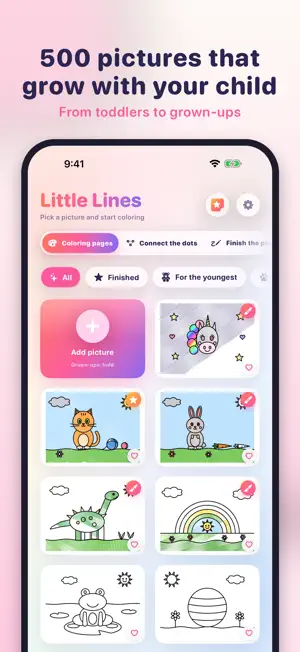
About Little Lines: Kids Coloring
Little Lines is a coloring book for kids on iPad and iPhone, optimized for iPhone Duo. Scribble over the lines as wildly as you like with Apple Pencil or a finger: the color stays in the area where the stroke started, so even the youngest finish a picture they want to show you. Little ones fill a whole area with one tap or a scribble. Older kids paint with real brushes, and on iPad the line gets wider and stronger the harder they press with Apple Pencil. There are 500 pictures, ordered from the easiest to the hardest. Big simple shapes for toddlers, busy scenes for school kids, and stained glass, patterns and 80 mandalas for experts and grown-ups. Animals, dinosaurs, unicorns, vehicles, the seasons, letters and numbers. Six ways to color let the app grow with your child: colors that appear by themselves, scribbling, tap to fill, ten big colors, your own palette with favorites, and free drawing. Ten brushes and effects range from pencil and oil paint to glitter and rainbow. It is more than coloring pages. Connect the dots has 72 pictures in four levels, the hardest with over 600 dots. Color by number works with a tap or with a brush. Finish the picture has 27 drawings with something missing, and the app reads the task aloud. Tracing teaches letters and numbers stroke by stroke, in print and in cursive modeled on the handwriting children learn at school. Guessing games ask about colors, letters and numbers out loud, so no reading is needed. Notebooks have lined, squared or blank paper and a full screen mode for writing. A friendly recorded voice speaks all 15 of the app's languages and works offline. On iPhone Duo, Little Lines changes with the phone. Closed, everything fits the outer screen. Open it and the picture you are coloring carries on across the big inner screen, with the roomy layout of the iPad. Half folded like a little laptop, the picture sits on the upper half and the tools on the lower one, so the fold never gets in the way. Add your own pictures from Photos or Files, or draw your own coloring page. Smart colors recognize what a picture shows, right on the device, and pick colors that fit. Every finished picture earns a sticker, 40 in all, and bigger milestones earn badges. A time-lapse video shows how a picture or a notebook page came to be. Siblings each get their own profile, and left-handers get a layout made for them. The settings sit behind a lock for grown-ups: drawing style, a daily time limit, sounds and music, saving progress. Sharing and printing are for grown-ups only. You can try it for free. The download includes a little of everything: 5 coloring pages, 2 connect the dots and 2 color by number pictures, 2 drawings to finish, the first letters of each tracing set, a few guessing games, one notebook and 5 stickers. The full version is a single purchase, never a subscription. It works on all your iPhones and iPads with the same Apple Account, and with Family Sharing for the whole family. No ads, no tracking, no accounts. Little Lines collects no data and works without internet.
What’s new
Version 1.3.0 · Updated November 25, 2026
• Christmas is here: from 1 December to 6 January, snow falls on the home screen, snowy fir garlands grow down both sides and the title wears a Santa hat. Grown-ups can turn the decorations off in the settings. • Advent calendar: from 1 to 24 December, a calendar above the coloring pages opens one window a day with a Christmas picture to color. A missed day can be opened later. • On Christmas Eve, the 24th window of the Advent calendar opens with a big celebration: Christmas confetti, stars and snowflakes, a golden star and Merry Christmas! • Letter to Santa: in the Christmas season, a child traces the greeting letter by letter and then draws what they wish for. Every child can write several letters. • Six Christmas cards to color, with Merry Christmas written in your language. Grown-ups can send or print a finished card. • Gift tags and Christmas ornaments to color, print and cut out. • 42 new Christmas pictures, from simple ones for the youngest to intricate ones for experts. In the Christmas season, three cards and the gift tags are free for everyone. • A Christmas app icon: a grown-up can switch to it in the settings, and back again at any time. • In the Christmas season there is a new song with sleigh bells, Sleigh Bells. It plays in turn with the others, or grown-ups can pick it in the settings under Sound. • Mirror: a new part of the app where every line is repeated around the middle, so a few strokes make a snowflake, a flower or a butterfly. The ruler button straightens lines, circles, rectangles and triangles. • A Mirror drawing can be saved to Photos in its colors with the button at the top, and grown-ups can share and print it from the settings (gear). • A glitter pen with sparkling flakes and twinkling stars, and gold and silver that shimmer. • Smudging: pick the finger under the brush and drag the paint along like a fingertip in wet paint. With Apple Pencil, a finger smudges while the Pencil draws. • A new gesture to move smoothly through your painting's history: hold two fingers on the picture and move them down, and the last line goes back bit by bit; move them up and it comes back. No need to jump back or forward a whole step at a time. Three fingers work the other way round. • A quick way to change the drawing style right on the picture: a grown-up holds the button with the mode's name in the picture's corner and switches the style for just this picture or notebook. • Czech and Slovak tracing has the letter Ch after H, print and cursive, capital and small; in cursive C runs on into h in one go, as in the copybook. • A finished connect the dots picture can now be colored in. • Photos and pictures already in color keep their own colors, so people are no longer colored green or blue. After adding a photo, the app explains that only its light areas can be colored. • The guided tour shows all the new things, and the gestures for zooming and stepping back can be tried right on the picture. • Everything runs more smoothly and uses less battery: scrolling, painting and the falling snow, also on older iPads and cheaper tablets. • Color it in keeps the stickers: a drawing from Mirror or Finish the picture becomes a coloring page with its stickers on it. • After picking a color from the Apple Pencil Pro squeeze palette, the Pencil draws with it at once. • We also fixed many small things: colors in the Christmas pictures, smudging with a big brush keeps up with the finger, the glitter looks finer, zooming no longer counts as a two-finger tap, and the capital M is traced in four strokes as in the copybook.
App privacy
The developer, Lukas Volprecht, reported these privacy practices to Apple.
Data Not Collected
The developer does not collect any data from this app.
Alternatives to Little Lines: Kids Coloring
Looking for apps like Little Lines: Kids Coloring? Here are 6 similar apps on the App Store.
-
 DrawForFun
-
 DrawyCheese: Kids Coloring
-
 Zoubky se Stellinkou
-
 2Si Games: Color by Number
-
 Piyoo: Coloring Games for Kids
-
 Origami Folds: Learn Easy
| App | Rating | Price | Last updated | Compare |
|---|---|---|---|---|
| Little Lines: Kids Coloring | – | Free | November 25, 2026 | |
| DrawForFun | – | Free | Jul 27, 2026 | Compare |
| DrawyCheese: Kids Coloring | – | Free | Oct 18, 2026 | Compare |
| Zoubky se Stellinkou | – | Free | Nov 15, 2026 | Compare |
| 2Si Games: Color by Number | – | Free | Nov 19, 2026 | Compare |
| Piyoo: Coloring Games for Kids | – | Free | Nov 17, 2026 | Compare |
| Origami Folds: Learn Easy | – | Free | Nov 13, 2026 | Compare |