

StrideLab - Sprint Analysis
AUSTIN ANDRES MUNOZ Sports iPhoneiPadiPod touch
StrideLab - Sprint Analysis is a free Sports app for iPhone and iPad by AUSTIN ANDRES MUNOZ. Rated 5.0/5 from 1 ratings. Requires iOS 18.0.
- Rating
- 5.0
- 1 ratings
- Price
- Free
- on the App Store
- Size
- 7 MB
- Age 4+
- Updated
- Nov 24
- 2026 · v1.0.6
Screenshots
Save to Pinterest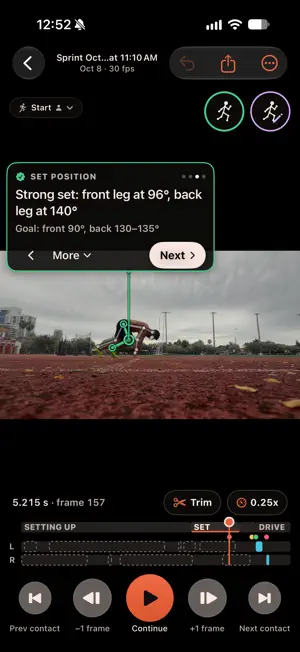


About StrideLab - Sprint Analysis
StrideLab analyses sprint video. Film a start, a run on the straight or the bend, and it plays back in slow motion with a skeleton drawn on the athlete, the angles measured, and coaching tips on the frames they are about. RECORD OR IMPORT • Record in the app at 120 fps (or 60). • Or import a video from Photos. For an iPhone Slo-mo, StrideLab can read the original high-frame-rate file (with your permission), so every frame filmed is measured. • A long recording with several block starts? StrideLab finds each start and lists them for you to confirm before cutting each into its own clip. • Use a tripod, film starts and the straight side-on, and keep the whole body in frame. START, STRIDE OR CURVE StrideLab works out what a clip shows and says how sure it is: • Start: the set position, the launch and the first strides. • Stride: a run on the straight, accelerating or at top speed. • Curve: running the bend, filmed from behind or in front, where the lean shows. Filmed from the side, StrideLab asks whether it is a stride or a curve. When it isn't sure, it asks, and you can always choose the kind yourself. COACHING THAT STOPS THE VIDEO Coach mode plays to the next moment worth talking about and holds on that frame, with the tip beside the runner and a line to the body part it is about: red for a fix, amber for a note, green for something done well. • Set: both knee angles, every time ("Front leg at 92°, back leg at 130°"), then shoulders over the hands, straight arms and the head. • Launch: whether the hips opened all the way, the angle of the push, and the head. • Every step: where the foot landed against the hips (behind, under or ahead) and the landing shin angle, measured from the ground. • Out of the blocks: ground contact time, the body angle as the athlete rises, and the arms against the legs. • Strides: rising while accelerating or running tall at top speed, the head, the hip at takeoff, the elbow and the arms against the legs. • Curve: leaning into the bend, with head, trunk and legs in one line. Contact time, flight time and step rate are listed for every step, and the report marks any number a low frame rate or uncertain tracking makes less precise. Foot placement is shown as zones, not centimetres: a phone video can't measure that distance reliably. Beginner coaching shows how to fix each tip and draws the target on the body. Compare against Elite, Collegiate, High School or Developing targets. FIX WHAT IT GETS WRONG Press and hold a frame to mark a foot landing, the set or the launch, tap the athlete if the skeleton is on someone else, or drag a joint into place. Everything is re-measured from your corrections, and each one can be undone. SHARE Save a video with the skeleton drawn in to Photos, or share the original video, a frame or a scorecard image. STAYS ON YOUR DEVICE The analysis runs on your iPhone or iPad. No account, no ads, no analytics, and nothing is uploaded. FREE, AND STRIDELAB PRO Two demo starts are free to explore, with the full player, coaching and report. Your library, deleting clips and sharing your original videos are always free. StrideLab Pro unlocks recording, importing, analysis of your own clips (start, stride and curve) and saving videos with the skeleton. • $4.99 per month or $39.99 per year (U.S. prices; the app shows your local price before you buy). • Eligible new subscribers get a 7-day free trial. • Payment is charged to your Apple Account at confirmation of purchase, or when the free trial ends. The subscription renews automatically unless cancelled at least 24 hours before the end of the current period. Manage or cancel it any time in Settings > Apple Account > Subscriptions. • If your subscription ends, your clips stay in your library. Terms of Use: https://www.apple.com/legal/internet-services/itunes/dev/stdeula/ Privacy Policy: https://moonyose.github.io/stridelab-site/privacy.html
What’s new
Version 1.0.6 · Updated November 24, 2026
• Better start detection when the camera pans to follow you: the set position, hip angle and first steps are now picked up more accurately. • Small fixes and polish.
App privacy
The developer, AUSTIN ANDRES MUNOZ, reported these privacy practices to Apple.
Data Not Collected
The developer does not collect any data from this app.
Alternatives to StrideLab - Sprint Analysis
Looking for apps like StrideLab - Sprint Analysis? Here are 6 similar apps on the App Store. The highest rated is Outperform Motion (5.0/5), and all 6 are free to download.
-
 DrivePhase - Sprint Analysis
4.8
-
 Outperform Motion
5.0
-
 Sprints Athlete
-
 SprintTrack - Ai Sprint Coach
5.0
-
 TrackSpeed: Sprint Timer
-
 Track & Field AI
4.8
| App | Rating | Price | Last updated | Compare |
|---|---|---|---|---|
| StrideLab - Sprint Analysis | 5.0 / 5 (1 rating) | Free | November 24, 2026 | |
| DrivePhase - Sprint Analysis | 4.8 / 5 (49) | Free | Nov 19, 2026 | Compare |
| Outperform Motion | 5.0 / 5 (12) | Free | Nov 18, 2026 | Compare |
| Sprints Athlete | – | Free | Nov 21, 2026 | Compare |
| SprintTrack - Ai Sprint Coach | 5.0 / 5 (7) | Free | Nov 11, 2026 | Compare |
| TrackSpeed: Sprint Timer | – | Free | Nov 12, 2026 | Compare |
| Track & Field AI | 4.8 / 5 (80) | Free | Oct 26, 2026 | Compare |