

Where Am I: GPS & Altitude
Roni Biran Navigation iPhoneiPadApple Watch
Where Am I: GPS & Altitude is a free Navigation app for iPhone and iPad by Roni Biran. Requires iOS 17.0. Updated November 15, 2026.
- Price
- Free
- on the App Store
- Size
- 5 MB
- Age 4+
- Updated
- Nov 15
- 2026 · v1.3
Screenshots
Save to Pinterest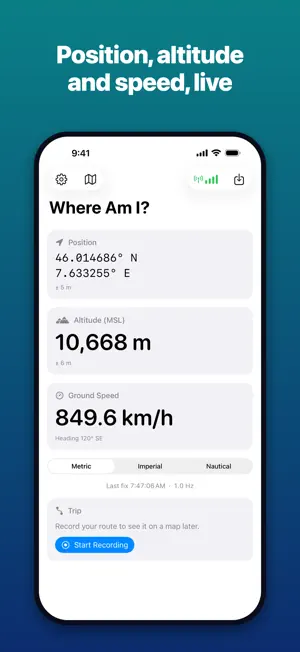

About Where Am I: GPS & Altitude
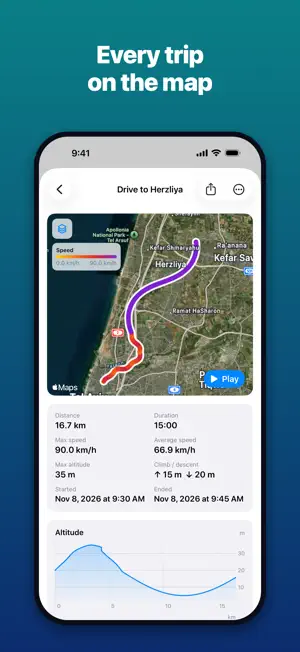
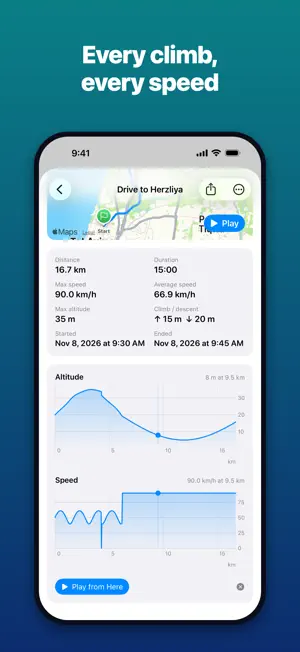
Look out the plane window and wonder where you are? Where Am I? shows your iPhone's live GPS readings in big, clear numbers: your position, your altitude above sea level and your ground speed. It works in airplane mode, with no internet and no account. LIVE READINGS • Latitude and longitude, in decimal degrees or degrees, minutes and seconds • Altitude above mean sea level • Ground speed and heading • Accuracy for every reading, so you know how far to trust it • Metric, imperial or nautical units: km/h, mph or knots, meters or feet SIGNAL YOU CAN SEE • A GPS antenna with signal bars shows how good your fix is • Lost the signal? The readings dim and the app tells you when it last heard from the satellites, so old numbers never look current • See the live update rate, about once a second SNAPSHOTS • Save a snapshot of your readings to Photos, or share it with a map link RECORD YOUR TRIPS • Start, stop, resume and save: record a flight, drive or hike • Keeps recording with the phone locked, and even if the app is closed • See each trip's distance, time, top and average speed, highest altitude, and total climb and descent, measured by your iPhone's barometer • Altitude and speed charts: tap any point to see the values there, and play the trip back from that spot • View the route on a map once you're back online, in standard, satellite or hybrid style, and color it by speed or altitude • Play a trip back: follow your car along the route with the speed, altitude and time at every moment, the whole drive in about a minute • With iCloud Drive on, your trips come back if you reinstall the app or get a new iPhone SHARE YOUR TRIPS • Send a trip to a friend by Messages, Mail, AirDrop and more. They open it in Where Am I? and see the route, charts and playback • Trip files are compressed, so even a long trip is small and quick to send • Works with other apps too: export a trip as GPX, or open GPX tracks from other GPS apps ON APPLE WATCH • Speed, altitude, position and heading on your wrist • With your iPhone nearby, the Watch shows the iPhone's readings. On a plane, leave the phone still on the tray table: it reads more steadily than a moving wrist • Out on a run or a hike without your phone? The Watch uses its own GPS and records the trip itself, then sends it to your iPhone • Start a trip on the Watch and open the app on your iPhone: the iPhone carries on recording it as one trip SIRI AND SHORTCUTS • Ask Siri for your position, altitude and speed, even with the app closed • Start and stop a trip with your voice, the Action button or a shortcut • Say "Save the trip" and give it a name, or ask how your last trip went • Touch and hold the app icon to start a trip or open your trips ON CARPLAY • Speed, heading, altitude, position and the street and town you're in, on your car's screen • Start, stop and save a trip without picking up your phone • Or let it record every drive: a trip starts when the app opens on CarPlay and is saved when you get out ON YOUR LOCK SCREEN • Turn on the Live Activity to see speed, altitude and signal on the Lock Screen and in the Dynamic Island MADE FOR THE WINDOW SEAT • GPS works in airplane mode, no in-flight Wi-Fi needed • Feet and knots for flying • Keep the screen awake, or save battery, your choice PRIVATE BY DESIGN • Your location stays on your iPhone and Apple Watch. It's never sent to us. • Readings and recording work fully offline. The internet is used only to load Apple Maps when you view a trip, to show the street and town you're in on CarPlay (your position is looked up with Apple), and to keep your trips in your own iCloud • Your trips are kept on your iPhone, or in your own iCloud account if iCloud Drive is on. We never see them. A trip leaves your phone only when you share it • No sign-up, no ads, no tracking, no analytics Readings come from your iPhone's GPS and are estimates. Where Am I? isn't for navigation or safety-critical use.
What’s new
Version 1.3 · Updated November 15, 2026
Apple Watch: Where Am I? is now on your wrist, with your speed, altitude, position and heading. With your iPhone nearby, the Watch shows the iPhone's steadier readings and its buttons control the iPhone's trip. On its own, the Watch uses its own GPS and records trips, then sends them to your iPhone. Start a trip on the Watch and open the iPhone app, and the iPhone carries on recording it as one trip. Smaller shared trips: a shared trip is now a Where Am I? trip file, compressed to a fraction of the size, and it shows up with the app's icon. Need GPX for another app? Choose Export as GPX. More from Siri: say "Save the trip in Where Am I" and give it a name, or ask "How was my last trip in Where Am I" to hear its distance, time and top speed. CarPlay: the street and town you're in now update more often as you drive.
App privacy
The developer, Roni Biran, reported these privacy practices to Apple.
Data Not Collected
The developer does not collect any data from this app.
Alternatives to Where Am I: GPS & Altitude
Looking for apps like Where Am I: GPS & Altitude? Here are 6 similar apps on the App Store.
-
 Flight Position Offline
-
 Quick GPS+
-
 MapoEV: EV Route & Charging
-
 Speed GPS – speedometer
-
 PikFly: Flight Telemetry
-
 Global Locator
| App | Rating | Price | Last updated | Compare |
|---|---|---|---|---|
| Where Am I: GPS & Altitude | – | Free | November 15, 2026 | |
| Flight Position Offline | – | Free | Nov 25, 2026 | Compare |
| Quick GPS+ | – | Free | Jul 8, 2026 | Compare |
| MapoEV: EV Route & Charging | – | Free | Nov 2, 2026 | Compare |
| Speed GPS – speedometer | – | Free | Nov 1, 2026 | Compare |
| PikFly: Flight Telemetry | – | Free | Nov 5, 2026 | Compare |
| Global Locator | – | 2.99 USD | Oct 28, 2026 | Compare |