

CalcOwlator: List Calculator
Mohammad Raiyan Asaral Finance iPhoneiPadiPod touch
CalcOwlator: List Calculator is a free Finance app for iPhone and iPad by Mohammad Raiyan Asaral. Requires iOS 18.0. Updated October 19, 2026.
- Price
- Free
- on the App Store
- Size
- 6 MB
- Age 4+
- Updated
- Oct 19
- 2026 · v1.1
Screenshots
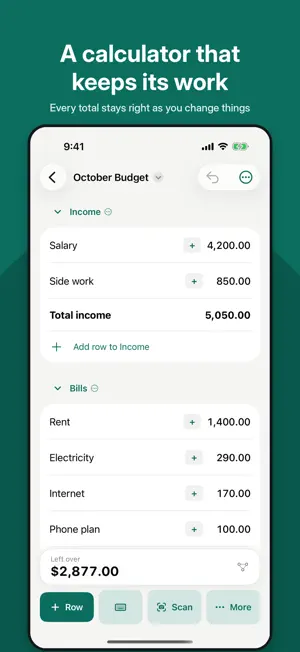


About CalcOwlator: List Calculator
CalcOwlator is a calculator that keeps its work. Write a list, give each line an amount, and the totals keep themselves right: section by section, month after month. TYPE IT LIKE A NOTE • "rent 1400", "3 coffees 5", "salary 4.2k". Each line becomes a row as you type. • Paste a whole list from Notes or a chat in one go. • Sections and section totals with a colon or an equals sign. SCAN INSTEAD OF TYPING • Point your camera at a receipt: the store, the date and every item come in, checked against the printed total. • With Pro, items are sorted into your sections as separate rows, and CalcOwlator learns where you put things. • Scan a bill to set its amount and due date, so you're reminded before it's due. • Barcodes remember their name and price after the first scan. Payment QR codes fill in who you paid. • Everything is read on your iPhone. Nothing is uploaded. TOTALS YOU CAN TRUST • Tap a total to see exactly how it was worked out. • Use one row in another: "Left over" is income minus bills, and stays right when either changes. • Exact decimal maths, so 1,977.075 rounds the way it should. BUDGETS THAT CARRY ON • Start next month from the list's menu, with what's left carried over. • Spending limits per section, due days with reminders, and ticks that mean paid, in the basket or done. • 14 templates: monthly and twice-a-month budgets, bills and subscriptions, groceries, a weekly allowance, a small shop, events, trips, savings goals, instalments and card payoff. Sample amounts follow your currency. • Linked templates where lists feed each other, like a budget that saves for a goal, or money sent home that lands in the family's budget. • A guide with a how-to for each task, and a list to try it on. YOUR ACCOUNTS, IN THE SAME PLACE • Cash, banks, e-wallets, credit cards and pay later, with bank lists for North America, the UK, Australia, Asia, the Middle East and the Philippines. • Say which account each row comes out of; balances follow what you tick. • Credit card statements, what's left to pay by the due date, and a reminder with a Mark paid button. AT A GLANCE • Widgets for your budget's total, what's due soon and how far a goal has come. • Export a list as a PDF, a picture for a chat, or a spreadsheet (CSV). • Face ID lock, and amounts hidden in the app switcher and widgets while it's on. CALCOWLATOR PRO Free includes 5 lists and nearly everything above. Pro adds unlimited lists and links between them, iCloud sync across your devices, the dashboard and month-by-month history, receipts split into separate rows, accounts in other currencies, and live account balances in your formulas. Pro is a monthly or yearly subscription (the yearly plan starts with a free week) or a one-time purchase. Subscriptions renew automatically unless cancelled at least 24 hours before the end of the period, in Settings › Apple Account › Subscriptions. Terms of Use: https://www.apple.com/legal/internet-services/itunes/dev/stdeula/ Privacy: CalcOwlator collects no data. Your lists stay on your iPhone, and in your own iCloud if you turn on sync.
What’s new
Version 1.1 · Updated October 19, 2026
Bills that come back every month now keep their history. When a new month starts, last month's paid bills stay counted in your account and card balances, and a bill you pay a few days early counts for the month it's due. Sync between your devices is smarter. If you edit the same list on your iPhone and iPad, both sets of changes are kept, row by row. Also in this update • Recently deleted: bring back a list for 30 days (Settings › Your lists) • Totals show a warning instead of a wrong number when a row has a problem • Amounts like 1,234,567 and comma decimals are read correctly everywhere • Goals show a more accurate finish date • More private: with the Face ID lock on, alerts and Lock Screen widgets don't show amounts • Subscribers can manage their plan or switch to Lifetime from Settings • Many smaller fixes and improvements
App privacy
The developer, Mohammad Raiyan Asaral, reported these privacy practices to Apple.
Data Not Collected
The developer does not collect any data from this app.
Alternatives to CalcOwlator: List Calculator
Looking for apps like CalcOwlator: List Calculator? Here are 6 similar apps on the App Store. The highest rated is TabCut — Split the Bill (5.0/5), and all 6 are free to download.
-
 TabCut — Split the Bill
5.0
-
 Asset Tracker - Quick Entry
-
 DebitTracker
-
 Last Payment: Bill Tracker
5.0
-
 Simpler Budget: Monarch
-
 Money Tracker: Savely Budget
5.0
| App | Rating | Price | Last updated | Compare |
|---|---|---|---|---|
| CalcOwlator: List Calculator | – | Free | October 19, 2026 | |
| TabCut — Split the Bill | 5.0 / 5 (1) | Free | Oct 6, 2026 | Compare |
| Asset Tracker - Quick Entry | – | Free | Jun 16, 2026 | Compare |
| DebitTracker | – | Free | Aug 27, 2026 | Compare |
| Last Payment: Bill Tracker | 5.0 / 5 (1) | Free | Sep 29, 2026 | Compare |
| Simpler Budget: Monarch | – | Free | Aug 2, 2025 | Compare |
| Money Tracker: Savely Budget | 5.0 / 5 (2) | Free | May 26, 2026 | Compare |