

Shelfnook
Ozge Ozmen Book iPhoneiPadiPod touch
Shelfnook is a free Book app for iPhone and iPad by Ozge Ozmen. Requires iOS 15.0. Updated October 23, 2026.
- Price
- Free
- on the App Store
- Size
- 4 MB
- Age 4+
- Updated
- Oct 23
- 2026 · v1.1
Screenshots



About Shelfnook
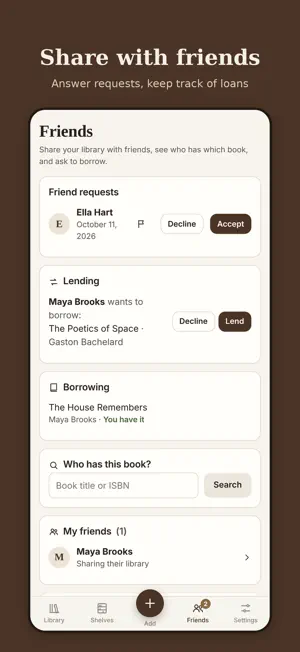
Shelfnook is a simple, fast inventory of the books you own at home. Scan the barcode on the back cover and the title, author, translator, publisher, year and page count fill in by themselves. Choose the bookcase and shelf as you save, and never search shelf by shelf again. If you like, share your library with friends: see who has which book, borrow from each other, and remember who took which of your books. NEW IN 1.1 • My Shelf: your shelves drawn like a real bookcase; 7 styles (Modern to Art Nouveau), your choice of wood and wall colour. Badges and treat ornaments stand in front of the books, and you can add a display shelf without books. • Bookstore list: books you scan in a shop wait on a separate list — Buy, Skip, Bought. • Badges and your Shelfnook Score: earn them as you add, read and lend; show your favourites in your showcase. • Sahaf: a personal pick of your next book, chosen by looking at your library. Your first Bookseller's Note is on us at your 10th book. • What kind of reader are you? A 7-question quiz with 5 books picked for you. • Batch scanning: scan book after book and add them all at once. • Scan in a bookshop: see whether you already own a book or which friend has it. • Want to read: a list you can share as a gift link. • Rate books with a short review (visible to your friends only). • Treat a friend to a tea: a digital treat that appears as an ornament on their shelf. • Invite friends and you each get a Bookseller's Note. • Write to the founder: message me from the app and I reply within 48 hours. • Phone notifications for friend and borrow requests, treats and catalog updates. Turn off any type you like. ALWAYS • Add by barcode, by ISBN, or search by title and author. • Books missing from the sources: read the details from a photo of the copyright page, or search the web by ISBN. • Shelf-level location: set up your bookcases (e.g. B1 · Study) and shelves, and see every book's exact place: B1-S2. • Friends: find Shelfnook users in your contacts or share your invite code. Only friends you accept see your library. • Who has it? Search for a book, see which friend has it and ask to borrow. • Multiple copies, automatic classification, accent-insensitive search, bulk moves between shelves. • Cover photos, reading status, finish dates and personal notes. • Backup and export as a CSV spreadsheet or a full backup. • The same library on your iPhone and your computer (shelfnook.app). • In English and Turkish; follows your device language. PRIVACY No ads, no tracking. Your library is visible only to you unless you share it; shelf locations, notes and reading status are never shared. Your contacts are compared only when you ask, as hashed digests created on your phone, and are not stored. You can report and block people. You can delete your account and all your data from inside the app at any time. A free account (e-mail, or a Turkish mobile number) is required to use Shelfnook.
What’s new
Version 1.1 · Updated October 23, 2026
• My Shelf: shelves drawn like a real bookcase — 7 styles (Modern to Art Nouveau), your wood and wall colour; badges and treat ornaments stand in front of the books, and you can add a display shelf without books • Bookstore list: books you scan in a store wait on a list — Buy / Skip / Bought • Scan your first 3 books: a guided start for new accounts • Your profile: a profile picture, total pages read and your pick of the month • Quotes: save the lines you love inside the book, with page numbers • Badges and your Shelfnook Score • What kind of reader are you? • Personal book picks from the Sahaf (your first note is on us at your 10th book) • Treat a friend to a tea • Rate books with a short review • Want-to-read list with a shareable gift link • Invite friends and you both get a reward • Write to the founder: message me directly from the app, I reply within 48 hours • Phone notifications for friend and borrow requests, treats and catalog updates (turn off any type you like) • See the books you share with a friend and open the details of their books (summary, pages, publisher) • Set the reading status while adding books (rapid scan too) • Import your Goodreads, StoryGraph or spreadsheet list in one go (CSV) • Forgot password: reset it with a code sent to your email • Bug fixes
App privacy
The developer, Ozge Ozmen, reported these privacy practices to Apple.
Data Linked to You
The following data, which may be collected and linked to your identity, may be used for the following purposes:
- Location: Coarse Location
- Usage Data: Product Interaction
- Contact Info: Email Address, Name, Phone Number
- User Content: Photos or Videos, Customer Support, Other User Content
- Identifiers: User ID
Used for: Analytics, App Functionality
Data Not Linked to You
The following data, which may be collected but is not linked to your identity, may be used for the following purposes:
- Search History: Search History
Used for: App Functionality
Alternatives to Shelfnook
Looking for apps like Shelfnook? Here are 6 similar apps on the App Store.
-
 Kitavia: Kitap Takip, Kitaplık
-
 Rafoloji
-
 Kitapi
-
 Bookinclub
-
 Papyris: AI Book Tracker
-
 Libroniq: AI Book Tracker
| App | Rating | Price | Last updated | Compare |
|---|---|---|---|---|
| Shelfnook | – | Free | October 23, 2026 | |
| Kitavia: Kitap Takip, Kitaplık | – | Free | Oct 11, 2026 | Compare |
| Rafoloji | – | Free | Nov 1, 2026 | Compare |
| Kitapi | – | Free | Oct 21, 2026 | Compare |
| Bookinclub | – | Free | Aug 2, 2026 | Compare |
| Papyris: AI Book Tracker | – | Free | Jul 1, 2026 | Compare |
| Libroniq: AI Book Tracker | – | Free | Jul 21, 2026 | Compare |
Compare Shelfnook with the top alternatives: ratings, updates, ASO score and keyword gaps →