

What First
Mincheol Yang Utilities iPhoneiPadiPod touch
What First is a free Utilities app for iPhone and iPad by Mincheol Yang. Requires iOS 16.0. Updated October 9, 2026.
- Price
- Free
- on the App Store
- Size
- 2 MB
- Age 17+
- Updated
- Oct 9
- 2026 · v1.0.2
Screenshots



About What First
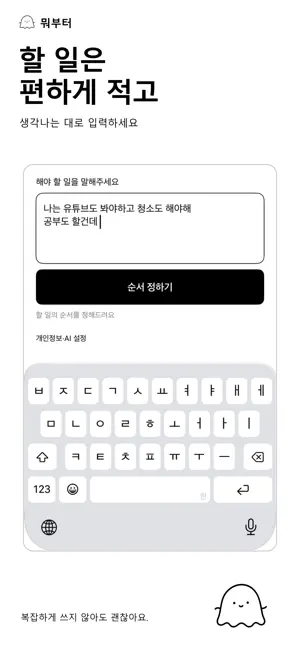
Cleaning, laundry, dishes, errands, work. When everything needs doing at once, tell What First what is on your list. AI identifies the tasks in your sentences and suggests a numbered order. Start one task at a time. There are no timetables or timers. Each request is ordered independently. Entering new input clears the previous result. Results are not restored when you reopen the app. You can enter more than five tasks. You can also enter tasks by voice. On supported devices and languages, speech is converted to text on your iPhone. Check and edit the recognized text before ordering your tasks. Audio recordings are not saved or sent to the server. With your new consent to Google Gemini, only your current input is sent through the server to Google Gemini. After you agree, AI stays on by default. You can turn it off or allow it again in Privacy & AI. Existing Groq consent does not authorize sending to Gemini. The app is free. On-device basic rules take over if AI is unavailable or the operating budget or abuse-prevention limits are reached. Basic rules are also available in regions where Google Gemini is not supported and work without an internet connection. The update supports all 50 App Store metadata localizations with 47 interface locales. It follows your iPhone or per-app language, with English for unsupported languages. Language is not determined by the download country. Tasks retain your input language. Simple lists can be processed on-device; complex natural-language recognition varies by language. A personal task-ordering tool for adults aged 18 or older. AI and basic-rule suggestions are for reference. Unfamiliar or ambiguous expressions may not be recognized.
What’s new
Version 1.0.2 · Updated October 9, 2026
Prevented tasks from a previous request appearing in a new result. Results clear when you enter new input. Improved task splitting in Korean basic rules.
App privacy
The developer, Mincheol Yang, reported these privacy practices to Apple.
Data Linked to You
The following data, which may be collected and linked to your identity, may be used for the following purposes:
- User Content: Other User Content
- Identifiers: Device ID
Used for: Product Personalization, App Functionality
Alternatives to What First
Looking for apps like What First? Here are 6 similar apps on the App Store. The highest rated is Catchtype (4.3/5), and all 6 are free to download.
-
 Meowtine: Weekly ToDo & Habits
-
 ピクモジ 画像を文字で出力するOCR
-
 Korea Public Wi-Fi
-
 Linkoo: Your Link Library
-
 NotiDrop
-
 Catchtype
4.3
| App | Rating | Price | Last updated | Compare |
|---|---|---|---|---|
| What First | – | Free | October 9, 2026 | |
| Meowtine: Weekly ToDo & Habits | – | Free | Oct 23, 2026 | Compare |
| ピクモジ 画像を文字で出力するOCR | – | Free | Oct 7, 2024 | Compare |
| Korea Public Wi-Fi | – | Free | Sep 14, 2026 | Compare |
| Linkoo: Your Link Library | – | Free | Nov 3, 2026 | Compare |
| NotiDrop | – | Free | Oct 24, 2026 | Compare |
| Catchtype | 4.3 / 5 (3) | Free | Nov 4, 2026 | Compare |
Compare What First with the top alternatives: ratings, updates, ASO score and keyword gaps →