

MusicCanvas: Draw Music
Malık SARI Music iPhoneiPadiPod touch
MusicCanvas: Draw Music is a free Music app for iPhone and iPad by Malık SARI. Requires iOS 18.0. Updated November 8, 2026.
- Price
- Free
- on the App Store
- Size
- 18 MB
- Age 4+
- Updated
- Nov 8
- 2026 · v1.3
Screenshots



About MusicCanvas: Draw Music
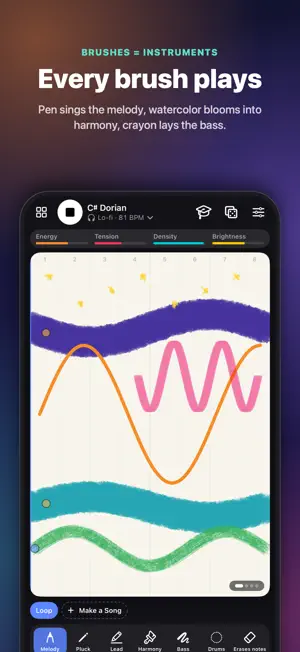
Some songs begin with a melody. Yours begins with a line. MusicCanvas turns drawing into composing. Sketch on the canvas and every stroke sings: height becomes pitch, time flows left to right, colors set the key and the mood, and each brush plays its own instrument. No music theory needed, yet everything you draw stays in harmony. WHAT YOU CAN CREATE • Brushes that are instruments: the pen sings the melody, watercolor blooms into harmony, crayon lays down the bass and the rhythm brush plays the drums • Colors that feel like music: warm hues glow, cool hues drift, bright and saturated strokes raise the energy • 10 genres, from ambient, lo-fi and jazz to synthwave, house, trap, blues, cinematic and classical, or let your drawing choose one • Turn any photo into a song, or hum a tune and watch it appear as a line on your canvas • Build full songs from up to 8 sections, with a theory layer that shows the chords and notes as they play • Train your ear with Draw the Melody: listen, draw what you hear and earn up to three stars • Share 9:16 time-lapse videos with music, export WAV, MIDI (one track per layer) or a 30-second ringtone, and send remix links • Made for iPad and Apple Pencil: pressure, hover previews, double-tap, squeeze and barrel roll • A new daily theme, streaks, a home screen widget and draw-together sessions over SharePlay Every sound is synthesized live on your device: no samples, no ads, no account needed, and your drawings stay on your device unless you share them. Pick up a brush and hear what your imagination sounds like. MUSICCANVAS PRO Try it free: hear your first drawings sing for 60 seconds. Pro unlocks the sound without limits, every brush, all 10 genres, song mode, photo to music, the melody game and every export (video, WAV, MIDI, ringtone). Choose a yearly plan with a 3-day free trial or a one-time lifetime purchase. The subscription renews automatically unless cancelled at least 24 hours before the period ends; manage it in your App Store account settings.
What’s new
Version 1.3 · Updated November 8, 2026
What's new in 1.3: • Type your name and hear it become a song • Richer music: smoother melodies, chord changes within bars, cadences, call-and-response phrases and a chorus lift • Every new drawing gets its own key, chords and groove • Videos start with music from the first second • Try it free: hear your first drawings for 60 seconds, plus a 3-day free trial on the yearly plan
App privacy
The developer, Malık SARI, reported these privacy practices to Apple.
Data Linked to You
The following data, which may be collected and linked to your identity, may be used for the following purposes:
- Purchases: Purchase History
- Usage Data: Product Interaction
Used for: Analytics, App Functionality
Alternatives to MusicCanvas: Draw Music
Looking for apps like MusicCanvas: Draw Music? Here are 6 similar apps on the App Store. The highest rated is AURI - Draw Music (5.0/5), and all 6 are free to download.
-
 SketchTone: Music Maker
2.4
-
 Music Draw: Melody Maker
-
 Melodo: Draw Music Maker
-
 Lines - Doodles to Music
-
 AURI - Draw Music
5.0
-
 Funny Draw & Music
| App | Rating | Price | Last updated | Compare |
|---|---|---|---|---|
| MusicCanvas: Draw Music | – | Free | November 8, 2026 | |
| SketchTone: Music Maker | 2.4 / 5 (8) | Free | Oct 20, 2026 | Compare |
| Music Draw: Melody Maker | – | Free | Oct 28, 2026 | Compare |
| Melodo: Draw Music Maker | – | Free | Nov 2, 2026 | Compare |
| Lines - Doodles to Music | – | Free | Dec 4, 2025 | Compare |
| AURI - Draw Music | 5.0 / 5 (1) | Free | Dec 14, 2025 | Compare |
| Funny Draw & Music | – | Free | Nov 4, 2026 | Compare |