

Pikoto: FM Synth Groovebox
Nicholas Counts Music iPhoneiPadiPod touch
Pikoto: FM Synth Groovebox is a free Music app for iPhone and iPad by Nicholas Counts. Rated 5.0/5 from 3 ratings. Requires iOS 17.0.
- Rating
- 5.0
- 3 ratings
- Price
- Free
- on the App Store
- Size
- 35 MB
- Age 4+
- Updated
- Nov 11
- 2026 · v1.2
Screenshots



About Pikoto: FM Synth Groovebox
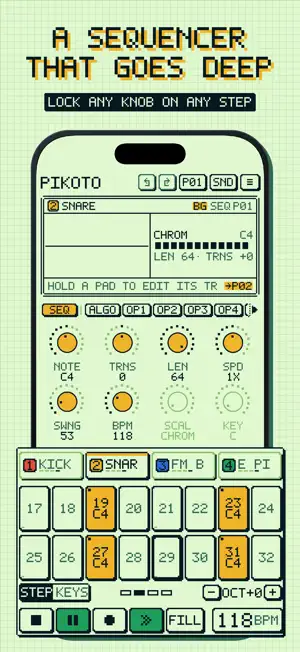
A four-operator FM synth and a four-track step sequencer, drawn like a handheld game cartridge. Sixty-two sounds to start from, and a song already playing when you open it. ONE SCREEN, EIGHT KNOBS Pick a page and the eight coloured encoders edit it. The screen always shows what you're turning: a scope of the track and a diagram of the page. FM YOU CAN STEER • Four operators per voice, eight algorithms, six waveforms • Stepped ratios from 0.25 to 32, with FREE, HARM, ODD and OCT modes that keep it musical • A pitch drop and a click for FM drums, and ten chord types from a single note • Poly, mono, legato with glide, and unison • A multimode filter with its own envelope • Two LFOs and SLOPE on every track, routable to pitch or any of 64 sound parameters A SEQUENCER THAT GOES DEEP • Four tracks of up to 64 steps, each with its own length and speed • Hold a step and turn any knob to lock a value to it, or lock a whole different sound to it • Trig conditions, ratchets, micro-timing, swing and fills • Record live from the pads, and chain sixteen patterns into a song • Undo and redo, or shake to undo PLAY IT • Turn the sixteen pads into a keyboard, or into the notes of any of fifteen scales in any key • An arpeggiator on every track, fed by your fingers or by the sequencer • Sixteen punch-in effects: repeat, roll, reverse, half and double speed, filters, brake and more. Hold a pad to bend the mix, let go to snap back EFFECTS Tempo-synced ping-pong delay, reverb with shimmer, a granular cloud, and a master section with drive, compression and width. CONNECT • MIDI in, out and clock over USB and Bluetooth • Export patterns and songs as 24-bit WAV, mixed or one file per track (with the unlock) • Keeps playing in the background • Audio Unit instrument for AUM, Logic Pro, GarageBand and other hosts (with the unlock) • Your projects and sounds in your own iCloud Drive (with the unlock) LEARN IT IN A MINUTE A short guided tour on first launch, a manual one tap away, and a line at the bottom of the screen that tells you what you're touching. Four palettes to pick from. FREE TO PLAY, PAY ONCE TO KEEP The free app is the whole instrument: every page, parameter and factory sound, the sequencer, the arp, the FX pads and MIDI. It keeps one project that autosaves. One purchase, yours for good, adds as many projects as you like, saving your own sounds, exporting audio, the Audio Unit and iCloud sync. No subscription, no ads, no timer. Family Sharing is on. Nothing you make is ever deleted or hidden. PIKOTO collects no data. It works fully offline.
What’s new
Version 1.2 · Updated November 11, 2026
NEW SOUND PACKS - 2 Included for free with the unlock • BLEEP (32 chiptune sounds) and DUSTY (33 chill-hop and lo-fi sounds) now come with the unlock. Find them under STORE in SOUNDS and tap GET FREE. • PRESSURE: 34 bass sounds for drum and bass, dubstep, techno and house, with a drum and bass demo song. • DRIFT: 34 pads, drones, textures and soft bells that move over bars, not notes. CHORDS AND STEPS • Hold notes and tap a step to put them on it as a chord. Tap it again with the same notes to clear it. Works with a MIDI keyboard, and with the chord the arp holds. • Set KEYS ROW in ≡ to STEPS to see the selected track's steps above the keys, four to a beat. ◀ and ▶ change track. SOUND • GLIDE and LEGATO work correctly now: in MONO and LEGATO, notes slide and tie instead of starting over. Songs that use them will sound different. • A HOLD slope falls smoothly when you let go, and the next note picks up from there instead of clicking. • The shimmer reverb no longer builds a low rumble under long tails. • Chords keep all their notes when every voice is busy, and notes end on time. • A held note keeps its sound when you change the sound pool. PLAYING • FOLLOW PLAYHEAD (») is on by default, and ■ takes the grid back to the first page. • Encoders and pads work with VoiceOver. FIXES • MIDI notes no longer hang when you change track while holding a key, or when a keyboard is unplugged. • LATCH no longer stacks notes after an ADD pool empties or a MIDI note repeats.
App privacy
The developer, Nicholas Counts, reported these privacy practices to Apple.
Data Not Collected
The developer does not collect any data from this app.
Alternatives to Pikoto: FM Synth Groovebox
Looking for apps like Pikoto: FM Synth Groovebox? Here are 6 similar apps on the App Store. The highest rated is Oxidzr Sequencer (5.0/5), and all 6 are free to download.
-
 tono: Pocket Synth & Sampler
3.7
-
 Oxidzr Sequencer
5.0
-
 Tonwerk
5.0
-
 Sylvaris Sapling
-
 BloopMachine - Acid Bassline
4.0
-
 Grainfold
5.0
| App | Rating | Price | Last updated | Compare |
|---|---|---|---|---|
| Pikoto: FM Synth Groovebox | 5.0 / 5 (3 ratings) | Free | November 11, 2026 | |
| tono: Pocket Synth & Sampler | 3.7 / 5 (3) | Free | Nov 18, 2026 | Compare |
| Oxidzr Sequencer | 5.0 / 5 (1) | Free | Nov 15, 2026 | Compare |
| Tonwerk | 5.0 / 5 (5) | Free | Nov 14, 2026 | Compare |
| Sylvaris Sapling | – | Free | Oct 27, 2026 | Compare |
| BloopMachine - Acid Bassline | 4.0 / 5 (5) | Free | Nov 12, 2026 | Compare |
| Grainfold | 5.0 / 5 (7) | Free | Nov 9, 2026 | Compare |