

Capy Scan – Calm PDF Scanner
Yuki Imai Productivity iPhoneiPadiPod touch
Capy Scan – Calm PDF Scanner is a free Productivity app for iPhone and iPad by Yuki Imai. Requires iOS 18.0. Updated October 25, 2026.
- Price
- Free
- on the App Store
- Size
- 10 MB
- Age 4+
- Updated
- Oct 25
- 2026 · v1.1.0
Screenshots


About Capy Scan – Calm PDF Scanner
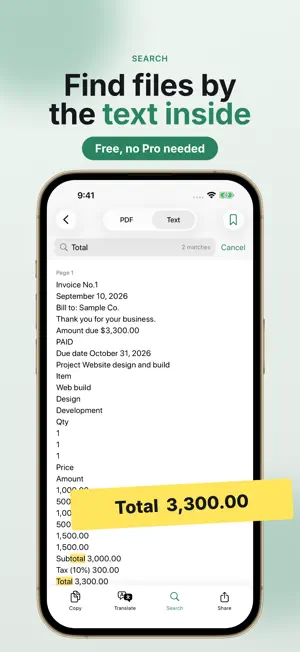
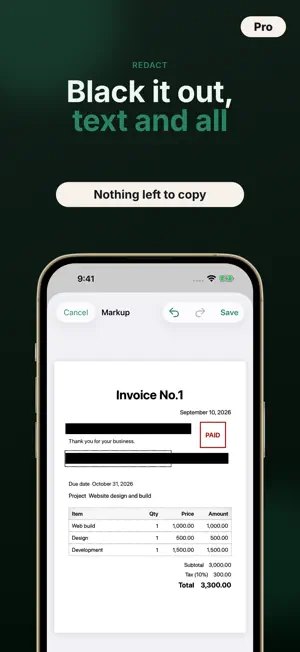
Point your camera at a document and get a clean, straight PDF. Capy Scan is a simple scanner, guided by a calm capybara. Text recognition and saving all happen on your iPhone, so your documents never leave your device. No ads. No watermarks. No subscription and no page limits. If your old scanner app shut down or started charging: Capy Scan needs no login, and saves PDFs on your iPhone and in the Files app. ■ JUST SCAN • Finds the four corners, then fixes distortion and tilt and crops the page • With Auto capture, just hold your iPhone over the page. The page count shows in the corner • Removes shadows and lighting tints for white paper and black text, while keeping faint pencil and red stamps • Shot at an angle? Pages are saved at their true proportions, not squashed ■ FIND IT LATER • On-device text recognition (English, Japanese, Chinese, Korean, and major European languages) adds an invisible text layer to every PDF • Search by file name or by the text inside your documents • Suggests file names from the document's title (for example: Invoice_20260427.pdf) (Pro) ■ BUILT FOR WORK • Markup, signatures, highlighter, and redaction (redacted text is removed from the PDF too) • Splits book spreads into left and right pages • Puts the front and back of an ID card on one page, at actual size • Adds business cards to Contacts, and reads the date and total from receipts ■ READY TO SEND • Export as PDF, JPG, or text, and see the file size before you share • Shrink PDFs to email size, and automatically put saved PDFs in a folder of your choice in the Files app (Pro) • Add a password when you send (the PDF in the app stays as is) • Share, Files app, print, mail, or copy ■ STAY ORGANIZED • Folders and tags, Favorites, list and grid views • Reorder, rotate, delete, and extract pages, and merge multiple PDFs • Start a scan right from a widget or Control Center ■ PRICING • Pro is a one-time purchase. No monthly or yearly fee • Free forever: scanning, saving, sharing, and printing PDFs, folders, tags, and search inside documents • No watermarks. No ads. No account • Try every Pro feature with a 7-day free trial (it's optional, and you're never charged automatically when it ends) • Supports Family Sharing Included with Pro (one-time purchase): markup, signatures, redaction, and watermarks / Book, ID Card, Business Card, and Receipt scanning / export to JPG and text / password protection / copying and translating text / merging PDFs and extracting pages / reminders / Face ID lock / names from document content / PDF compression / automatic saving to the Files app ■ PRIVACY • Scanned images and recognized text never leave your device • No account to create. No login • No ads and no usage tracking • Lock the app with Face ID or Touch ID (Pro) ■ GREAT FOR Keeping invoices, receipts, and contracts; organizing business cards; saving receipts for expenses and tax time; school handouts; pages from books and reports; copies of your ID. Questions or feedback? Reach us through the support page on the App Store.
What’s new
Version 1.1.0 · Updated October 25, 2026
• Your documents now show up in iPhone search, even by the words inside them (you can turn this off in Settings; text is hidden while the app is locked) • Open documents from Shortcuts and Siri • A clearer Pro screen: start the trial and pick up right where you left off • When a business card is scanned as a document, the app suggests reading it as a card
App privacy
The developer, Yuki Imai, reported these privacy practices to Apple.
Data Not Collected
The developer does not collect any data from this app.
Alternatives to Capy Scan – Calm PDF Scanner
Looking for apps like Capy Scan – Calm PDF Scanner? Here are 6 similar apps on the App Store. The highest rated is ToDo List - Daily Task Planner (4.7/5), and all 6 are free to download.
-
 Pdf Compressor - Compress File
4.6
-
 PottLoood - Notebook
-
 ZED MSME
-
 Aqua Voice: AI Dictation
4.4
-
 PDF Scanner Converter & Viewer
4.6
-
 ToDo List - Daily Task Planner
4.7
| App | Rating | Price | Last updated | Compare |
|---|---|---|---|---|
| Capy Scan – Calm PDF Scanner | – | Free | October 25, 2026 | |
| Pdf Compressor - Compress File | 4.6 / 5 (5) | Free | Aug 21, 2026 | Compare |
| PottLoood - Notebook | – | Free | Mar 9, 2026 | Compare |
| ZED MSME | – | Free | Jul 28, 2026 | Compare |
| Aqua Voice: AI Dictation | 4.4 / 5 (99) | Free | Oct 1, 2026 | Compare |
| PDF Scanner Converter & Viewer | 4.6 / 5 (104) | Free | Jul 3, 2026 | Compare |
| ToDo List - Daily Task Planner | 4.7 / 5 (5,253) | Free | Oct 9, 2026 | Compare |