

PinWall: Lock Screen Notes
Yang Wang Graphics & Design iPhoneiPadiPod touch
PinWall: Lock Screen Notes is a free Graphics & Design app for iPhone and iPad by Yang Wang. Requires iOS 18.0. Updated October 18, 2026.
- Price
- Free
- on the App Store
- Size
- 3 MB
- Age 4+
- Updated
- Oct 18
- 2026 · v1.1
Screenshots



About PinWall: Lock Screen Notes
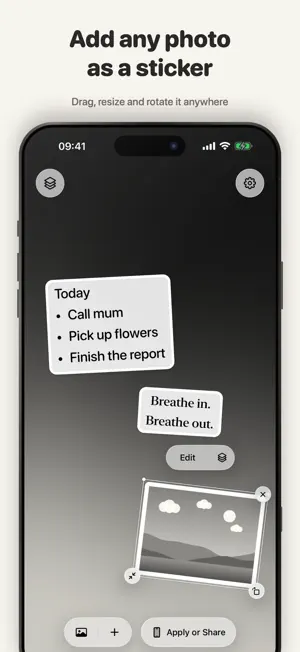
Create a personal iPhone Lock Screen with sticky notes, reminders, quotes, and photo stickers. PinWall is a wallpaper editor for the things you want to keep in view. Add a to-do list, an inspiring sentence, or a favorite photo to your own background. Move, resize, rotate, and style each element to make a Lock Screen that feels like yours. MAKE IT YOURS - Choose a wallpaper background from Photos or Files. - Add notes with custom fonts, colors, alignment, and backgrounds. - Add photos or transparent images and give them sticker outlines or a paper backing. - Arrange notes and images in layers with drag, pinch, rotation, and alignment guides. SAVE AND APPLY - Your current wallpaper draft saves automatically on your device. - Save the finished PNG to Photos or share it with another app. - Follow the illustrated guide in Settings to set your wallpaper manually on your iPhone. - Or add the included companion shortcut to set your Lock Screen through Apple Shortcuts. - If photo saving is denied, open iPhone Settings from PinWall to allow adding photos. PRIVATE BY DESIGN Your text, photos, and wallpaper draft are processed on your device. No account is required, and PinWall includes no ads or third-party analytics SDKs. PinWall supports portrait iPhone layouts on iOS 18 or later. Saving and sharing images, and following the manual wallpaper guide, do not require Shortcuts. The Set Wallpaper action uses Apple's Shortcuts app and requires adding the companion shortcut. Notes are part of the exported image; they are not interactive widgets or notification alerts. PINWALL PRO The free plan includes one note and one image per wallpaper. All sticker styles, export and Shortcuts are included. Upgrade to PinWall Pro for unlimited notes and images with a lifetime one-time purchase or a monthly auto-renewable subscription. Prices are shown in the app for your App Store region. When Pro ends, each wallpaper keeps only its most recently added note and image. Older items are permanently deleted and are not restored if you purchase Pro again. Payment is charged to your Apple Account. Monthly subscriptions renew automatically unless cancelled at least 24 hours before the end of the current period. Manage or cancel your subscription in App Store subscription settings. Restore Purchases is available in PinWall Settings. Privacy Policy: https://github.com/ywang035/pinwall-ios-app/blob/main/PRIVACY.md Terms of Use: https://www.apple.com/legal/internet-services/itunes/dev/stdeula/
What’s new
Version 1.1 · Updated October 18, 2026
Make your wallpaper with fewer interruptions. - Follow a new illustrated guide to set your wallpaper manually from iPhone Settings. - Re-enable photo saving from Settings if you previously denied permission, with clearer guidance when saving is blocked. - Dismiss the keyboard with one tap while editing notes or your shortcut name. - Enjoy a refreshed app icon and a coordinated light and dark appearance.
App privacy
The developer, Yang Wang, reported these privacy practices to Apple.
Data Not Collected
The developer does not collect any data from this app.
Alternatives to PinWall: Lock Screen Notes
Looking for apps like PinWall: Lock Screen Notes? Here are 6 similar apps on the App Store. The highest rated is Themes & Widgets - ThemeScape (4.5/5), and all 6 are free to download.
-
 TypePick - Compare Fonts
4.0
-
 Image Utils - Image Editor
4.2
-
 3minders - Lock Screen Notes
4.2
-
 EmoGen AI - Emoji Generator
3.7
-
 Mixy-Themes, Lock Widget
3.5
-
 Themes & Widgets - ThemeScape
4.5
| App | Rating | Price | Last updated | Compare |
|---|---|---|---|---|
| PinWall: Lock Screen Notes | – | Free | October 18, 2026 | |
| TypePick - Compare Fonts | 4.0 / 5 (1) | Free | Feb 2, 2026 | Compare |
| Image Utils - Image Editor | 4.2 / 5 (10) | Free | Oct 12, 2026 | Compare |
| 3minders - Lock Screen Notes | 4.3 / 5 (8) | Free | Dec 27, 2025 | Compare |
| EmoGen AI - Emoji Generator | 3.7 / 5 (14) | Free | Jul 30, 2024 | Compare |
| Mixy-Themes, Lock Widget | 3.5 / 5 (24) | Free | Mar 29, 2026 | Compare |
| Themes & Widgets - ThemeScape | 4.5 / 5 (239) | Free | Jun 30, 2026 | Compare |