

Clayshell
Arvind Kumar Developer Tools iPhoneiPadiPod touchMac
Clayshell is a free Developer Tools app for iPhone and iPad by Arvind Kumar. Requires iOS 18.0. Updated October 11, 2026.
- Price
- Free
- on the App Store
- Size
- 12 MB
- Age 4+
- Updated
- Oct 11
- 2026 · v1.1
Screenshots



About Clayshell
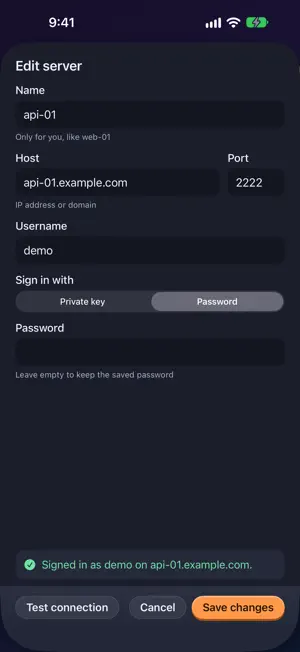
Clayshell is an SSH client and server manager for people who run their own servers. Add a server once, then do the daily work without leaving the app. NEW IN 1.1 • Test connection: check the address, user and key before you save a server. If it fails, Clayshell says why: the name was not found, nothing is listening on that port, no answer, not an SSH server, or the key needs its passphrase. • On the Mac, Clayshell is now a desktop: Terminal, Files, Monitor and PM2 open as windows inside it, with a dock and a top bar that shows the server you are working on. Press Command-K to switch servers. Liquid Glass on macOS 26. • Files: choose several files and folders at once, download several in one go, and delete a folder with everything inside it. Clayshell refuses to delete the root, top-level system folders and your home folder. TERMINAL A real terminal with full colour, in tabs. Your own shell, as many sessions as you need. FILES Browse the server over SFTP. Upload, download, rename, delete, make files and folders, and preview text files. EDITOR WITH A BACKUP Open a file on the server, edit it and save. Before every save the previous version is kept next to it as a .bak file, and one tap puts it back. If the file changed on the server while you were editing, Clayshell tells you instead of overwriting it. MONITOR CPU, memory, disk, load, uptime and the busiest processes, live, for Linux servers. PM2 See your PM2 processes, start, stop and restart them, and follow their logs. ALERTS Be told when a disk fills up, when CPU or memory stays high, when a PM2 process goes down, or when a server cannot be reached. On the Mac, Clayshell can watch your servers from the menu bar. A small script can also be installed on the server itself, so alerts reach Telegram, ntfy or a webhook even when your devices are asleep. MORE SSH Jump hosts. Import from your SSH config. Local port forwarding. Ed25519 and RSA keys, or a password. YOUR DATA STAYS WITH YOU • No account, no analytics, no tracking. Nothing is sent to us. • Passwords and keys are kept in the Keychain on your device. • Clayshell only talks to the servers you add. • It asks before trusting a new server, and stops if a server's key changes. • An optional lock with Face ID, Touch ID or your passcode. Clayshell has a day and a night look, and works on Mac and iPhone. Monitoring needs a Linux server. The PM2 screen needs PM2 on the server. Server alerts need curl and cron on the server. An RSA key protected by a passphrase is not supported yet.
What’s new
Version 1.1 · Updated October 11, 2026
• Test connection in the add and edit form, with clear reasons when it fails. • Mac: a desktop inside the app window, with a dock, a server switcher (Command-K) and Liquid Glass on macOS 26. • Files: choose several items, download several files, and delete folders with their contents. • Problems are shown under the field they belong to.
App privacy
The developer, Arvind Kumar, reported these privacy practices to Apple.
Data Not Collected
The developer does not collect any data from this app.
Alternatives to Clayshell
Looking for apps like Clayshell? Here are 6 similar apps on the App Store.


| App | Rating | Price | Last updated | Compare |
|---|---|---|---|---|
| Clayshell | – | Free | October 11, 2026 | |
| ParaPort | – | Free | Oct 6, 2026 | Compare |
| BURSU Connection Manager | – | Free | Oct 21, 2026 | Compare |
| GITDASH | – | Free | Sep 24, 2026 | Compare |
| Ducktor | – | Free | Mar 18, 2026 | Compare |
| Repo Search | – | Free | Sep 8, 2026 | Compare |
| DockerMonPro | – | 0.99 USD | Oct 13, 2026 | Compare |
Compare Clayshell with the top alternatives: ratings, updates, ASO score and keyword gaps →