

MustDo: To-Do Alarm
Lightning LLC. Productivity iPhoneiPadiPod touch
MustDo: To-Do Alarm is a free Productivity app for iPhone and iPad by Lightning LLC. Requires iOS 26.0. Updated October 24, 2026.
- Price
- Free
- on the App Store
- Size
- 15 MB
- Age 4+
- Updated
- Oct 24
- 2026 · v1.0.6
Screenshots


About MustDo: To-Do Alarm
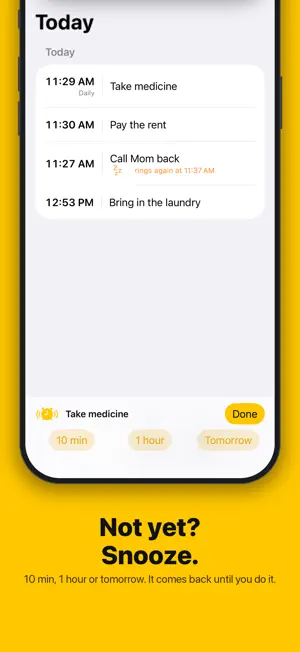
"I'll do it later." Later never came. The notification came and went while your phone was face down on the table. MustDo is for the things you cannot let slide. Add a to-do and a time. At that time, a real alarm rings and keeps ringing until you stop it. Stopping it means you did it. Not yet? Snooze until you do. ■ A real alarm, not a notification MustDo uses AlarmKit, the same system behind the Clock app's alarms. It rings full screen. It rings through Silent mode and Focus. It keeps ringing until you reach over and stop it. A notification you can swipe away is not a reminder. ■ Stop it when it's done Stopping the alarm marks the to-do as done, and it moves to Completed in the Today tab. Tapped Done by mistake? Swipe left to undo. ■ Not yet? Snooze until you do it "10 min", "1 hour" and "Tomorrow" are right on the alarm screen and in the Live Activity on the Lock Screen. It comes back and rings again, as many times as it takes. Tomorrow rings at the same time, or at a fixed morning time if you set one. ■ Repeats Daily, or weekly on the days you pick. The medicine at 9 PM, the bins on Tuesday, the report every Friday. Snoozing a repeating to-do to Tomorrow skips today's occurrence only. ■ Your to-dos stay in your iCloud Everything is stored in your own iCloud (CloudKit private database) and synced across your devices by Apple. MustDo has no server that stores your to-dos. No account, no sign-in. ■ Add to-dos from AI (MCP) A small MCP server for your Mac lets Claude and other AI clients read and add your to-dos, straight into your iCloud. Tell your assistant what needs doing; MustDo rings until it's done. ■ Make it yours 25 alarm sounds, or vibrate only. Light, dark, or match your device. Optional Face ID lock: alarms still ring and can be stopped while the app is locked. ■ Free for 30 days, then a subscription Try everything for 30 days. After that, a subscription (monthly or yearly, auto-renewing) is needed to add new to-dos. To-dos you have already added keep ringing without one, and you can still stop, snooze and delete them. An app like this should never go quiet because of billing. Requires iOS 26 or later. Website and user guide: https://ltng.jp/mustdo Privacy Policy: https://ltng.jp/mustdo/privacy Terms of Use: https://ltng.jp/mustdo/terms
What’s new
Version 1.0.6 · Updated October 24, 2026
Added History at the top left. See the to-dos you completed in the last 30 days, and swipe left to undo any from the last 7 days. After you stop an alarm, a “Marked as done” notification appears. If you stopped it by mistake, you can undo it from the notification.
App privacy
The developer, Lightning LLC., reported these privacy practices to Apple.
Data Linked to You
The following data, which may be collected and linked to your identity, may be used for the following purposes:
- Identifiers: User ID
Used for: App Functionality
Alternatives to MustDo: To-Do Alarm
Looking for apps like MustDo: To-Do Alarm? Here are 6 similar apps on the App Store. The highest rated is nag: Persistent Reminders (5.0/5), and all 6 are free to download.
-
 Reminder Alert: EventBuzzr
4.0
Reminder Alert: EventBuzzr
4.0
-
 HabitsWonder: Lifetime Habits
-
 nag: Persistent Reminders
5.0
nag: Persistent Reminders
5.0
-
 LockTodoNote: Lock Screen Todo
-
 Unmissable: Calendar Alarm
3.0
Unmissable: Calendar Alarm
3.0
-
 Kyugo
3.7
Kyugo
3.7
| App | Rating | Price | Last updated | Compare |
|---|---|---|---|---|
| MustDo: To-Do Alarm | – | Free | October 24, 2026 | |
| Reminder Alert: EventBuzzr | 4.0 / 5 (1) | Free | Jan 20, 2026 | Compare |
| HabitsWonder: Lifetime Habits | – | Free | Aug 9, 2024 | Compare |
| nag: Persistent Reminders | 5.0 / 5 (1) | Free | Oct 26, 2026 | Compare |
| LockTodoNote: Lock Screen Todo | – | Free | Oct 22, 2026 | Compare |
| Unmissable: Calendar Alarm | 3.0 / 5 (1) | Free | Sep 29, 2026 | Compare |
| Kyugo | 3.7 / 5 (9) | Free | Feb 4, 2026 | Compare |