

SONO-HINO: Daily To-Do List
Yusuke Toyoshima Productivity iPhoneiPadiPod touch
SONO-HINO: Daily To-Do List is a free Productivity app for iPhone and iPad by Yusuke Toyoshima. Requires iOS 15.0. Updated October 22, 2026.
- Price
- Free
- on the App Store
- Size
- 36 MB
- Age 4+
- Updated
- Oct 22
- 2026 · v1.0.2
Screenshots


About SONO-HINO: Daily To-Do List
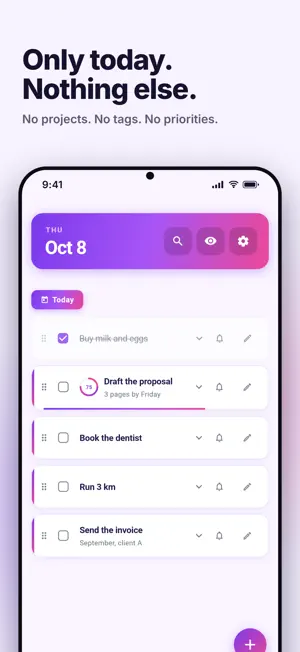
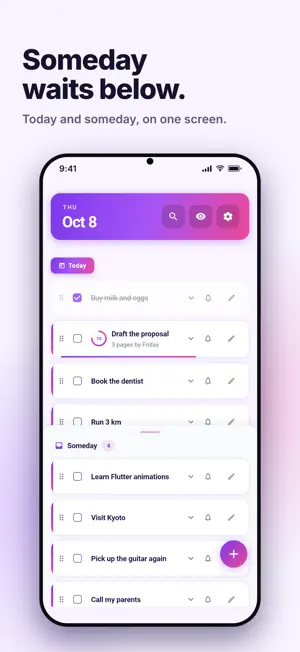
SONO-HINO (Japanese for "that day's") is a to-do app built around one idea: focus on today. No projects, no tags, no priorities. Just two places for your tasks: Today and Someday. ■ Today and Someday, on one screen Your timeline at the top holds today's tasks. Pull up the Someday drawer from the bottom for everything else. Both are always one glance away. No switching between screens. ■ Unfinished tasks roll over on their own Whatever you didn't finish moves to the top of today's list the next time you open the app. You never have to rebuild your list in the morning. ■ Break big work into small wins Split any task into subtasks, up to three levels deep. A progress ring shows how much is left, and when every subtask is done, the parent completes itself. ■ Handle everything with one thumb - Tap to expand, tap again to complete - Swipe right to move a task to Today or Someday - Swipe left to delete (with Undo) - Long-press and drag to reorder ■ Reminders for the things you can't miss Set a notification time on any task. Save the time you use most as your default. ■ A design you'll want to open every day Five themes (Violet, Pure White, Rose, Sky, Green) and three display modes (Light, Dark, or follow your system), all built on soft gradients that are easy on the eyes. ■ Also included - Search across task names and notes - Show or hide completed tasks, or clear them all at once - Japanese and English - Sign in to sync to the cloud and pick up right where you left off on a new phone 【Made for】 - People who have tried a dozen to-do apps and never stuck with one - Anyone who only wants to see what matters today - Those who like their tools simple, and beautiful 【Pricing】 All core features are free. The app shows ads, which you can remove with a one-time in-app purchase. 【Please note】 SONO-HINO stores your tasks in the cloud, so it needs an email account and a network connection.
What’s new
Version 1.0.2 · Updated October 22, 2026
A small improvement: • Carrying a task out of the Someday drawer no longer scrolls the timeline above • The guide shown on an empty timeline stays visible when the Someday drawer is open • In the EEA, the UK and Switzerland, the app asks for ad consent, which you can change anytime in Settings > Ad Privacy Settings
App privacy
The developer, Yusuke Toyoshima, reported these privacy practices to Apple.
Data Used to Track You
The following data may be used to track you across apps and websites owned by other companies:
- Location: Coarse Location
- Identifiers: Device ID
- Usage Data: Product Interaction, Advertising Data
Data Linked to You
The following data, which may be collected and linked to your identity, may be used for the following purposes:
- Contact Info: Email Address
- User Content: Other User Content
- Identifiers: User ID
Used for: App Functionality
Data Not Linked to You
The following data, which may be collected but is not linked to your identity, may be used for the following purposes:
- Location: Coarse Location
- Identifiers: Device ID
- Usage Data: Product Interaction, Advertising Data
- Diagnostics: Crash Data, Performance Data, Other Diagnostic Data
Used for: Third-Party Advertising, Analytics, App Functionality