

Homeck for HomeKit
Jung Yu Lam Lifestyle iPhoneiPadiPod touch
Homeck for HomeKit is a free Lifestyle app for iPhone and iPad by Jung Yu Lam. Requires iOS 26.0. Updated November 21, 2026.
- Price
- Free
- on the App Store
- Size
- 24 MB
- Age 4+
- Updated
- Nov 21
- 2026 · v0.2.4
Screenshots
Save to Pinterest

About Homeck for HomeKit
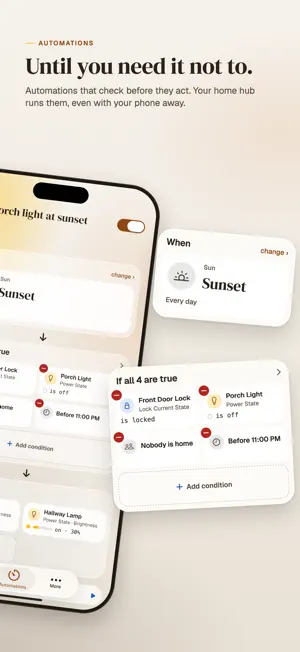
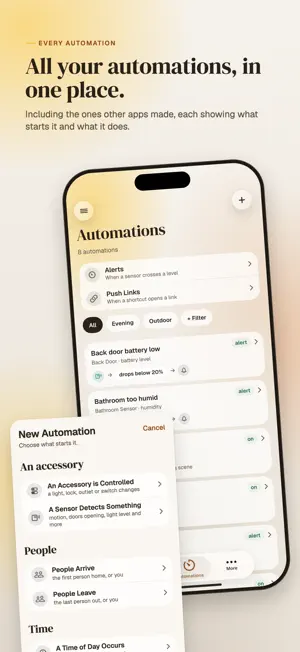
Homeck works like the Home app you already know, then goes deeper when you need it: every setting your accessories publish, automations that check other accessories, and alerts when a reading crosses the line you set. Open it and you see your rooms, accessories and scenes the way Apple Home shows them. Go one level deeper and the rest of HomeKit is there: every value your accessories publish, and automation logic Apple Home has no screen for. Depth is something you step into, never the thing you land on. EVERY VALUE YOUR ACCESSORIES PUBLISH Accessories report far more than Apple Home shows: battery levels, sensor readings, colour temperature, firmware and settings with their real published ranges. Homeck lists every one in plain words. With Pro, each gets the control it calls for (a switch, a slider or a picker), and stays read-only when the accessory says so. AUTOMATIONS THAT CHECK OTHER ACCESSORIES (PRO) Apple Home lets an automation check the time and who is home. Homeck can also check other accessories at the same moment, such as "only while the front door is unlocked", and start on any setting an accessory publishes, not just on and off. The automation is saved in HomeKit and your home hub runs it, so it keeps working with Homeck closed. ALERTS Watch any number an accessory publishes, such as a freezer's temperature or a battery level: below, above or between two values. Your home hub does the watching, so nothing depends on Homeck being open. A Shortcut you attach in Apple Home sends the banner to every iPhone and iPad in the home that has Homeck, with up to two scene buttons. PUSH LINKS A link any Shortcut can open to notify everyone in your home, with your own title, message and up to two scene buttons. SETUP CODE VAULT HomeKit never gives a setup code back once an accessory is paired. Type it in or read the printed code from the label with the camera, and Homeck keeps it in the Keychain on this device for the day you need to pair again. BACKUP AND RESTORE Save your rooms, accessory names, groups, scenes, automations with their tags and filters, and Push Links to a file, and recreate them in a new home or after a reset. Restore shows its plan before it changes anything. Pairing has to be redone by hand; the rest comes back. With Pro, accessories you pair again are matched to the backup by serial number, for you to confirm. CAMERAS Live view, full screen with zoom, and stills from your HomeKit cameras. HomeKit gives other apps no access to recordings, and Homeck says so instead of pretending. ACCESSORY HEALTH See which accessories are not responding and the bridge behind them, low batteries, and anything jammed, obstructed or tampered with. Identify an accessory so you can find it. WIDGET A Home Screen widget shows an accessory's state together with how old that reading is. NO ACCOUNT Homeck works directly with HomeKit on your iPhone and iPad. There is no sign-up and no server of ours between you and your accessories. The one server we run passes alert and Push Link banners to your devices; it keeps no readings and no accessory names. FREE AND PRO Free covers everything the Home app does, plus every value to read, backup and restore, three setup codes per home, one alert and one Push Link. Homeck Pro adds changing every value, automations that start on any setting or check other accessories, time windows on timed automations, automation tags and filters, matching re-paired accessories on restore, reading setup code labels with the camera in the vault, Shortcuts, and any number of setup codes, alerts and Push Links. Pro is monthly, yearly or lifetime, and can be shared with family. REQUIREMENTS A home set up in Apple Home. Automations and alerts need a home hub: a HomePod or Apple TV. Terms of Use (EULA): https://www.apple.com/legal/internet-services/itunes/dev/stdeula/ Homeck Terms: https://homeck.app/terms Privacy Policy: https://homeck.app/privacy
What’s new
Version 0.2.4 · Updated November 21, 2026
- Automations: tap a start or a condition to change just that part, and pick its value from a list, as in Apple Home. - Automations made in other apps with several starts or conditions can now be edited part by part. - "Who is home" can be added even when the home hub says it can't check it. - Pull down to refresh cameras and scenes. - Fixed: on and off values in automations and alerts read as they do in Apple Home.
App privacy
The developer, Jung Yu Lam, reported these privacy practices to Apple.
Data Not Linked to You
The following data, which may be collected but is not linked to your identity, may be used for the following purposes:
- Identifiers: Device ID
- Other Data: Other Data Types
Used for: App Functionality
Alternatives to Homeck for HomeKit
Looking for apps like Homeck for HomeKit? Here are 6 similar apps on the App Store. The highest rated is Pet Care Reminder: Dog & Cat (4.1/5), and all 6 are free to download.
-
 Home Glass for HomeKit
-
 我愛毛小孩
-
 HomeScreen for HomeKit
-
 HomeDeck for HomeKit
-
 Pet Care Reminder: Dog & Cat
4.1
-
 Smart Shades
2.1
| App | Rating | Price | Last updated | Compare |
|---|---|---|---|---|
| Homeck for HomeKit | – | Free | November 21, 2026 | |
| Home Glass for HomeKit | – | Free | Nov 23, 2026 | Compare |
| 我愛毛小孩 | – | Free | Sep 3, 2026 | Compare |
| HomeScreen for HomeKit | – | Free | Oct 12, 2026 | Compare |
| HomeDeck for HomeKit | – | Free | Nov 10, 2026 | Compare |
| Pet Care Reminder: Dog & Cat | 4.1 / 5 (14) | Free | Oct 20, 2026 | Compare |
| Smart Shades | 2.1 / 5 (65) | Free | Jul 20, 2026 | Compare |
Compare Homeck for HomeKit with the top alternatives: ratings, updates, ASO score and keyword gaps →