

Quiet Sudoku: Classic Puzzles
jintao LV Games iPhoneiPadiPod touch
Quiet Sudoku: Classic Puzzles is a free Games app for iPhone and iPad by jintao LV. Rated 5.0/5 from 1 ratings. Requires iOS 17.0. Updated October 16, 2026.
- Rating
- 5.0
- 1 ratings
- Price
- Free
- on the App Store
- Size
- 2 MB
- Age 4+
- Updated
- Oct 16
- 2026 · v1.0.1
Screenshots


About Quiet Sudoku: Classic Puzzles
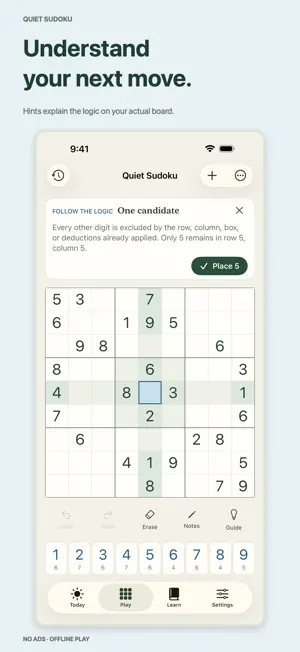
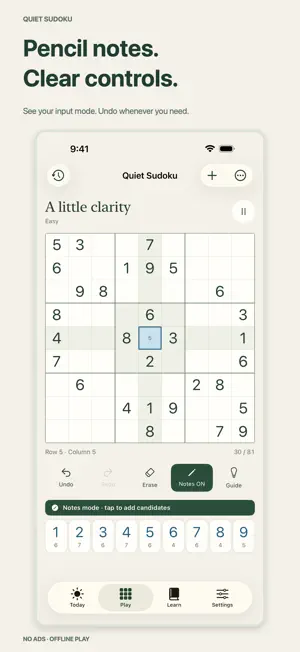
Play classic Sudoku without ads or interruptions. Quiet Sudoku works offline and explains the next logical step when you get stuck—so you can enjoy solving and learn along the way. CLASSIC SUDOKU, AT YOUR PACE Choose Easy, Medium, Hard or Expert, with puzzles rated by the techniques needed to solve them. Every puzzle has one solution and a verified logical path. There is no mistake limit, and the timer is optional. Wrong entries are marked against the solution by default; you can switch that off for a fully unassisted solve. Open the app to continue an unfinished game or start today's puzzle. HINTS THAT EXPLAIN First see where to look. Then follow the reasoning and decide whether to apply the step. The guide works with your actual board, and the number keys stay in reach so you can make the move yourself. If a wrong entry is in the way, the guide marks it and lets you erase it in one tap. Learn six techniques, from single candidates to hidden pairs and X-Wings, and practice them on different positions, with guided answers recorded separately from independently correct attempts. COMFORTABLE NUMBER ENTRY Use pencil notes, automatic note cleanup, undo and redo. Notes already ruled out by a number in the same row, column or box are struck through. A compact number row keeps the board in view. Prefer bigger targets? Choose large number keys. A clear notes-mode indicator helps you know whether you are entering an answer or a candidate. A DAILY HABIT, WITHOUT PRESSURE Solve the daily puzzle, revisit completed days or catch up on the past year. Optional local reminders respect your choice; finishing today's puzzle cancels its upcoming reminder. Track your completed puzzles and progress by difficulty. MADE FOR IPHONE AND IPAD Enjoy a larger board in iPad portrait and tools beside the board in landscape. Choose a light paper theme or a dark chalkboard. Local progress saves automatically. Optional iCloud checkpoints let you open a recent game from another device as a separate copy, keeping both devices' progress safe. No ads, subscriptions or in-app purchases in this version. No account registration required. Available in English, Simplified and Traditional Chinese, Japanese, Korean, German, French, Spanish, Portuguese and Italian.
What’s new
Version 1.0.1 · Updated October 16, 2026
• New Expert level with hidden pairs and X-Wings, each with its own lesson and practice. • Lessons now draw a small board, so you can see exactly where the logic applies. • Simpler navigation: four tabs, with your progress on the Today tab. • Play separates “New puzzle” from actions on the current puzzle, and asks before setting unfinished work aside. • Saved games are split into In progress and Finished. Swipe to delete one; your records stay. • A finished puzzle shows its completion card right below the board, and starting numbers now say they can’t be changed. • Every move is saved the moment you make it. The zoomed focus view is gone; the main board does the job. • Now in Traditional Chinese, Japanese, Korean, German, French, Spanish, Portuguese and Italian. Choose a language in Settings or follow your device. • The guide no longer hides the number keys or shrinks the board. Look first, then make the move yourself. • If a wrong entry is in the way, the guide marks it in red and lets you erase it in one tap. Undo brings it back. • Notes that a number in the same row, column or box has already ruled out are now struck through. • Checking against the solution is on for new players. You can turn it off in Settings. • While today's puzzle is in progress, the Today card shows your progress and takes you straight back to it. • Smaller iPhone layout fixes, including opening on the first empty cell.
Play today's Inkspill puzzle
Spread your ink until the whole board is one color, within the move limit. A free daily puzzle from Fiplay, same board for everyone. It plays right here, no download.
App privacy
The developer, jintao LV, reported these privacy practices to Apple.
Data Not Collected
The developer does not collect any data from this app.
Alternatives to Quiet Sudoku: Classic Puzzles
Looking for apps like Quiet Sudoku: Classic Puzzles? Here are 6 similar apps on the App Store. The highest rated is Sudoku: Daily Offline Puzzles (5.0/5), and all 6 are free to download.
-
 Sudoku: Daily Offline Puzzles
5.0
-
 Home Games – 60 Classic Games
-
 itomani – minimal sudoku
-
 Apparent Sudoku
3.4
-
 Carbles: Marbles & Cards Game
4.8
-
 Open Sudoku: No Ads & Offline
4.3
| App | Rating | Price | Last updated | Compare |
|---|---|---|---|---|
| Quiet Sudoku: Classic Puzzles | 5.0 / 5 (1 rating) | Free | October 16, 2026 | |
| Sudoku: Daily Offline Puzzles | 5.0 / 5 (1) | Free | Nov 20, 2026 | Compare |
| Home Games – 60 Classic Games | – | Free | Sep 4, 2026 | Compare |
| itomani – minimal sudoku | – | Free | Sep 18, 2026 | Compare |
| Apparent Sudoku | 3.4 / 5 (10) | Free | Oct 18, 2026 | Compare |
| Carbles: Marbles & Cards Game | 4.8 / 5 (44) | Free | Oct 7, 2026 | Compare |
| Open Sudoku: No Ads & Offline | 4.3 / 5 (9) | Free | Oct 12, 2026 | Compare |