

Loopkeeper: Knit & Crochet
Jakob Fabian Naher Lifestyle iPhoneiPadiPod touch
Loopkeeper: Knit & Crochet is a free Lifestyle app for iPhone and iPad by Jakob Fabian Naher. Requires iOS 18.0. Updated November 26, 2026.
- Price
- Free
- on the App Store
- Size
- 2 MB
- Age 4+
- Updated
- Nov 26
- 2026 · v1.6
Screenshots
Save to Pinterest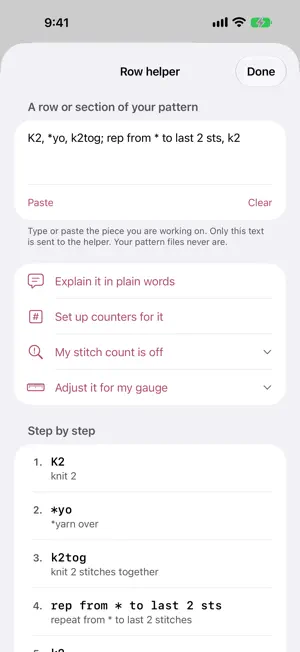


About Loopkeeper: Knit & Crochet
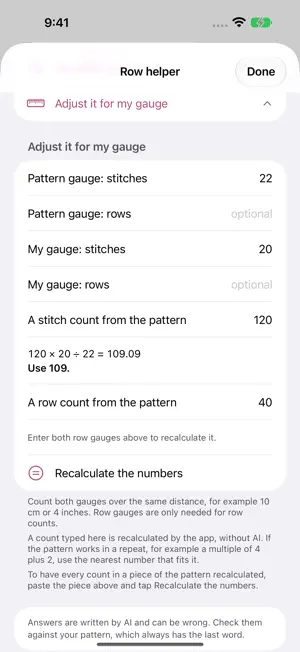
Loopkeeper keeps your place. YOUR PATTERN, RIGHT THERE Import a pattern as a PDF or a photo. Drag the row marker to the line you're on and add highlights to the repeats that matter. Marks are stored next to the pattern, never inside your PDF. COUNTERS THAT UNDERSTAND REPEATS Tap the big number to count a row. Make a counter a repeat of any length and link it to another counter: when you pass the last row of the repeat it starts again at 1 and the linked counter goes up by one. Add notes to rows — “row 24: start decreases” — and see them when you get there. Set a target and watch the progress. THE ROW HELPER Stuck on a line of shorthand? Type or paste it, and the helper explains it step by step in plain words, lists the abbreviations and works out how the stitch count changes. Or paste the instructions for a section (“work rows 1–8 twelve times, cable on row 5”) and the helper proposes the counters, repeats and row notes for it. One tap adds them to your project. NEW: WHEN THE COUNT IS OFF 41 stitches where the pattern says 42? Tell the helper the count you have. It works out what the row should end with and names the mistakes that would explain exactly that difference: where to look in your work, and how to put it right, without ripping back when that is possible. NEW: YOUR GAUGE, THEIR PATTERN Enter the pattern's gauge and yours. The helper finds the stitch and row counts in the piece you pasted, and the app recalculates each one and shows the sum, so you can check it: 124 × 20 ÷ 22 = 112.73. If the pattern states a multiple (“multiple of 8 + 4”), the suggestion keeps it. What cannot be converted by multiplying, such as shaping or ribbing that needs an even count, is pointed out for your own judgement. The row helper is AI and part of the one-time unlock. It can be wrong, so your pattern always has the last word. It sees only the text and numbers you give it, after you agree: they are sent to the Loopkeeper helper service and on to OpenAI to be answered, and the helper service keeps none of it. Your pattern files are never sent. UNDO THAT TAKES BACK ONE TAP Undo removes exactly your last tap, including the rollover it caused, and nothing else. PICK UP WHERE YOU LEFT OFF Projects, counters, patterns and marks sync between your iPhone and iPad through your own iCloud. Every tap is saved as its own small record, so rows counted on two devices while offline are all kept once they sync. ON IPAD, SIDE BY SIDE Pattern on the left, counters on the right. YOURS, AND ONLY YOURS No account, no ads, no tracking. Patterns live on your devices and in your private iCloud, and the app has no public sharing feature. Export everything at any time: every project as a file you can read and every pattern exactly as you imported it. ONE PRICE, NO SUBSCRIPTION Free: two projects with one pattern each, with full export. A single one-time purchase unlocks unlimited projects and patterns and the row helper (up to 200 questions in any 30 days, 800 in total).
What’s new
Version 1.6 · Updated November 26, 2026
Your row, step by step, and in your size. • Type or paste a row into the row helper and it appears step by step at once: each step as your pattern writes it, and under it with the abbreviations written out, for example "k to last 3 sts" as "knit to last 3 stitches". It works offline, without AI and without a purchase, for English and German patterns. • Making the second size of four? When a row gives one number per size, such as "k12 (14, 16, 18)", choose your size once and the row helper shows the row with only your numbers: "k14". The steps, the abbreviations and the helper's answers then use that text. Without AI, offline, free. A bracket that does not list one number per size stays as written. • Nothing is worked out or changed: numbers and order stay exactly as in your pattern. Where US and UK crochet patterns use the same abbreviation for different stitches, the step keeps it, and the list below says what it means in each. • When the helper has answered a question, the answer now comes first and the built-in steps and abbreviations follow it.
App privacy
The developer, Jakob Fabian Naher, reported these privacy practices to Apple.
Data Linked to You
The following data, which may be collected and linked to your identity, may be used for the following purposes:
- Purchases: Purchase History
- User Content: Other User Content
Used for: App Functionality
Alternatives to Loopkeeper: Knit & Crochet
Looking for apps like Loopkeeper: Knit & Crochet? Here are 3 similar apps on the App Store. The highest rated is ORLEN VITAY (4.8/5), and all 3 are free to download.


| App | Rating | Price | Last updated | Compare |
|---|---|---|---|---|
| Loopkeeper: Knit & Crochet | – | Free | November 26, 2026 | |
| SmartApple - Food Nutrition | – | Free | Nov 21, 2026 | Compare |
| ieGeek Cam | 4.6 / 5 (1,709) | Free | Oct 26, 2026 | Compare |
| ORLEN VITAY | 4.8 / 5 (380) | Free | Nov 26, 2026 | Compare |