

DocSwitch - PDF Editor
thierry de bast Productivity iPhoneiPadiPod touch
DocSwitch - PDF Editor is a free Productivity app for iPhone and iPad by thierry de bast. Requires iOS 15.0. Updated October 19, 2026.
- Price
- Free
- on the App Store
- Size
- 55 MB
- Age 4+
- Updated
- Oct 19
- 2026 · v1.0
Screenshots

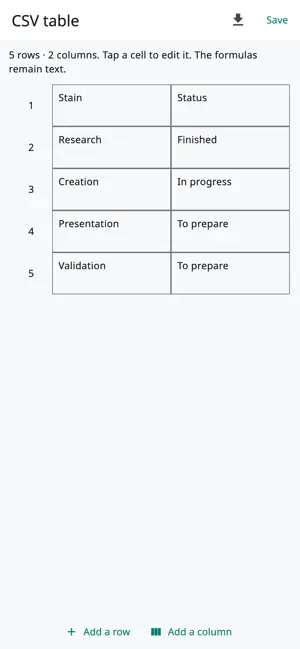


About DocSwitch - PDF Editor
DocSwitch brings together a PDF editor, document converter, and page layout tools in one application. Prepare a report, edit text, or combine multiple files without creating an account. CONVERT YOUR DOCUMENTS Switch between compatible formats for your documents, text, images, tables and presentations. PDF, DOCX, ODT, RTF, TXT, HTML/HTM, Markdown/MD, XLSX, ODS, CSV, TSV, PPTX, ODP, PNG, JPG/JPEG, BMP, GIF, TIFF/TIF, WEBP. On mobile, modern Office formats are rebuilt with simplified formatting. DOC, XLS and PPT are not supported. WRITE AND EDIT Create formatted text: fonts, colors, lists, links, alignment and line spacing. Add photos, frames, diagrams and tables. Insert or delete rows and columns, find and replace text, add page breaks, and undo your changes. Edit PDF text when its structure allows it. Converting to an editable document can rebuild the layout. ORGANIZE YOUR PDFs Assemble documents, add pages, reorder them, rotate them, duplicate them or extract them. Extract text and detected information to review and reuse. Take a photo of a page with your camera and add it to the document. Recognize text from scans with local OCR. The result depends on the language, scan quality and available engine; the original layout is not reconstructed identically. KEEP YOUR FILES WITHIN REACH Document processing is done on your device. The originals are preserved. Save a project to resume your work, share your files and print your documents. Interface available with 97 language and region choices. PLEASE NOTE Some complex documents are simplified. Exported presentations contain page images; spreadsheet exports do not preserve formulas. WEBP is available for import only. DOCSWITCH SUBSCRIPTION Choose the monthly plan at €5.99 or the annual plan at €60. Access to the tools requires an active subscription. The applicable price and currency are displayed in the Store before confirmation. Automatic renewal; manage or cancel your subscription in your Store account. In the event of cancellation, access remains available until the end of the paid period. No DocSwitch account to create; A Store account is required to purchase and restore the subscription. https://maurage.alwaysdata.net/presentation/docswitch.html#confidentialite https://www.apple.com/legal/internet-services/itunes/dev/stdeula/
App privacy
The developer, thierry de bast, reported these privacy practices to Apple.
Data Not Collected
The developer does not collect any data from this app.
Alternatives to DocSwitch - PDF Editor
Looking for apps like DocSwitch - PDF Editor? Here are 6 similar apps on the App Store. The highest rated is CPU-x Dasher z Battery life (4.6/5), and all 6 are free to download.
-
 Print Job
-
 Instant Guard
3.4
Instant Guard
3.4
-
 eSign AI - AI Signature Maker
4.1
eSign AI - AI Signature Maker
4.1
-
 Clean Now: Format Conversion
4.4
Clean Now: Format Conversion
4.4
-
 MailTime: AI Email Inbox
3.7
MailTime: AI Email Inbox
3.7
-
 CPU-x Dasher z Battery life
4.6
CPU-x Dasher z Battery life
4.6
| App | Rating | Price | Last updated | Compare |
|---|---|---|---|---|
| DocSwitch - PDF Editor | – | Free | October 19, 2026 | |
| Print Job | – | Free | Feb 27, 2024 | Compare |
| Instant Guard | 3.4 / 5 (61) | Free | Jun 16, 2026 | Compare |
| eSign AI - AI Signature Maker | 4.1 / 5 (754) | Free | May 5, 2026 | Compare |
| Clean Now: Format Conversion | 4.4 / 5 (69) | Free | Jun 9, 2026 | Compare |
| MailTime: AI Email Inbox | 3.7 / 5 (97) | Free | Oct 25, 2026 | Compare |
| CPU-x Dasher z Battery life | 4.6 / 5 (23,118) | Free | Oct 16, 2026 | Compare |