

SlideSort: PPT Photos to PDF
超 雷 Utilities iPhoneiPadiPod touch
SlideSort: PPT Photos to PDF is a free Utilities app for iPhone and iPad by 超 雷. Requires iOS 16.0. Updated October 19, 2026.
- Price
- Free
- on the App Store
- Size
- 5 MB
- Age 4+
- Updated
- Oct 19
- 2026 · v1.0.5
Screenshots



About SlideSort: PPT Photos to PDF
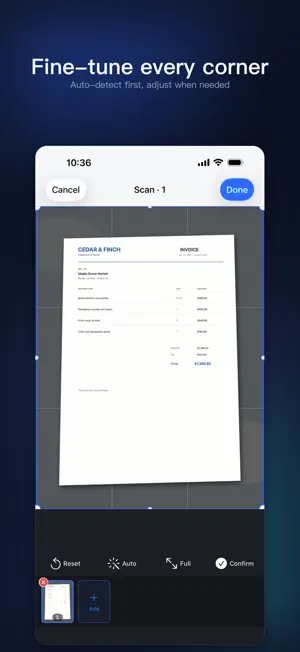
At a lecture, training, talk, or product launch, snap each slide on the screen. Afterward, import all those photos into SlideSort in one go — the app finds the screen area in every photo, crops it, straightens the perspective, enhances it, and combines everything into one complete, clean PDF you can save and share. Dozens of slide photos, and no cropping one by one. Import them all, and get a single organized PDF. IMPORT ALL AT ONCE, PROCESS IN BATCH Multi-select dozens of slide photos from your library in one import. SlideSort processes each automatically: it detects the screen or projector area, crops, and corrects the perspective — no manual framing. You can also capture directly with the camera. A CAMERA THAT KEEPS UP Zoom, tap to lock focus and exposure, and turn on a composition grid — so a projector screen still comes out sharp from the back of the room. CORRECT AND ENHANCE When auto detection needs a hand, adjust any of the four corners manually. Choose Original, Auto, Color, Grayscale, or Black & White to make dim auditorium shots clear and readable. ANNOTATE, HIGHLIGHT, AND SIGN Highlight what matters, blur out anything sensitive, draw by hand, add text boxes, and save a signature to reuse. Annotations are written into the page itself, so they carry through to PDF, Word, and image exports. ORGANIZE YOUR PAGES Reorder, rotate, duplicate, or delete pages to put the content back in the order it was presented. RECOGNIZE AND SEARCH TEXT Recognize the text on every page on-device with Apple Vision. Exported PDFs can include a searchable text layer, and searching inside a document takes you straight to the page that matched. EXPORT IN THE FORMAT YOU NEED Beyond PDF and Word, export JPEG, PNG, or TXT. PDF exports offer page size and quality settings. Save to Files or share directly with colleagues and classmates. RECENTLY DELETED Deleted documents go to Recently Deleted first, where you can restore them for 30 days — no more worrying about a slip of the thumb. A PRIVATE, LOCAL LIBRARY Documents live on your device as files with a local index. No account required, nothing uploaded. On iPhone and iPad alike, the interface is laid out natively for the screen. FREE AND PRO The free tier processes up to 20 photos per day and 10 pages per document, and free PDF exports carry a SlideSort mark in the bottom-right corner. Pro adds higher usage limits, original-quality PDFs, batch OCR, full-text search, and PDF passwords. Purchases and subscriptions are managed by the App Store; see the app for available plans. Detection, correction, and text recognition all run on-device. Questions or feedback: [email protected] Terms of Use: https://www.apple.com/legal/internet-services/itunes/dev/stdeula/
What’s new
Version 1.0.5 · Updated October 19, 2026
Added support for iPhone Duo and improved the overall user experience.
App privacy
The developer, 超 雷, reported these privacy practices to Apple.
Data Not Collected
The developer does not collect any data from this app.
Alternatives to SlideSort: PPT Photos to PDF
Looking for apps like SlideSort: PPT Photos to PDF? Here are 6 similar apps on the App Store. The highest rated is Fanshu Translator (5.0/5), and all 6 are free to download.
-
 飞看监控 - 手机秒变摄像头
-
 理想连山
理想连山
-
 AI Car Photoshoots: AutoPic
4.5
AI Car Photoshoots: AutoPic
4.5
-
 Fanshu Translator
5.0
Fanshu Translator
5.0
-
 ManifestFlow-Your Life OS
5.0
ManifestFlow-Your Life OS
5.0
-
 星星充电商家版
| App | Rating | Price | Last updated | Compare |
|---|---|---|---|---|
| SlideSort: PPT Photos to PDF | – | Free | October 19, 2026 | |
| 飞看监控 - 手机秒变摄像头 | – | Free | Jun 3, 2026 | Compare |
| 理想连山 | – | Free | Oct 16, 2026 | Compare |
| AI Car Photoshoots: AutoPic | 4.5 / 5 (15) | Free | Feb 26, 2025 | Compare |
| Fanshu Translator | 5.0 / 5 (3) | Free | Aug 12, 2026 | Compare |
| ManifestFlow-Your Life OS | 5.0 / 5 (1) | Free | Oct 21, 2026 | Compare |
| 星星充电商家版 | – | Free | Oct 23, 2026 | Compare |