

PixSweep: Photo Video Cleaner
Kittikhun Yodrak Utilities iPhoneiPadiPod touch
PixSweep: Photo Video Cleaner is a free Utilities app for iPhone and iPad by Kittikhun Yodrak. Requires iOS 16.4. Updated October 24, 2026.
- Price
- Free
- on the App Store
- Size
- 53 MB
- Age 4+
- Updated
- Oct 24
- 2026 · v1.0.1
Screenshots


About PixSweep: Photo Video Cleaner
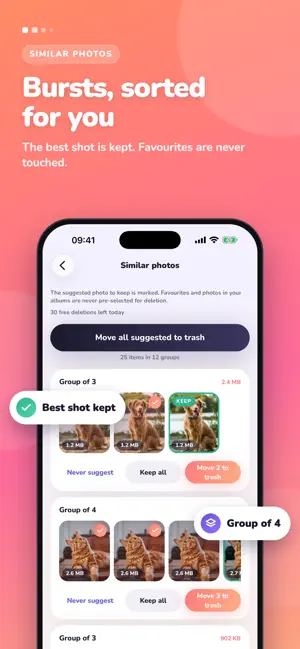
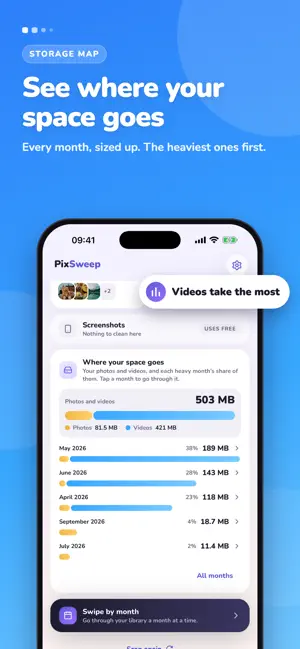
PixSweep finds the photos and videos you don't need and helps you remove them, without your library ever leaving your phone. WHAT IT FINDS • Exact duplicates: free to remove, without limit • Copies: the same picture saved again, resized, sent through a chat app or exported. The highest-resolution copy is kept • Similar photos: bursts and near-identical shots, with the best one suggested to keep • Large videos: sorted by real size, so the biggest wins come first • Screenshots: oldest first • Photos that may be blurry: for your review only Sort any list by space, size or date, and narrow the long ones down to a single year. SWIPE BY MONTH Swipe right to keep and left to delete, one month at a time. PixSweep suggests where to start, shows your progress month by month, and lets you undo any swipe. Favourite a photo, add it to an album or share it without leaving the swipe. With Pick keepers, tap the few you love and send the rest to the trash in one go, or let "Best of each burst" choose for you. ON THIS DAY Photos taken on today's date in past years, ready to keep or let go. YOU STAY IN CONTROL PixSweep only suggests. Favourites and photos in your albums are never pre-selected. Compare two shots side by side and zoom both at once. Nothing is deleted until you confirm, and deleted items go to Recently Deleted first, where you can still get them back. SEE THE SPACE COME BACK A storage map shows which months take the most space, and every cleanup shows what you freed. PRIVATE BY DESIGN Everything is analysed on your device. No account, no uploads, no ads, no tracking. It works in airplane mode. HONEST PRICING You see what's free and what the unlock costs before you do any work. Scanning, reviewing and removing exact duplicates are always free. Other deletions are free up to a daily allowance, or unlimited with a one-time unlock or a yearly plan. No weekly subscriptions. Terms of Use (EULA): https://pixsweep.co/terms Privacy Policy: https://pixsweep.co/privacy
What’s new
Version 1.0.1 · Updated October 24, 2026
Smarter picks for similar shots When several similar photos show faces, PixSweep now keeps the one where the faces are sharpest, and tells you why: "Faces in focus". Faster group review Select or clear a whole group with one tap, so you can trash every extra shot or keep them all. Swipe through full-screen previews Hold a photo to open it full screen, then swipe left or right to move to the next one without closing. Clearer video previews While a large video is downloaded from iCloud or prepared for playback, you now see what is happening and how far along it is, with a retry if it stalls.
App privacy
The developer, Kittikhun Yodrak, reported these privacy practices to Apple.
Data Not Collected
The developer does not collect any data from this app.
Alternatives to PixSweep: Photo Video Cleaner
Looking for apps like PixSweep: Photo Video Cleaner? Here are 6 similar apps on the App Store. The highest rated is Phoneclean-smartclean (4.1/5), and all 6 are free to download.
-
 Humanize AI Text - Human GPT
-
 Mr.FOX
3.7
-
 Phoneclean-smartclean
4.1
-
 AP EasyPower
2.5
-
 Sticker Maker: Emoji Creator
4.1
-
 Nepal Telecom
3.0
| App | Rating | Price | Last updated | Compare |
|---|---|---|---|---|
| PixSweep: Photo Video Cleaner | – | Free | October 24, 2026 | |
| Humanize AI Text - Human GPT | – | Free | Oct 21, 2026 | Compare |
| Mr.FOX | 3.7 / 5 (3) | Free | May 11, 2026 | Compare |
| Phoneclean-smartclean | 4.1 / 5 (40) | Free | Jun 22, 2026 | Compare |
| AP EasyPower | 2.5 / 5 (13) | Free | Aug 19, 2026 | Compare |
| Sticker Maker: Emoji Creator | 4.1 / 5 (129) | Free | Mar 28, 2025 | Compare |
| Nepal Telecom | 3.0 / 5 (44) | Free | Oct 16, 2026 | Compare |