

GPUFieldDiag
Sanjay Korde Reference iPhoneiPadiPod touch
GPUFieldDiag is a paid Reference app for iPhone and iPad by Sanjay Korde. Requires iOS 17.0. Updated November 23, 2026.
- Price
- 0.99 USD
- on the App Store
- Size
- 1 MB
- Age 4+
- Updated
- Nov 23
- 2026 · v1.2
Screenshots
Save to Pinterest


About GPUFieldDiag
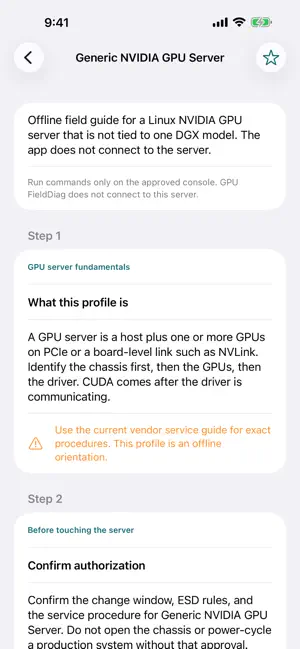
GPU FieldDiag is an offline GPU field reference. The iPhone guides the work. Commands run only on the console your organization already approves. The app does not connect to the GPU server and does not upload logs. Scan a barcode or QR code on a GPU, CPU, or chassis label, or type the code. The scanner reads QR, Data Matrix, Code 128, Code 39, PDF417, EAN, UPC, and other common barcodes. Copy the code or share it with the iOS share sheet. The app does not look the code up. Start from a GPU symptom, such as a missing GPU, an XID, ECC, thermals, power, containers, or a job that cannot see the GPU. Each step shows the command, why it exists, the risk, and what to compare. You read the result on the approved terminal and tap the closest observation. Read GPU server guides for a generic NVIDIA GPU server, DGX H100, DGX H200, DGX B200, and a generic AMD Instinct server. Guides cover identity, power-on, driver and software checks, thermals, topology, shutdown, evidence, and escalation. The GPU command library, glossary, field checklists, and XID reference stay on the device. Search covers the bundled library only. An XID points to a troubleshooting area. It does not decide that a GPU should be replaced. Checklist ticks stay on the device and are not uploaded. NVIDIA, CUDA, DGX, NVLink, AMD, Instinct, and related names are trademarks of their owners. GPU FieldDiag is an independent reference and is not affiliated with or endorsed by those companies. GPU FieldDiag provides technical reference information and guided troubleshooting. Follow your organization's service procedures and hardware vendor documentation before making changes to production systems.
What’s new
Version 1.2 · Updated November 23, 2026
• Unlock GPU FieldDiag Pro for the full offline reference • Keep Scan & Share and Safety & Privacy free • Faster close-up barcode and QR scanning with zoom • On-screen guide for supported code types • Search, glossary, and field checklists • Restore Purchases from Safety & Privacy
App privacy
The developer, Sanjay Korde, reported these privacy practices to Apple.
Data Not Collected
The developer does not collect any data from this app.
Alternatives to GPUFieldDiag
Looking for apps like GPUFieldDiag? Here are 6 similar apps on the App Store. The highest rated is Free Wiki Explorer: Rabbitrail (5.0/5), and 5 of the 6 are free to download.
-
 BookBite
-
 AAC make your cards
-
 Write Devanagari Alphabet
-
 Free Wiki Explorer: Rabbitrail
5.0
-
 WaitForecast
-
 Learn to code with MasterOnce
| App | Rating | Price | Last updated | Compare |
|---|---|---|---|---|
| GPUFieldDiag | – | 0.99 USD | November 23, 2026 | |
| BookBite | – | Free | Aug 24, 2026 | Compare |
| AAC make your cards | – | Free | Apr 14, 2026 | Compare |
| Write Devanagari Alphabet | – | 3.99 USD | Aug 19, 2026 | Compare |
| Free Wiki Explorer: Rabbitrail | 5.0 / 5 (3) | Free | Nov 10, 2026 | Compare |
| WaitForecast | – | Free | Oct 24, 2026 | Compare |
| Learn to code with MasterOnce | – | Free | Feb 2, 2026 | Compare |
Compare GPUFieldDiag with the top alternatives: ratings, updates, ASO score and keyword gaps →