

Home Budget: Expense Tracker
Ahmet Murat Kokbas Finance iPhoneiPadiPod touch
Home Budget: Expense Tracker is a free Finance app for iPhone and iPad by Ahmet Murat Kokbas. Requires iOS 17.0. Updated October 23, 2026.
- Price
- Free
- on the App Store
- Size
- 26 MB
- Age 4+
- Updated
- Oct 23
- 2026 · v2.0.5
Screenshots



About Home Budget: Expense Tracker
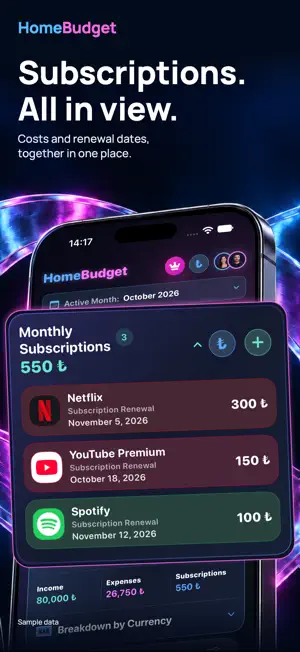
Know what's left this month. HomeBudget brings income, everyday expenses and monthly subscriptions together, so you can see your household budget clearly. YOUR MONTH AT A GLANCE Add income and expenses, choose a month and see your remaining balance. Keep amounts, dates and currencies organised. Edit your records whenever plans change. No app account is needed for basic budgeting. SUBSCRIPTIONS IN ONE PLACE Save subscriptions, amounts and payment dates. Follow upcoming payments and see your monthly subscription total alongside other spending. You manage the records; HomeBudget does not discover, pay for or cancel subscriptions automatically. THREE WAYS TO SEE YOUR BUDGET Add small or medium Home Screen widgets for your budget overview, remaining-budget progress or upcoming payments. Widgets use saved records; iOS controls refresh timing. UNDERSTAND YOUR SPENDING Compare monthly expenses, explore spending distribution and review your year. Track TRY, USD, EUR and GBP records in their original currencies. Converted totals use available reference rates, not bank transaction quotes. SHARE A HOUSEHOLD BUDGET Personal Budget stays on this device. Create a separate Family Budget and invite someone through iCloud; joining does not automatically share personal history. Share members, income, expenses, recurring expenses and subscriptions after an invitation is accepted. iCloud accounts are required. Other planning tools and Pro access are not shared through this feature. EVERYDAY BUDGET TOOLS Split a bill equally, add an optional tip, track debts, plan a travel budget, manage shared pots and set savings goals. Reach voice expense entry through a shortcut and review the result before saving. Voice entry needs microphone and speech permissions; language and device support vary. GO DEEPER WITH HOMEBUDGET PRO Pro brings Smart Budget Coach, deeper insights, spending heatmaps, subscription analysis, category alerts, PDF export, receipt scanning and custom bill splitting and a separate Yearly Subscriptions section. The coach is rule-based and uses your records, not a conversational AI model. Estimates are not guarantees or financial advice. Receipt scanning requires a supported camera; check the recognised total before using it. Basic budget entry, editing, standard analysis, monthly subscriptions and equal bill splitting remain available without Pro. Pro is an optional auto-renewable subscription. Monthly and annual plans provide the same access; the annual plan is billed upfront. Local prices and billing periods appear in the app and Apple's purchase confirmation. Annual savings depend on your storefront's prices. Manage or cancel in your Apple account subscription settings; restore purchases in the app. Available in English and Turkish. Support: [email protected] Terms of Use: https://www.apple.com/legal/internet-services/itunes/dev/stdeula/
What’s new
Version 2.0.5 · Updated October 23, 2026
Clearer budgets, smoother navigation and more flexible subscription tracking. - Personal Budget and iCloud Family Budget now have separate spaces. Switching budgets does not move records, and joining a family does not automatically share your personal history. - Your last selected budget is remembered. Budget Control, Budget Tools, Analytics and Settings follow the selected budget. - The new Budget Control Center brings saved budgets together in compact cards, with contextual settings and confirmation before switching. Manage names, people and deletion within each budget's own settings. - Deleting the last personal budget leaves an empty list instead of creating another budget automatically. Create a new one whenever you are ready. - Add local people to a Personal Budget; invite Family Budget members through iCloud. Profile icons and income-entry shortcuts open the correct budget's management screen. - Improved family creation, invitations, participant name confirmation, owner permissions, member removal and leaving a family. Additional safeguards preserve historical records and prevent former members from lingering in selection lists. - Tap subscriptions to edit them. Pro adds a separate Yearly Subscriptions section: annual payments affect only the payment month's budget, with renewal dates shown separately. - Added subscription logos including Google One, Digiturk, Türk Telekom, TOD, Claude, Canva, CapCut and PlayStation Plus. The collapsed subscription card prioritizes services with logos. - Improved two-decimal amount formatting, the Pro savings badge calculated from store prices, PDF reports and widgets. - Improved purchase-status refresh, pending transaction handling and subscription expiry checks. Simplified advertising measurement preferences and technical status explanations. - Smoother Personal/Family transitions and more reliable selection highlights. Fixed open month and currency menus blocking interactions after changing tabs. - Kept the floating Liquid Glass navigation while improving access to final cards, buttons and the AI assistant. Fixed keyboard, Done-button and focus issues in Split the Bill and widget shortcuts. - Refined compact layouts, larger-text presentation, empty states and stability across Turkish and English screens.
App privacy
The developer, Ahmet Murat Kokbas, reported these privacy practices to Apple.
Data Used to Track You
The following data may be used to track you across apps and websites owned by other companies:
- Purchases: Purchase History
- Identifiers: Device ID
- Usage Data: Product Interaction
- Other Data: Other Data Types
Data Linked to You
The following data, which may be collected and linked to your identity, may be used for the following purposes:
- Purchases: Purchase History
- Identifiers: Device ID
- Usage Data: Product Interaction
- Other Data: Other Data Types
- Diagnostics: Other Diagnostic Data
Used for: Third-Party Advertising, Developer’s Advertising or Marketing, Analytics, App Functionality
Data Not Linked to You
The following data, which may be collected but is not linked to your identity, may be used for the following purposes:
- Diagnostics: Crash Data
Used for: App Functionality
Alternatives to Home Budget: Expense Tracker
Looking for apps like Home Budget: Expense Tracker? Here are 6 similar apps on the App Store.
-
 Paramio – Finans Takibi
-
 Mubisoft
-
 CoHome: Roommate Bill Splitter
-
 Hissem
-
 SubTracks Subscription Tracker
-
 Kiremit: Budget for Your Home
| App | Rating | Price | Last updated | Compare |
|---|---|---|---|---|
| Home Budget: Expense Tracker | – | Free | October 23, 2026 | |
| Paramio – Finans Takibi | – | Free | Mar 9, 2026 | Compare |
| Mubisoft | – | Free | Jun 12, 2026 | Compare |
| CoHome: Roommate Bill Splitter | – | Free | Oct 13, 2026 | Compare |
| Hissem | – | Free | Oct 6, 2026 | Compare |
| SubTracks Subscription Tracker | – | Free | Mar 23, 2026 | Compare |
| Kiremit: Budget for Your Home | – | Free | Sep 12, 2026 | Compare |