

PadBrain: Drums for the Stage
jaeryong lee Music iPhoneiPadiPod touchMac
PadBrain: Drums for the Stage is a free Music app for iPhone and iPad by jaeryong lee. Requires iOS 18.0. Updated October 19, 2026.
- Price
- Free
- on the App Store
- Size
- 106 MB
- Age 4+
- Updated
- Oct 19
- 2026 · v1.0.7
Screenshots


About PadBrain: Drums for the Stage
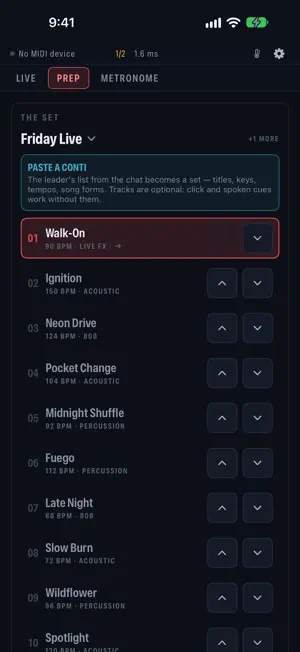
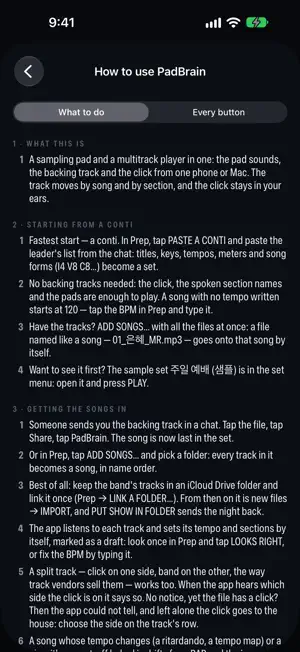
PadBrain is built for drumming live: backing tracks to the house, the click to your in-ears and pad sounds on cue, from one iPhone, iPad or Mac. For small gigs, college shows, worship teams, rehearsals and lessons, without a laptop rig. WHEN THE BAND DRIFTS • SYNC: the band lands a beat off the click? Tap on the band's one and the click and bar count move to it at once. Undo for ten seconds. • With a backing track, the same button takes the click out: you lead the band to the bar line, and the click comes back exactly on it. ON STAGE • Backing tracks and click run on one clock. One splitter cable: left to the house (tracks + pads), right to your in-ears (click + cues). • One line under the song says where the sound goes — and warns when a single output puts the click in with the band. • Section chips and HOLD: tap the chorus when the leader calls it, or HOLD for "once more". Moves land on the next bar line. • "Next ▸ Chorus · 3 bars" beside the section, then the beats of the last bar. • Voices only fades the band and keeps your click. An ambient pad in the song's key fills the space between songs. • Stopped, tap the tempo to hear one bar of the next song's click in your ears before you count it in. • PANIC (hold), LIVE LOCK (tap to lock, hold to unlock), foot switches and page-turner pedals. PADS • A kit per song, nine pads: a recorded acoustic kit with four dynamics and up to four takes per sound, a worship kit with ride, bell and floor tom, 808, percussion and FX. • Plug in a USB MIDI pad, drum module or trigger and play. Around 10 ms. • Pads that fire on a section's first beat, a crash on the chorus. Soft hits ignored and screen pads locked after a stop, if you want. PREP • Paste the song list from the chat: titles, keys, tempos, meters and song forms become a set. Backing tracks are optional. • Share tracks from mail, a chat or AirDrop; the app listens for the tempo and sections. • Rehearsal tempo 90–110%, pitch unchanged. Several sets, a linked iCloud Drive folder per set, a whole show in one file. • Rig drawings, down to the plugs, and a pre-show check that warns when the click would reach the room. Every feature free. No ads, no account, no data collected. Works offline.
What’s new
Version 1.0.7 · Updated October 19, 2026
• One line under the song on the Live screen says where the sound goes: "band → house · click → your ears" — and tells you when a single output puts the click in with the band. • The pads fill the spare room on screen; their header reads "Play from MIDI pads or an e-kit". • iPhone stays in portrait, so a phone knocked on its stand never changes the stage screen mid-song. (iPad and Mac as before.) • On first launch the sample song shows what to try: PLAY, HOLD while it plays, a Y cable. • Korean file names copied from the Mac's Finder now match their songs. • Small screens (iPhone SE) keep every stage button in view.
App privacy
The developer, jaeryong lee, reported these privacy practices to Apple.
Data Not Collected
The developer does not collect any data from this app.
Alternatives to PadBrain: Drums for the Stage
Looking for apps like PadBrain: Drums for the Stage? Here are 6 similar apps on the App Store. The highest rated is Dark Metronome (5.0/5), and all 6 are free to download.
-
 Dark Metronome
5.0
Dark Metronome
5.0
-
 JHG Guitar Coach
-
 NAM FX
3.0
NAM FX
3.0
-
 JAMIT - Your Part, Our Jam
-
 Moeum - BackingTrackGenerator
-
 JHG Course Hub
2.4
JHG Course Hub
2.4
| App | Rating | Price | Last updated | Compare |
|---|---|---|---|---|
| PadBrain: Drums for the Stage | – | Free | October 19, 2026 | |
| Dark Metronome | 5.0 / 5 (1) | Free | May 21, 2026 | Compare |
| JHG Guitar Coach | – | Free | Oct 12, 2026 | Compare |
| NAM FX | 3.0 / 5 (2) | Free | Oct 23, 2026 | Compare |
| JAMIT - Your Part, Our Jam | – | Free | Oct 20, 2026 | Compare |
| Moeum - BackingTrackGenerator | – | Free | Aug 17, 2026 | Compare |
| JHG Course Hub | 2.4 / 5 (5) | Free | Feb 6, 2026 | Compare |