

IO Mail
Ali Kemal Celebioglu Productivity iPhoneiPadiPod touch
IO Mail is a free Productivity app for iPhone and iPad by Ali Kemal Celebioglu. Requires iOS 15.0. Updated October 23, 2026.
- Price
- Free
- on the App Store
- Size
- 33 MB
- Age 4+
- Updated
- Oct 23
- 2026 · v1.0.2
Screenshots


About IO Mail
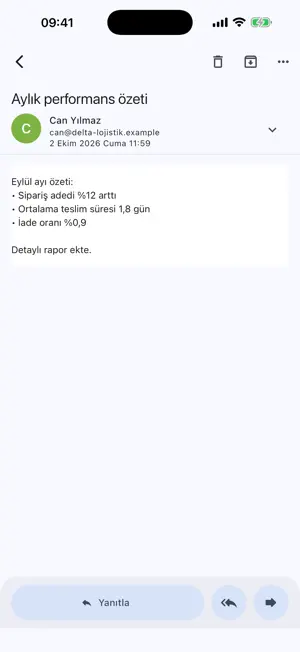
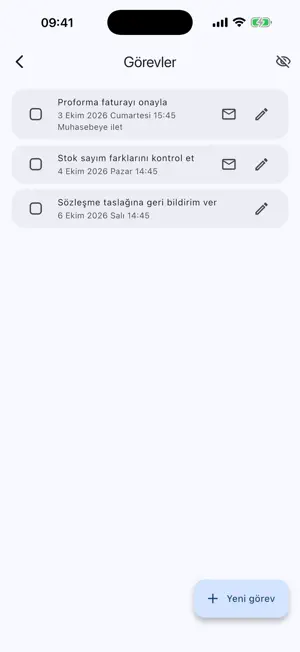
IO Mail is an email app you don't just read — you manage your mail with it. MAIL HUB Every launch starts with a summary of your day: unread mail, messages from important people, today's tasks, overdue items, follow-ups awaiting a reply and snoozed mail, all on one screen. MULTIPLE ACCOUNTS Bring Iyonosfer, Gmail, Outlook and any IMAP account into one app. See all inboxes together and give each account its own color and signature. RULES Create rules by sender, subject, attachment or size: move to a folder, label, flag, mark as read, mute notifications, notify with priority or create a task automatically. For Iyonosfer accounts rules also run on the server, so unwanted notifications never reach your phone. FOLLOW-UPS AND EXPECTED MAIL Get reminded when a mail you sent goes unanswered. Expecting a message? Create an expectation; it's marked when the mail arrives and you're alerted if it doesn't. TASKS, NOTES, SNOOZE Turn a mail into a task with a due date and add it to your calendar. Take notes and send them as mail. Snooze a message and it returns to your inbox when the time comes. LABELS AND IMPORTANT PEOPLE Group mail with colored labels. Mark important people so their mail stands out in Mail Hub. Send unwanted senders straight to junk. CALENDAR INVITATIONS Accept or decline meeting invitations and add them to your device calendar. INSTANT NOTIFICATIONS New-mail notifications arrive within seconds for Iyonosfer accounts. Other accounts are checked in the background at regular intervals. BUILT FOR IPAD In landscape, folders, the message list and the message sit side by side. PRIVACY AND SECURITY No ads, no tracking. Passwords are kept in the device's secure storage and mail content stays on your device. Lock the app with Face ID. Remote images never load without your permission. IO Mail is developed by Iyonosfer Yazılım Hizmetleri.
What’s new
Version 1.0.2 · Updated October 23, 2026
• Fixed the app hanging with a "cannot reach the mail server · timed out" warning when opened from a notification • Mail now syncs right away when you return to the app • Connection error messages are shown in the app language
App privacy
The developer, Ali Kemal Celebioglu, reported these privacy practices to Apple.
Data Linked to You
The following data, which may be collected and linked to your identity, may be used for the following purposes:
- Contact Info: Email Address
- Identifiers: Device ID
Used for: App Functionality
Alternatives to IO Mail
Looking for apps like IO Mail? Here are 6 similar apps on the App Store. The highest rated is Video Teleprompter App - Vixo (4.6/5), and all 6 are free to download.
-
 SnackBack: AI Link Organizer
-
 Video Teleprompter App - Vixo
4.6
-
 Sticker Calendar: Time Planner
4.5
-
 SingleFile for Safari
4.6
-
 Covve - Personal CRM
4.5
-
 YouTrack
3.1
| App | Rating | Price | Last updated | Compare |
|---|---|---|---|---|
| IO Mail | – | Free | October 23, 2026 | |
| SnackBack: AI Link Organizer | – | Free | Oct 12, 2026 | Compare |
| Video Teleprompter App - Vixo | 4.6 / 5 (25) | Free | Sep 11, 2026 | Compare |
| Sticker Calendar: Time Planner | 4.5 / 5 (66) | Free | Oct 23, 2026 | Compare |
| SingleFile for Safari | 4.6 / 5 (63) | Free | Oct 21, 2026 | Compare |
| Covve - Personal CRM | 4.5 / 5 (626) | Free | Oct 16, 2026 | Compare |
| YouTrack | 3.1 / 5 (29) | Free | Oct 23, 2026 | Compare |
Compare IO Mail with the top alternatives: ratings, updates, ASO score and keyword gaps →