

Mosslock: App Blocker & Focus
JIYULMOM Productivity iPhoneiPadiPod touch
Mosslock: App Blocker & Focus is a free Productivity app for iPhone and iPad by JIYULMOM. Requires iOS 17.0. Updated October 17, 2026.
- Price
- Free
- on the App Store
- Size
- 10 MB
- Age 4+
- Updated
- Oct 17
- 2026 · v1.1.0
Screenshots



About Mosslock: App Blocker & Focus
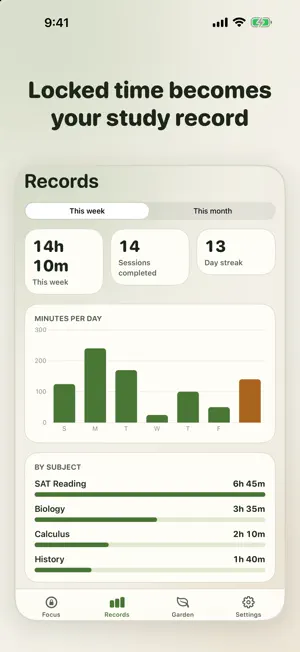
Mosslock locks the apps that pull you away while you study, and turns every locked minute into your study record. PICK WHAT TO PAUSE Choose apps or whole categories once, like social media and games. Mosslock uses Apple's Screen Time features, so the apps you choose stay private, even from us. START A SESSION Pick a subject and a length (25, 50 or 90 minutes) and start. Paused apps show your moss instead of the feed. When the time is up, they open again on their own. A STUDY RECORD YOU CAN TRUST Only time your apps were really locked is counted. See today, this week and each subject at a glance. GROW A MOSS GARDEN Every finished session plants a patch of moss. Longer sessions grow bigger moss. Stop early and that patch withers. Keep your streak going day after day. FREE - Pause any apps and categories during sessions of up to 50 minutes - Up to 3 subjects - The last 7 days of records - Moss garden and Home Screen widget MOSSLOCK PRO - Your full study history - This month's report with a subject breakdown - Weekly study hours that start on their own - Strict mode for exam season - Study sessions up to 4 hours - Unlimited subjects PRIVATE BY DESIGN No account, no ads, no analytics. Your study records and the apps you choose stay on your iPhone. Purchases are processed by Apple and managed by RevenueCat with an anonymous ID. YOU'RE ALWAYS IN CONTROL You can stop a session in the app, and you can turn off Mosslock's Screen Time access in the Settings app at any time. Mosslock is a study tool, not medical treatment. SUBSCRIPTION Mosslock Pro is available as a yearly subscription with a 7-day free trial for eligible new subscribers ($29.99 per year), a monthly subscription ($5.99 per month), or a one-time Lifetime purchase ($59.99). Prices are in US dollars and may vary by country; your local price is shown in the app before you buy. Payment is charged to your Apple Account when you confirm the purchase or when the free trial ends. Subscriptions renew automatically unless canceled at least 24 hours before the end of the current period, and your account is charged for renewal within 24 hours before the period ends. Manage or cancel in Settings > Apple Account > Subscriptions. Terms of Use: https://www.apple.com/legal/internet-services/itunes/dev/stdeula/ Privacy Policy: https://ootssu.com/mosslock/privacy.html
What’s new
Version 1.1.0 · Updated October 17, 2026
New in 1.1: Moss Buddy • Meet your Moss Buddy, a little pixel creature that grows while your apps are locked. Every finished session adds minutes, and your buddy reaches a new stage as your study time adds up. • During a session, your buddy and the time left now show on the Lock Screen and, on supported iPhones, in the Dynamic Island. The Home Screen widget shows your buddy too. • Pro adds three more buddies to choose from. Locking apps and study sessions work exactly as before.
App privacy
The developer, JIYULMOM, reported these privacy practices to Apple.
Data Not Linked to You
The following data, which may be collected but is not linked to your identity, may be used for the following purposes:
- Purchases: Purchase History
- Identifiers: User ID
Used for: App Functionality
Alternatives to Mosslock: App Blocker & Focus
Looking for apps like Mosslock: App Blocker & Focus? Here are 6 similar apps on the App Store.
-
 Flip Focus: Deep Work Timer
-
 Kissa: Cozy Focus Timer
-
 시간표 레벨업
-
 squi - ai focus friend & timer
-
 App Blocker: StayBrief
-
 LockHour Pro: Block Apps
| App | Rating | Price | Last updated | Compare |
|---|---|---|---|---|
| Mosslock: App Blocker & Focus | – | Free | October 17, 2026 | |
| Flip Focus: Deep Work Timer | – | Free | Oct 6, 2026 | Compare |
| Kissa: Cozy Focus Timer | – | Free | Oct 12, 2026 | Compare |
| 시간표 레벨업 | – | Free | Jan 18, 2026 | Compare |
| squi - ai focus friend & timer | – | Free | Apr 23, 2026 | Compare |
| App Blocker: StayBrief | – | Free | Aug 31, 2026 | Compare |
| LockHour Pro: Block Apps | – | Free | Oct 9, 2026 | Compare |