

Sol Suite: Metronome & Tuner
Alexis Arapatsakos Music iPhoneiPadiPod touchMacApple Watch
Sol Suite: Metronome & Tuner is a free Music app for iPhone and iPad by Alexis Arapatsakos. Requires iOS 18.0. Updated October 14, 2026.
- Price
- Free
- on the App Store
- Size
- 25 MB
- Age 4+
- Updated
- Oct 14
- 2026 · v1.3
Screenshots


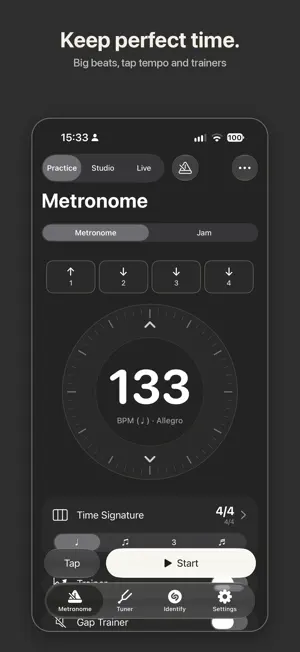
About Sol Suite: Metronome & Tuner
Sol Suite is a complete practice and performance studio for musicians — on iPhone, iPad, Mac and Apple Watch. Three modes, one app: PRACTICE to tune and keep time, STUDIO to learn songs, LIVE to play them on stage. PRACTICE — free • Tuner — fast and precise, with presets for guitar, bass, ukulele and more, single-string or all strings, historical temperaments, a drone and a strobe view. • Metronome — 10 to 800 BPM, any time signature, accents, subdivisions and polyrhythms, a tempo trainer and gap trainer, tap tempo and setlists. Start it from Control Center, a widget or Siri. Also on Apple Watch. • Identify — find out which song is playing, then practice it in Studio. STUDIO • Songs — import from Files or your music library, or record. See the chords, key and sections, loop any part with A–B markers that snap to the beat, slow it down without changing pitch, transpose it, reduce the vocal, and record yourself playing along. Transcribe the notes to MIDI. • Jam — play along with real drums and bass in many styles. Pick the key and chords, set the tempo, and record yourself. • Loops — a loop station with 4 tracks on iPhone, 8 on iPad and up to 64 on Mac, with console faders: reverb, delay, distortion and filters, a click with count-in, bounce, and export. • Training — ear training for intervals, chords, rhythm, melodic dictation, scale degrees and the fretboard, plus voice training with a live pitch graph and range check. LIVE • Your show, on every music stand — press Play and the guide follows the band: lyrics scroll line by line, the drummer sees the part, the bar and the next change, everyone else sees the chords. Each musician picks what to show. • Band Sync — every iPad, iPhone and Mac in the band follows the same show, song and part, nearby and without internet. Add a session code so only your band can join. • Band messages — send "One more chorus!" or "Watch me for the ending" to the whole band; it pops up on every screen in your color. • Band Songs — write each song once (key, tempo, parts, chords, lyrics) and use it in any tracklist. Play with more than one band? Each has its own songs and shows. • Count-in and an optional click (headphones), and auto-continue to the next song. • Stage — big type, a part map you can tap, tap tempo, lyric timing, and control by page-turner pedal or keyboard. The Tuner and the Analyzer are one tap away. ON iPAD AND MAC Every screen uses the big display, with larger controls and side-by-side layouts. On Mac it is a real Mac app: menus and keyboard shortcuts, your audio interface, MIDI clock for your gear, drag & drop, and a separate Stage window. iCLOUD SYNC Your bands, tracklists, songs, jam charts, metronome presets, tunings and practice log stay in sync across your iPhone, iPad and Mac. One purchase covers them all. Practice Log with a daily goal and reminders keeps you on track. PRICING Tuner and Metronome are free forever. Try every Studio feature free for 15 days. Then unlock everything with a single one-time purchase, or only the packs you need — no subscriptions. PRIVACY Sol Suite collects no data. Everything stays on your device — or, with iCloud Sync on, in your own private iCloud.
What’s new
Version 1.3 · Updated October 14, 2026
New in 1.3 • Now on Mac — the full Sol Suite as a real Mac app, with menus, keyboard shortcuts and drag & drop • Mac looper with up to 64 tracks; choose your audio interface; send MIDI clock to your gear • iCloud Sync — bands, tracklists, songs (with their audio), jam charts, metronome presets, tunings and your practice log stay in sync across your iPhone, iPad and Mac. Stored in your own iCloud; turn it off in Settings • Edit the same song on two devices and both changes are kept • Live: protect your show with a session code, so only your band can join • Live: song title and controls on the Lock Screen while the show plays • Metronome: new tempo dial — spin it, flick it, or drag the number • Metronome: a real recorded cowbell • Analyzer: 120 updates per second, faster highs, and a Peak Hold readout you can actually read • Open audio files from Files or Finder straight into Songs • Swipe back from the song player • Bug fixes and improvements
App privacy
The developer, Alexis Arapatsakos, reported these privacy practices to Apple.
Data Not Collected
The developer does not collect any data from this app.
Alternatives to Sol Suite: Metronome & Tuner
Looking for apps like Sol Suite: Metronome & Tuner? Here are 6 similar apps on the App Store. The highest rated is SHINOBI DJ (4.3/5), and all 6 are free to download.
-
 Minuet: Metronome & Tuner
-
 HelloMusic – Metronome & Tuner
-
 Batuta: Metronome & Tuner
-
 Quietune: Metronome & Tuner
-
 Metronome & Tuner Sowlea
-
 SHINOBI DJ
4.2
SHINOBI DJ
4.2
| App | Rating | Price | Last updated | Compare |
|---|---|---|---|---|
| Sol Suite: Metronome & Tuner | – | Free | October 14, 2026 | |
| Minuet: Metronome & Tuner | – | Free | Oct 14, 2026 | Compare |
| HelloMusic – Metronome & Tuner | – | Free | Oct 17, 2026 | Compare |
| Batuta: Metronome & Tuner | – | Free | Sep 28, 2026 | Compare |
| Quietune: Metronome & Tuner | – | Free | Oct 12, 2026 | Compare |
| Metronome & Tuner Sowlea | – | Free | Oct 8, 2026 | Compare |
| SHINOBI DJ | 4.3 / 5 (16) | Free | Jun 28, 2026 | Compare |