

Cacha Tasks
LUIS ANTONIO HERNANDEZ VERA Productivity iPhoneiPadiPod touchMac
Cacha Tasks is a paid Productivity app for iPhone and iPad by LUIS ANTONIO HERNANDEZ VERA. Requires iOS 17.0. Updated October 16, 2026.
- Price
- 9.99 USD
- on the App Store
- Size
- 7 MB
- Age 4+
- Updated
- Oct 16
- 2026 · v1.2
Screenshots

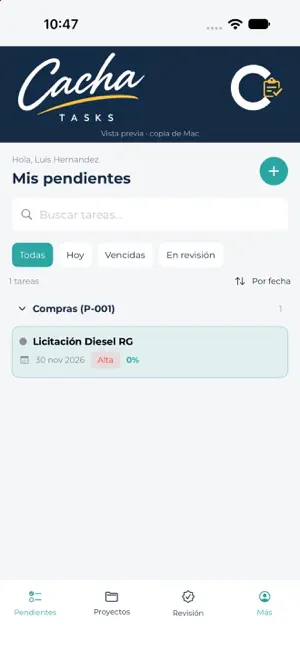


About Cacha Tasks
• Add items to your favorites. TRACK AND REPORT • View the Gantt with automatic scaling and Group/Project sections. • Combine assignee, group or project, and active-task filters. • Spot overdue tasks in red and locate today; completed tasks are excluded. • Recurring tasks show a single occurrence period. • Export the calendar and follow-up report as PDF. • Identify overdue, not started, and unacknowledged tasks, sorted by assignee. • Prepare an individual email with each assignee’s task list and send it from Mail. • Opening a task’s details automatically acknowledges it for its assignee, without starting the task. COLLABORATE AND APPROVE • Set administrator, editor, or read-only access for each project. • Send one invitation covering the projects you assigned to a collaborator. • Editors can create tasks and edit the names and descriptions of tasks they created. • Task completion requires administrator approval. • Keep comments and change history with authors and dates. • Receive assignment, comment, progress, and approval request notifications according to your access and involvement. PLAN AND KEEP CONTEXT • Schedule recurring tasks and reminders. • Review and edit scheduled tasks. • Archive tasks and projects while preserving their history. • Sync information and your personal order between Mac, iPhone, and iPad through iCloud. • Review version comparisons when field conflicts occur. • Access help from the app and use the interface in English or Spanish. An Apple Account with iCloud access is required. Collaborators need Cacha Tasks installed and must accept the invitation with the authorized account. Keep participating devices updated to use the latest collaboration features. Recurring tasks are generated when you open or sync the app after they become due. Notifications require permission, and delivery depends on iCloud, connectivity, and system conditions. Emails are prepared for the user to send; they are not sent automatically.
What’s new
Version 1.2 · Updated October 16, 2026
WHAT’S NEW A clearer Gantt and more room for your work. • New blue app icon with a white C and task symbol. • Automatic scaling to view the full task timeline. • Assignee and Group/Project filters, combined with All / Active only. • Tasks grouped by Group/Project with darker section headers. • Red bars for overdue tasks and a line marking today. • Completed tasks no longer appear in the Gantt; recurring tasks show a single occurrence period. • Gantt PDFs respect the selected filters. • Controls in the top banner and more compact rows to make better use of space. • On iPad, lists and details side by side, with a sidebar on wide screens and adaptive navigation in smaller windows. iCloud sync improvements: • Avoid unnecessary uploads when content has not changed. • Better handling of simultaneous acknowledgements and collaborator modification timestamps. • More information about fields and values in both versions when a conflict occurs.
App privacy
The developer, LUIS ANTONIO HERNANDEZ VERA, reported these privacy practices to Apple.
Data Not Collected
The developer does not collect any data from this app.
Alternatives to Cacha Tasks
Looking for apps like Cacha Tasks? Here are 6 similar apps on the App Store. The highest rated is FleetLocate Periscope (4.8/5), and 5 of the 6 are free to download.
-
 Speaker Aid
4.0
-
 MasterTrack GPS Mobile
-
 SDS Movil
-
 Intrare Escuelas
-
 FleetLocate Periscope
4.8
-
 Redex
2.3
| App | Rating | Price | Last updated | Compare |
|---|---|---|---|---|
| Cacha Tasks | – | 9.99 USD | October 16, 2026 | |
| Speaker Aid | 4.0 / 5 (2) | 0.99 USD | Jul 17, 2026 | Compare |
| MasterTrack GPS Mobile | – | Free | Oct 23, 2026 | Compare |
| SDS Movil | – | Free | Jun 27, 2026 | Compare |
| Intrare Escuelas | – | Free | Sep 29, 2026 | Compare |
| FleetLocate Periscope | 4.8 / 5 (2,273) | Free | May 25, 2026 | Compare |
| Redex | 2.3 / 5 (3) | Free | May 8, 2024 | Compare |
Compare Cacha Tasks with the top alternatives: ratings, updates, ASO score and keyword gaps →