

Mix Tape: 80s Cassette
Dave Pickles Music iPhoneiPadiPod touch
Mix Tape: 80s Cassette is a free Music app for iPhone and iPad by Dave Pickles. Requires iOS 18.0. Updated November 8, 2026.
- Price
- Free
- on the App Store
- Size
- 2 MB
- Age 4+
- Updated
- Nov 8
- 2026 · v1.1
Screenshots



About Mix Tape: 80s Cassette
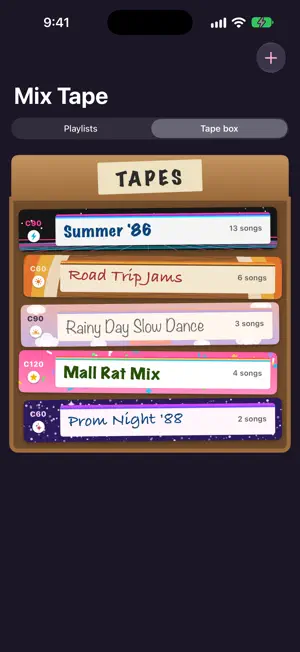
Remember making mix tapes? Picking the perfect songs, fitting them onto side A and side B, and writing the name on the label by hand? Mix Tape brings it all back, using the songs in Apple Music. NAME IT, THEN TAPE IT Every tape starts with a name, written on the cassette label in handwriting. Add a dedication like "for Sam, love Alex", then choose a felt-tip, biro or pencil and an ink colour. Dress it in one of 25 cassette skins: classic colours, genres from rock to country and hip-hop, the 60s through the 2000s, Christmas, Halloween and Valentine's, or a clear, glitter or gold finish, each with its own artwork. Pick a C60, C90 or C120 tape and watch how much time is left on each side as you record. RECORD FROM APPLE MUSIC Press the red REC key and search Apple Music: results appear as you type, with album covers so you pick the right version. Drop songs onto side A or side B. Reorder them, swap them around, or flip the tape and keep going on the other side. PLAY IT ON A BOOM BOX Your tape plays on a row of chunky silver keys: REC, PLAY, REW, F.FWD, STOP/EJ and PAUSE. Keys clunk and latch down, the reels turn as the tape winds from one spool to the other, and every side starts with a few seconds of tape hiss. Tap any song to fast-forward straight to it. When a side ends, eject it, turn it over and play side B. SHARE THE J-CARD Every tape gets its own J-card, the paper insert listing every song in your handwriting. Share it with friends or save it to Photos. YOUR TAPE BOX Keep your tapes stacked spine-out in a cardboard tape box, or browse them as a simple list. Tap a tape to see its J-card and open it to play. SAVE TO YOUR LIBRARY Save any tape to your Apple Music library as a playlist. Change the tape later and update the playlist with one tap. PRIVATE BY DESIGN Your tapes stay on your iPhone. No accounts, no ads and no tracking. An Apple Music subscription is required to play songs.
What’s new
Version 1.1 · Updated November 8, 2026
Cassette skins! Dress every tape in one of 25 designs: classic colours, music genres from rock and soft rock to country, hip-hop, metal, disco, jazz and classical, every decade from the 60s to the 2000s, Christmas, Halloween and Valentine's Day, and clear, glitter and gold finishes. Each skin has its own artwork and label stripes, and shows on the tape's spine and J-card too. Your existing tapes keep their look. Finding songs is quicker too: results appear as you type, with suggestions, album covers and the album and year for each song.
App privacy
The developer, Dave Pickles, reported these privacy practices to Apple.
Data Not Collected
The developer does not collect any data from this app.
Alternatives to Mix Tape: 80s Cassette
Looking for apps like Mix Tape: 80s Cassette? Here are 6 similar apps on the App Store. The highest rated is DeliTape - Deluxe Cassette Player (4.5/5), and all 6 are free to download.
-
 Retro Room: Vinyl & Cassette
1.0
-
 Retro CD Player - Beatsy
-
 Harpejii Instrument
1.0
-
 DeliTape - Deluxe Cassette Player
4.5
-
 LE05: Digitalism 2000 + AUv3
4.1
-
 AudioKit Retro Piano
4.3
| App | Rating | Price | Last updated | Compare |
|---|---|---|---|---|
| Mix Tape: 80s Cassette | – | Free | November 8, 2026 | |
| Retro Room: Vinyl & Cassette | 1.0 / 5 (1) | Free | Nov 10, 2026 | Compare |
| Retro CD Player - Beatsy | – | Free | Nov 18, 2026 | Compare |
| Harpejii Instrument | 1.0 / 5 (2) | Free | Apr 30, 2025 | Compare |
| DeliTape - Deluxe Cassette Player | 4.5 / 5 (26) | Free | Oct 12, 2016 | Compare |
| LE05: Digitalism 2000 + AUv3 | 4.1 / 5 (139) | Free | Feb 26, 2025 | Compare |
| AudioKit Retro Piano | 4.3 / 5 (158) | Free | Feb 27, 2025 | Compare |