

MiaoNote: AI Meeting Notes
子欣 陈 Productivity iPhoneiPadiPod touchMacApple Watch
MiaoNote: AI Meeting Notes is a free Productivity app for iPhone and iPad by 子欣 陈. Rated 5.0/5 from 1 ratings. Requires iOS 17.0. Updated October 24, 2026.
- Rating
- 5.0
- 1 ratings
- Price
- Free
- on the App Store
- Size
- 9 MB
- Age 4+
- Updated
- Oct 24
- 2026 · v1.1.1
Screenshots
Save to Pinterest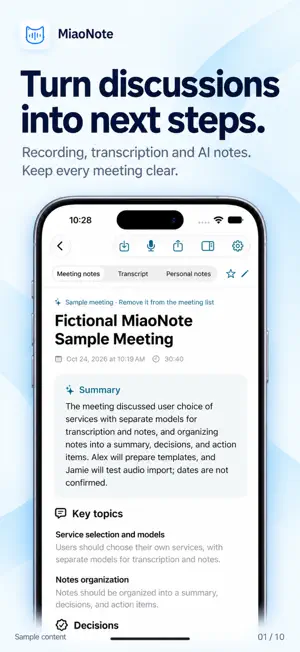

About MiaoNote: AI Meeting Notes
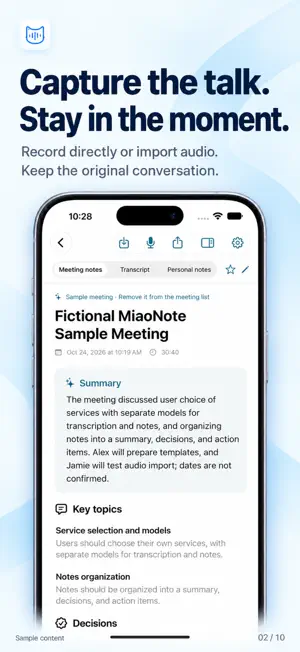
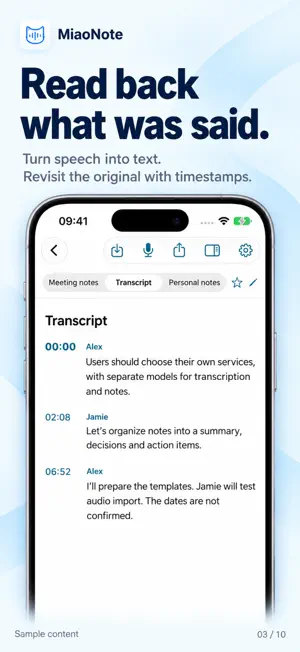
Keep the recording. Turn the discussion into meeting notes you can review and act on. MiaoNote brings recording, audio import, transcription, personal notes and AI summaries to Mac, iPhone and iPad. Capture a thought on Apple Watch and transfer the recording to its paired iPhone. 60 minutes of free DeepSeek meeting summaries each day No MiaoNote account or personal DeepSeek API key is required for the built-in free service. Each device gets 3,600 seconds per day, resetting at midnight Beijing time (UTC+8). Usage is based on the recording duration rounded up to the next whole second, not word count or processing time. If a recording exceeds your remaining allowance, that free summary request will not run. Transcribe first, then summarize Apple on-device speech recognition turns audio into text without using your free summary allowance. Availability depends on your device, system, language and required speech assets. The free DeepSeek service summarizes existing transcript text; it does not transcribe audio. Choose a standard, action-focused or decision-focused template to organize summaries, topics, decisions, action items and open questions. Check transcription and AI output against the original recording. A guide for your first recording A four-page guide in Simplified Chinese and English covers recording and import, on-device transcription, free summaries and data sharing, then reviewing, editing and exporting. Skip it or reopen it in Settings. Updates do not force the guide on users with an existing meeting library. Reading the guide does not upload meeting content. Know where your text goes Explicit confirmation is required before your first cloud call. For free summaries, transcript text passes through MiaoNote’s Cloudflare service to DeepSeek. Original audio is not uploaded through this free-summary route. The service retains generated results for 24 hours for task recovery; notes already saved on your device remain available. Quota, task and deduplication metadata are also retained. Upstream handling and retention follow the provider’s policies. Review, edit and take your notes with you Recordings and meeting records are stored on your device by default. Play back audio, follow transcript timestamps, add personal notes, edit summaries and tasks, and export PDF, Markdown, HTML, JSON or a complete meeting file. Check for sensitive information before sharing. You can still configure your own services for custom models and prompts. These may require your own provider account and API key, with separate provider charges. They are outside the built-in free allowance and remain subject to provider limits. Data sharing depends on your selected service; audio transcription services may need to receive audio. Your own credentials stay in the system Keychain and are excluded from meeting exports. Free summaries require internet access and are subject to remaining allowance, input limits, service capacity and availability. Apple Watch recordings are transcribed and summarized on a paired iPhone or another supported device.
What’s new
Version 1.1.1 · Updated October 24, 2026
Fixed an issue where Apple on-device transcription could stop an entire long recording when a silent segment returned “No speech detected.” Recognized text is preserved. If no text is recognized across all segments, you can retry transcription. New: daily free DeepSeek meeting summaries, with a 60-minute recording allowance per device. Resets at midnight Beijing time (UTC+8). No personal DeepSeek API key needed. Recording duration is rounded up to whole seconds; Apple on-device transcription does not use this allowance. New: a four-page first-use guide in Simplified Chinese and English. Skip it or revisit it in Settings. Users with an existing meeting library are not forced through it after updating. Confirm before your first cloud call: transcript text passes through MiaoNote’s Cloudflare service to DeepSeek. Original audio is not uploaded through the free-summary route. View remaining allowance, recover submitted tasks and continue using your own configured services.
App privacy
The developer, 子欣 陈, reported these privacy practices to Apple.
Data Linked to You
The following data, which may be collected and linked to your identity, may be used for the following purposes:
- User Content: Audio Data, Other User Content
- Identifiers: Device ID
- Usage Data: Product Interaction
Used for: App Functionality
Alternatives to MiaoNote: AI Meeting Notes
Looking for apps like MiaoNote: AI Meeting Notes? Here are 6 similar apps on the App Store. The highest rated is Saidkept: AI Meeting Notes (5.0/5), and all 6 are free to download.
-
 Saidkept: AI Meeting Notes
5.0
-
 Transly Pocket: Voice to Text
-
 Moment Notes: AI Voice Memos
5.0
-
 Memova AI
5.0
-
 Captionify
5.0
-
 Blocker App: Block app, Focus
4.7
| App | Rating | Price | Last updated | Compare |
|---|---|---|---|---|
| MiaoNote: AI Meeting Notes | 5.0 / 5 (1 rating) | Free | October 24, 2026 | |
| Saidkept: AI Meeting Notes | 5.0 / 5 (1) | Free | Nov 11, 2026 | Compare |
| Transly Pocket: Voice to Text | – | Free | Nov 12, 2026 | Compare |
| Moment Notes: AI Voice Memos | 5.0 / 5 (11) | Free | Oct 7, 2026 | Compare |
| Memova AI | 5.0 / 5 (1) | Free | Nov 14, 2026 | Compare |
| Captionify | 5.0 / 5 (1) | Free | Aug 20, 2026 | Compare |
| Blocker App: Block app, Focus | 4.7 / 5 (6) | Free | Apr 4, 2024 | Compare |