

CaptionUI: Translated Captions
Kingdom Ideas Factory LTDA Photo & Video iPhoneiPadiPod touch
CaptionUI: Translated Captions is a free Photo & Video app for iPhone and iPad by Kingdom Ideas Factory LTDA. Requires iOS 17.0. Updated November 28, 2026.
- Price
- Free
- on the App Store
- Size
- 21 MB
- Age 4+
- Updated
- Nov 28
- 2026 · v1.4
Screenshots
Save to Pinterest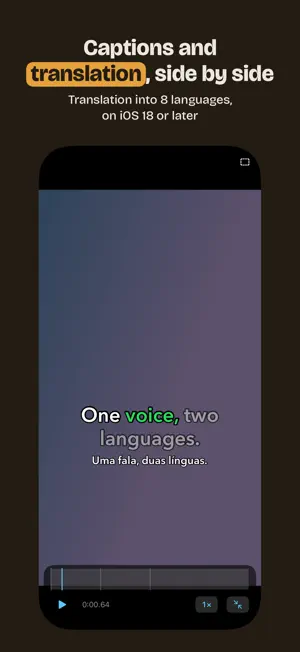


About CaptionUI: Translated Captions
CaptionUI turns the speech in your video into on-screen text that looks professionally edited, made on your iPhone: in the original language, the translation only or both languages together, for viewers who don't speak the language, can't hear or can't play sound. By default, transcription, translation and export happen on your iPhone. CaptionUI never uploads your video, asks for no account and adds no watermark, not even on the free plan. Two optional features send your content, each only after you say yes: cloud transcription, which sends the audio of the part you choose, and AI direction and translation, which sends only the text of the words. The app also always sends usage and diagnostics data, with none of your content. The privacy policy says what is sent and where. DIRECTED CAPTIONS (PRO) In the directed styles, each caption is composed like an edit: the word that carries the idea gets size and color, linking words get smaller, and the caption breaks where the idea ends. Each word comes in by its role; the key word, with the style's signature. There are ten, eight of them new: Magazine, Poster, Marker, Quiet, Paper Cutout, Terminal, Scoreboard and Ember. • A number standing out counts up to the value said (in Full). List things ("first", "second"…) and up to four short items become one screen, revealed item by item. • With translation on, pick the layout: Echo (the whole translation under the caption), Pair (only the key word's, when the languages match up) or Track (the translation becomes the caption, the speech runs below). • Motion: Full, Gentle (words only fade in) or Color only (nothing moves). The video exports the same way. The rules on your device do the directing. With AI direction and translation on, an AI model picks the key word, its strength and the breaks and, if you ask, translates. GOOD TO KNOW BEFORE YOU DOWNLOAD • Translation covers 8 languages: English, Portuguese, Spanish, French, German, Italian, Japanese and Korean. Translating on the device needs iOS 18 or later (the app runs on iOS 17) and, the first time, downloading the language. • CaptionUI captions the speech. It doesn't describe sounds. • On-device transcription uses your iPhone's speech recognition: the languages depend on your device and iOS. • Directed styles compose text left to right, with spaces, in the languages your iPhone can analyze (lists only in English and Portuguese, without translation). Otherwise, and in Translation only without Track, the standard layout applies. • Each SRT or VTT file comes out in one language: the original or the translation. WHAT YOU CAN DO • Transcribe on the device, or in the cloud with speakers told apart (Pro), and fix any word; unsure words are flagged. • Find and replace, add captions and adjust each word's timing. • Choose from 43 styles, one of them high-contrast (High Legibility). • Import from Photos or Files, frame for 9:16, 4:5, 1:1, 16:9 or the original shape, and trim the clip. • Export the video with the captions burned in, as HEVC or H.264, and SRT, VTT and ASS files. FAIR PRICE Free, forever: every editing and timing tool, 11 styles, export up to 720p, and unlimited SRT, VTT and ASS files. Exports in the free styles have no counter and no watermark. Pro unlocks 1080p and 4K export, all 43 styles, AI direction and translation, cloud transcription with speakers, and saving and importing your own styles, as a weekly, monthly or yearly subscription or a one-time lifetime purchase. On-device translation and Bilingual in the other styles are not part of Pro. Pro limits: AI direction, 40 a day, with up to 6,000 words each; cloud transcription, up to 30 min per video, 120 min a day and 300 min in 30 days. Free accounts get 20 min of cloud transcription to try, up to 10 min per video. The cloud features also share a daily limit for the whole service. Terms of Use: https://www.apple.com/legal/internet-services/itunes/dev/stdeula/ Privacy Policy: https://captionui.kifactory.app/privacy/
What’s new
Version 1.4 · Updated November 28, 2026
In this version: • Eight new directed styles (Pro), each giving the key word its own signature. In Magazine it rises in italics; in Poster a rule draws itself under it; in Marker a highlighter sweeps it, and a short last line may come handwritten; in Quiet, set in light lower case, it gains weight. • In Paper Cutout it lands like a stamp on a paper tag, with linking words handwritten; in Terminal, in a typewriter face, it is typed into a block; in Scoreboard, when the key word is a number, it comes in large and counts up to its value; in Ember it lights up with an amber glow and stays lit. • In the directed styles (Pro), each word comes in by its role: linking words simply appear, the others rise, and the key word comes in with the style's signature. • Bilingual layout in the directed styles, with translation on: besides Echo, Pair puts only the key word's translation right below it, when the two languages match up, and Track makes the translation the caption, with the speech running below, in Translation only too. • In the directed styles, a number standing out counts up to the value said when it stays on screen long enough: whole numbers, with a currency sign or percent too. • When you list things in English or Portuguese ("first", "second"…), with translation off, up to four short items become one screen that appears item by item. • Motion, in the directed styles: Full, Gentle (words only fade in) or Color only (nothing moves, only colors change). The video exports the same way. Only Full makes words rise and numbers count. • Outline and shadow, in the directed styles: turn each on or off. Directed styles now come with no outline and a soft shadow; projects you already saved keep their look, and the "Updated style available" card brings the new one. Questions or suggestions: [email protected]
App privacy
The developer, Kingdom Ideas Factory LTDA, reported these privacy practices to Apple.
Data Not Linked to You
The following data, which may be collected but is not linked to your identity, may be used for the following purposes:
- Purchases: Purchase History
- Location: Coarse Location
- Identifiers: Device ID
- Usage Data: Product Interaction
- Diagnostics: Crash Data, Performance Data, Other Diagnostic Data
- User Content: Audio Data
Used for: Analytics, App Functionality
Alternatives to CaptionUI: Translated Captions
Looking for apps like CaptionUI: Translated Captions? Here are 6 similar apps on the App Store. The highest rated is Teleprompter: Video & Captions (5.0/5), and all 6 are free to download.
-
 Teleprompter Video: SpeakHead
-
 CaptionSpeak
-
 Letr: Animated Captions
-
 RapidSubs Captions & Subtitles
-
 Teleprompter: Video & Captions
5.0
-
 Easy Captions
5.0
| App | Rating | Price | Last updated | Compare |
|---|---|---|---|---|
| CaptionUI: Translated Captions | – | Free | November 28, 2026 | |
| Teleprompter Video: SpeakHead | – | Free | Oct 27, 2026 | Compare |
| CaptionSpeak | – | Free | Jun 22, 2026 | Compare |
| Letr: Animated Captions | – | Free | Nov 14, 2026 | Compare |
| RapidSubs Captions & Subtitles | – | Free | Oct 30, 2026 | Compare |
| Teleprompter: Video & Captions | 5.0 / 5 (2) | Free | Nov 9, 2026 | Compare |
| Easy Captions | 5.0 / 5 (2) | Free | Apr 26, 2025 | Compare |