

Dollop: Lock Screen Tasks
Seongju Park Productivity iPhoneiPadiPod touch
Dollop: Lock Screen Tasks is a free Productivity app for iPhone and iPad by Seongju Park. Rated 5.0/5 from 1 ratings. Requires iOS 26.0.
- Rating
- 5.0
- 1 ratings
- Price
- Free
- on the App Store
- Size
- 22 MB
- Age 4+
- Updated
- Oct 24
- 2026 · v1.6
Screenshots


About Dollop: Lock Screen Tasks
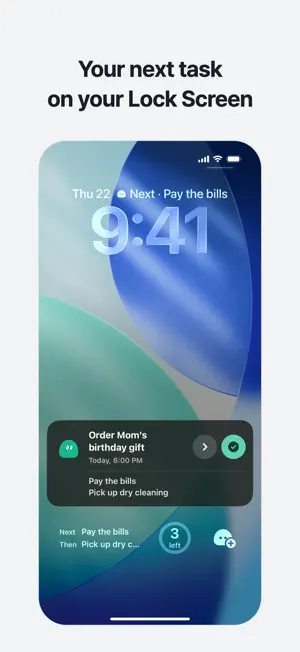
Write a task and it shows up big on your Lock Screen. You see it every time you look at your phone, so it’s hard to forget. Dollop keeps the task you’re on at the front of your Lock Screen and holds it there until it’s done. Without opening the app, you can mark it done or move on to the next task right from the Lock Screen. Right on your Lock Screen • Your top task shows up large on a Lock Screen card and in the Dynamic Island. • Tap Done or Next right on the Lock Screen, and see up to two tasks coming next. • If the card goes away, a Lock Screen widget stays, so you can bring the card back at any time. • The free Today list Lock Screen widget shows up to three tasks. Tap a circle to mark one done. • Home Screen widgets show your top task too. The medium widget, which lists the rest of your tasks, is part of PLUS. See your day • Tap the task count to expand your Today list, then tap a task to bring it to the front. • Complete or snooze tasks from their detail screen. A short first-use guide can be replayed in Settings. Easy to add • Type something like “Dentist tomorrow 3pm” and Dollop picks up the time and keeps the title clean. • Type “Take meds every day at 9am” and it picks up the repeat, too. • Add by voice: just say it and it becomes a task. Your words are turned into text on your iPhone and never sent anywhere. • You can also add tasks quickly with Siri, Shortcuts, Control Center or the Action button. Reminders right on time • Get a reminder at the time you set, with an optional heads-up 5, 10 or 30 minutes or 1 hour before. For deadlines, the heads-up comes 30 minutes before by default. • Long-press a reminder to mark the task done or snooze it for an hour. • Not now? Snooze a task for an hour, until evening or until tomorrow morning. • Morning weather: on days with rain or a chill in the air, Dollop lets you know at 7:30 in the morning. You can also pick days warmer than yesterday, days with a big temperature swing and days with strong UV, and change the time. • Place reminders: get reminded of a task when you arrive at or leave a place, and get an out-the-door list of things to take when you leave home. • Pick a date in Upcoming to see tasks and available forecasts. Manage repeats, places and morning weather under “On my radar” on the Dollop tab. Life with Dollop • Finish a task and Dollop reacts. The more you get done, the higher Dollop’s level. • Task cards and Dollop are soft to the touch: they squish when you tap and stretch when you pull. • Dress up Dollop with six colors and accessories. Free and PLUS The basics are free: tasks and notes, the Lock Screen card and widgets, adding by voice, time reminders and snoozing, morning weather, iCloud sync, 1 repeating task and 1 place. PLUS adds unlimited repeats, up to 20 places, times on repeats, reminders that keep coming back until you turn them off, your full history of done tasks with detailed stats, a shareable monthly report, PLUS accessories, alternate app icons and the medium Home Screen widget. • Monthly subscription • Yearly subscription (7-day free trial for first-time subscribers) • Lifetime (one-time purchase) Prices are shown in your local currency in the app and on the App Store. Subscriptions renew automatically unless you cancel at least 24 hours before the end of the current period. If you don’t cancel the yearly free trial at least 24 hours before it ends, the yearly subscription price is charged when the trial ends. You can cancel under Subscriptions in the Settings app on your iPhone. Privacy No sign-up, no ads and no analytics. Your tasks are stored only on your iPhone and, if you turn on iCloud sync, in your own iCloud. We can’t see them. Terms of Use: https://malang.xeta.im/en/terms Apple Standard License Agreement (EULA): https://www.apple.com/legal/internet-services/itunes/dev/stdeula/ Privacy Policy: https://malang.xeta.im/en/privacy Contact: [email protected]
What’s new
Version 1.6 · Updated October 24, 2026
Accidentally marked a task as done? You can now undo it. Use Undo completion right away, or find it in today’s completed tasks later—even after reopening the app. Today, Upcoming and Dollop now make better use of the wide screen on iPhone Duo. On the unfolded screen, drag a task card to a day in the week pane to schedule it. We’ve also refined screen transitions, input sheets and widgets, and improved reliability.
App privacy
The developer, Seongju Park, reported these privacy practices to Apple.
Data Not Collected
The developer does not collect any data from this app.