

Pacebit Internet Speed Limiter
BYFLARE TECHNOLOGIES (OPC) PRIVATE LIMITED Utilities iPhoneiPadiPod touch
Pacebit Internet Speed Limiter is a free Utilities app for iPhone and iPad by BYFLARE TECHNOLOGIES (OPC) PRIVATE LIMITED. Requires iOS 17.0.
- Price
- Free
- on the App Store
- Size
- 5 MB
- Age 4+
- Updated
- Oct 20
- 2026 · v1.0
Screenshots


About Pacebit Internet Speed Limiter
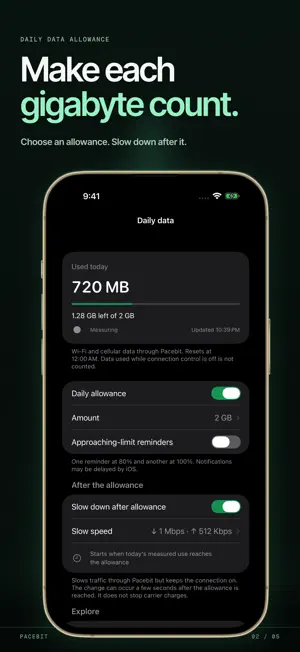
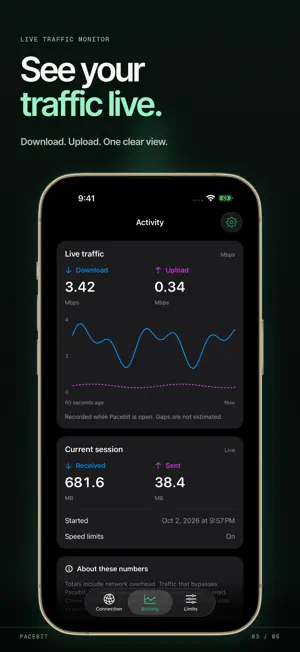
Limit internet speed and track daily data usage while Pacebit is connected. Pacebit measures traffic that passes through its on-device connection control. See live transfer speeds, set a daily allowance, and choose the pace that suits your day. Switch between Normal and Save data, or set separate download and upload caps. Changes apply to the running connection without a new setup. EVERYDAY CONTROL • See live download and upload speeds, plus data used in the current session. • Set a personal daily allowance for traffic measured through Pacebit. • Optionally slow the connection after the allowance is reached, while keeping it online. Pause that slowdown for the rest of the day when needed. • Review seven days of measured totals, with missing periods left unestimated. • Choose reminders near your allowance or an alert for heavy use in a 15-minute period. • Start and stop from a Home Screen widget after the first setup; Control Center controls are available on iOS 18 or later. • Run a website check and share a report without browsing history or IP addresses. HOW IT WORKS Pacebit uses iOS VPN technology to forward eligible traffic locally through this iPhone. iOS asks to add a VPN configuration when you first start connection control. Pacebit does not change your public location or decrypt HTTPS content. An optional mobile fallback can use cellular data for IPv6 if Wi-Fi lacks it. Traffic that bypasses Pacebit is not measured or capped. Totals include network overhead and are not your carrier's billed usage or remaining balance. A speed cap can change how an app streams, but cannot guarantee a lower bill or less total data use. Pacebit does not show per-app or per-site usage. PRIVATE BY DESIGN No account is required. Settings and aggregate usage records stay on this iPhone. Pacebit does not keep a browsing log or send usage records to a company server. Website lookups normally use your current network's DNS servers; if none are available, the tunnel uses Cloudflare DNS.
App privacy
The developer, BYFLARE TECHNOLOGIES (OPC) PRIVATE LIMITED, reported these privacy practices to Apple.
Data Not Collected
The developer does not collect any data from this app.
Alternatives to Pacebit Internet Speed Limiter
Looking for apps like Pacebit Internet Speed Limiter? Here are 6 similar apps on the App Store. The highest rated is Curb: Internet Speed Limiter (5.0/5), and all 6 are free to download.
-
 Curb: Internet Speed Limiter
5.0
-
 APN Settings - 2G 3G 4G LTE 5G
-
 Norvexa: Network Privacy
3.0
-
 Viral App - Get More Views
3.9
-
 Accessibility Checker
-
 Ge Air Conditioner
5.0
| App | Rating | Price | Last updated | Compare |
|---|---|---|---|---|
| Pacebit Internet Speed Limiter | – | Free | October 20, 2026 | |
| Curb: Internet Speed Limiter | 5.0 / 5 (2) | Free | Sep 8, 2026 | Compare |
| APN Settings - 2G 3G 4G LTE 5G | – | Free | Nov 12, 2025 | Compare |
| Norvexa: Network Privacy | 3.0 / 5 (2) | Free | Sep 27, 2026 | Compare |
| Viral App - Get More Views | 3.9 / 5 (18) | Free | Jul 14, 2026 | Compare |
| Accessibility Checker | – | Free | Oct 12, 2026 | Compare |
| Ge Air Conditioner | 5.0 / 5 (2) | Free | Mar 24, 2026 | Compare |