

AI Hair Style: Try On
Hasti Dabhi Productivity iPhoneiPadiPod touch
AI Hair Style: Try On is a free Productivity app for iPhone and iPad by Hasti Dabhi. Requires iOS 15.0. Updated October 13, 2026.
- Price
- Free
- on the App Store
- Size
- 37 MB
- Age 4+
- Updated
- Oct 13
- 2026 · v1.0
Screenshots



About AI Hair Style: Try On
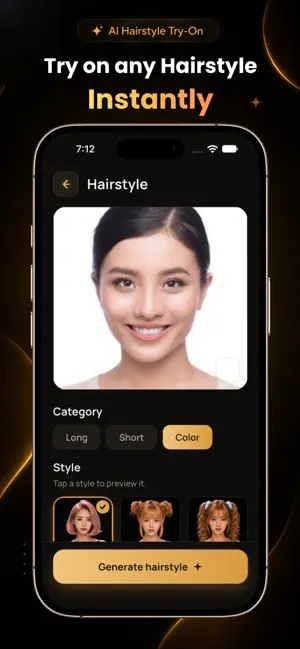
SEE YOUR NEXT HAIRCUT BEFORE YOU COMMIT Not sure which hairstyle suits you? Hairstyle Try On uses AI to show you how new haircuts, beard styles, and hair colors look on your own photo. Take a selfie, pick a style, and see the result in seconds. Use it to decide on a haircut, test a bold hair color, or show your barber exactly what you want. AI HAIRSTYLE TRY-ON - Upload a selfie or take a new one in the app - Browse short, medium, and long haircut categories - Try trendy styles like fades, layers, curls, waves, bangs, and more - For men and women HAIR COLOR PREVIEW - Try blonde, brunette, red, pastel, fashion colors, and more - Compare shades on your own photo before you visit the salon - Avoid color regret and pick a shade you'll love BEARD STYLE TRY-ON - Switch to Beard mode to try different shapes and trims - Preview stubble, full beards, goatee, mustache, and more - Decide whether to grow it out or trim it down BONUS AI PHOTO TOOLS - Background Remover: cut out the background in one tap - Image Enhancer: sharpen details and improve photo quality - Object Remover: erase unwanted people or items from your photos MY CREATIONS Every look you generate is saved to your personal gallery. Revisit and compare your favorite styles, or share them with friends and your stylist. HOW IT WORKS 1. Take a selfie or choose a photo (front-facing, well-lit photos work best) 2. Choose Hairstyle or Beard mode and browse the style gallery 3. Tap a style and let the AI create your new look 4. Save it or share it with your barber or friends PERFECT FOR - Choosing a haircut before booking a barber or salon - Testing a new hair color without dyeing - Trying a beard style before you grow or shave - Planning a makeover or a new look for a special occasion - Cleaning up and enhancing photos on the go FREQUENTLY ASKED QUESTIONS Can I use my own photo? Yes. Upload a selfie or take one in the app, and the AI applies your chosen style directly to it. Does it include beard styles? Yes. Switch to Beard mode to preview beard shapes and trims. Can I preview hair colors? Yes. The Color category lets you try different shades on your photo. Are there other photo tools? Yes. Background removal, quality enhancement, and object removal are built in. Where are my past results? All your generated looks are saved under My Creations. Download Hairstyle Try On today and preview your next haircut, beard, or hair color before you ever sit in the chair.
App privacy
The developer, Hasti Dabhi, reported these privacy practices to Apple.
Data Used to Track You
The following data may be used to track you across apps and websites owned by other companies:
- Usage Data: Advertising Data
Data Not Linked to You
The following data, which may be collected but is not linked to your identity, may be used for the following purposes:
- Usage Data: Advertising Data
Used for: Analytics
Alternatives to AI Hair Style: Try On
Looking for apps like AI Hair Style: Try On? Here are 6 similar apps on the App Store. The highest rated is RemotePC Remote Desktop (4.6/5), and all 6 are free to download.
-
 Street Reach Mobile
4.0
-
 Polk Co NC Citizen Connect
-
 MobileTek Core
4.0
-
 Pro Referral
4.2
-
 RemotePC Remote Desktop
4.6
-
 Brightspeed WiFi
4.4
| App | Rating | Price | Last updated | Compare |
|---|---|---|---|---|
| AI Hair Style: Try On | – | Free | October 13, 2026 | |
| Street Reach Mobile | 4.0 / 5 (4) | Free | Aug 26, 2026 | Compare |
| Polk Co NC Citizen Connect | – | Free | Oct 24, 2026 | Compare |
| MobileTek Core | 4.0 / 5 (212) | Free | Sep 10, 2026 | Compare |
| Pro Referral | 4.2 / 5 (438) | Free | Oct 15, 2026 | Compare |
| RemotePC Remote Desktop | 4.6 / 5 (3,559) | Free | Oct 23, 2026 | Compare |
| Brightspeed WiFi | 4.4 / 5 (961) | Free | Aug 28, 2026 | Compare |