

Voice Unlock & App Locker
Dao Son Tung Utilities iPhoneiPadiPod touch
Voice Unlock & App Locker is a free Utilities app for iPhone and iPad by Dao Son Tung. Requires iOS 17.0. Updated October 4, 2026.
- Price
- Free
- on the App Store
- Size
- 2 MB
- Age 4+
- Updated
- Oct 4
- 2026 · v1.0
Screenshots


About Voice Unlock & App Locker
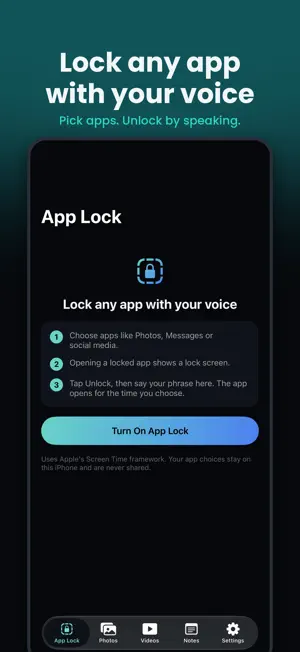
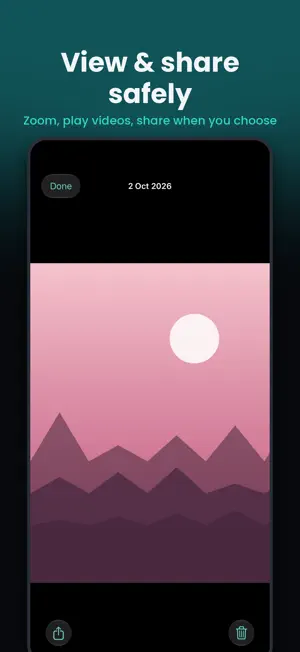
Lock any app with your voice, and keep your private photos, videos and notes in an encrypted vault. Voice Unlock & App Locker puts a lock screen in front of the apps you choose. To get in, just say your secret phrase. Can't speak out loud? Face ID and a 6-digit PIN are always there as backup. APP LOCK • Choose any apps, app categories or websites to lock • Opening a locked app shows a lock screen. Tap Unlock, then say your phrase • The app opens for the time you pick (1 minute to 1 hour), then locks again automatically • Built on Apple's Screen Time framework. Your app choices stay on your iPhone UNLOCK WITH YOUR VOICE • Choose a secret phrase of two or more words • Say it once during setup so the app knows your iPhone hears it • Recognition runs on your iPhone when your language supports it (English and Vietnamese) PRIVATE PHOTO & VIDEO VAULT • Move photos and videos from your library into the vault • Photos and Videos each have their own tab • View photos full screen with pinch to zoom, and play videos inside the app • Share a photo or video when you choose, straight from the viewer • Optionally remove the originals from Photos afterwards • Every item is encrypted with AES-256-GCM before it's saved SECRET NOTES • Keep passwords, ideas and personal thoughts in notes only you can open • Notes are encrypted too BUILT FOR PRIVACY • No account, no ads, no tracking, no analytics • Nothing is uploaded: your vault lives only on this iPhone • The encryption key stays in your iPhone's Keychain • The vault locks when you leave and stays covered in the app switcher • Forgot your PIN? Reset it with Face ID or your iPhone passcode without losing anything GOOD TO KNOW • Voice Unlock doesn't change your iPhone's own lock screen. • A spoken phrase is convenient, not secret from people nearby. Use Face ID or your PIN when others are around. • Your vault is not backed up to iCloud. Deleting the app deletes the vault. • App Lock needs Screen Time permission. You can turn it off in the app or in iPhone Settings at any time. Support: https://voicelocker.app/support/ Privacy Policy: https://voicelocker.app/privacy/
App privacy
The developer, Dao Son Tung, reported these privacy practices to Apple.
Data Not Collected
The developer does not collect any data from this app.
Alternatives to Voice Unlock & App Locker
Looking for apps like Voice Unlock & App Locker? Here are 6 similar apps on the App Store. The highest rated is Battery 100% Alarm (4.4/5), and all 6 are free to download.
-
 Flex Calculators
-
 FlyDrop
-
 VidMaster!
-
 QR Code Generator - Studio
-
 Battery 100% Alarm
4.4
Battery 100% Alarm
4.4
-
 Local Send: File Transfer App
1.0
Local Send: File Transfer App
1.0
| App | Rating | Price | Last updated | Compare |
|---|---|---|---|---|
| Voice Unlock & App Locker | – | Free | October 4, 2026 | |
| Flex Calculators | – | Free | Apr 30, 2026 | Compare |
| FlyDrop | – | Free | May 10, 2026 | Compare |
| VidMaster! | – | Free | Oct 20, 2026 | Compare |
| QR Code Generator - Studio | – | Free | Sep 21, 2026 | Compare |
| Battery 100% Alarm | 4.4 / 5 (25) | Free | Apr 21, 2024 | Compare |
| Local Send: File Transfer App | 1.0 / 5 (2) | Free | Oct 6, 2026 | Compare |