

Screen Time & Parental Control
Muhammad Kashif Productivity iPhoneiPadiPod touch
Screen Time & Parental Control is a free Productivity app for iPhone and iPad by Muhammad Kashif. Requires iOS 16.0. Updated October 13, 2026.
- Price
- Free
- on the App Store
- Size
- 15 MB
- Age 9+
- Updated
- Oct 13
- 2026 · v1.0
Screenshots


About Screen Time & Parental Control
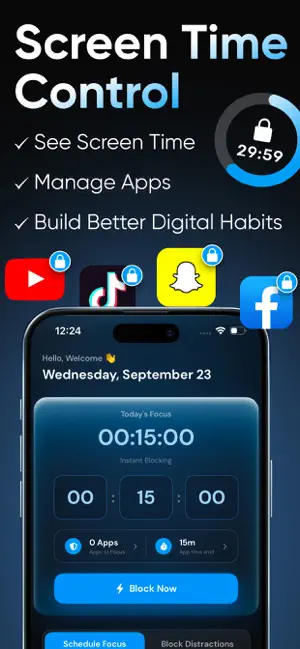
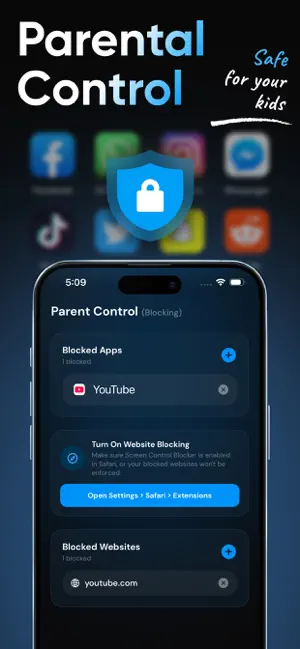
Take back control of your screen time – block distractions, build focus, and keep your family safe, all in one app. Schedule focus sessions, limit addictive apps, and set powerful parental controls in just a few taps. Screen Time & Parental Control helps you spend less time scrolling and more time on what matters. Whether you're trying to stay productive at work, study without interruptions, sleep better, or protect your kids online, this app gives you the tools to build healthier digital habits. • SCHEDULE FOCUS MODE Create custom focus modes for Work, Study, Sleep, or anything you need. Choose the apps you want to keep available, set the time and days, and the focus mode activates automatically. During each session, only your selected apps stay usable while everything else is blocked, so you can stay on track without relying on willpower. • BLOCK DISTRACTIONS Add the apps that steal your time and set daily limits for each one. Control how long you can use an app and how many times you can open it. Once the limit is reached, the app stays locked for the rest of the day. You can also choose which days these limits are active. • INSTANT FOCUS Need to concentrate right now? Start an instant focus session in seconds. Choose apps to block or allow, set the duration, and get to work – no scheduling required. • PARENTAL CONTROL BLOCKING Block apps and websites that aren't appropriate for your child. Once added, they stay blocked until you choose to remove them, giving you peace of mind that harmful content stays out of reach. • DETAILED REPORTS See exactly how screen time is spent. Track your focus sessions and app usage during each mode, and review parental control reports showing the total number of apps and websites blocked. Enable Screen Monitoring to view captured activity snapshots in your reports. • APP LOCK Protect your settings with a password. Every time the app is opened, your password is required, so no one can change your rules without permission. • PREVENT APP REMOVAL Turn on removal protection to stop the app from being deleted, keeping your focus rules and parental controls in place. • WHO IS IT FOR? - Parents who want to protect their children from harmful apps and websites, manage screen time, and stay informed about device usage. - Students who want to study without the pull of social media and games, and build better habits during exam season. - Professionals and remote workers who want to protect deep-work hours, reduce notifications overload, and get more done. - Anyone struggling with phone addiction who wants to cut down on endless scrolling, sleep better, and be more present in daily life. • WHY YOU'LL LOVE IT - Automatic schedules mean less effort and more consistency - Flexible limits by time and number of opens - Strong protection with password lock and removal prevention - Clear reports that show your progress over time - Simple, clean design that's easy for anyone to set up Your phone should work for you, not the other way around. Download Screen Time & Parental Control today and start building a healthier relationship with your screen. Note: This app offers limited free access. Unlocking premium features and unlimited use requires an additional purchase.Payment is charged to your iTunes Account at the time of purchase. Your subscription renews automatically unless you cancel at least 24 hours before the end of the current billing period. You can manage or cancel your subscription anytime in your App Store Account Settings. For more details, see our Privacy Policy https://sites.google.com/view/kashifprivacy/home Terms of Use https://sites.google.com/view/kashifterms/home
App privacy
The developer, Muhammad Kashif, reported these privacy practices to Apple.
Data Not Collected
The developer does not collect any data from this app.
Alternatives to Screen Time & Parental Control
Looking for apps like Screen Time & Parental Control? Here are 6 similar apps on the App Store. The highest rated is App Blocker & Focus: Simba (5.0/5), and all 6 are free to download.
-
 PawLock: Screen Time Blocker
-
 App Blocker & Focus: Simba
5.0
App Blocker & Focus: Simba
5.0
-
 Days Since & Countdown: Whenly
-
 DragonX: Focus Timer
-
 Focusone: Screen Time Control
5.0
Focusone: Screen Time Control
5.0
-
 Barrier: Screen Time Blocker
3.0
Barrier: Screen Time Blocker
3.0
| App | Rating | Price | Last updated | Compare |
|---|---|---|---|---|
| Screen Time & Parental Control | – | Free | October 13, 2026 | |
| PawLock: Screen Time Blocker | – | Free | Oct 3, 2026 | Compare |
| App Blocker & Focus: Simba | 5.0 / 5 (5) | Free | Oct 29, 2026 | Compare |
| Days Since & Countdown: Whenly | – | Free | Aug 26, 2026 | Compare |
| DragonX: Focus Timer | – | Free | Aug 21, 2026 | Compare |
| Focusone: Screen Time Control | 5.0 / 5 (1) | Free | Jun 23, 2026 | Compare |
| Barrier: Screen Time Blocker | 3.0 / 5 (2) | Free | Mar 24, 2026 | Compare |