

Follow Up Until It's Done
Nguyen Ngan Hanh Tran Productivity iPhoneiPadiPod touch
Follow Up Until It's Done is a free Productivity app for iPhone and iPad by Nguyen Ngan Hanh Tran. Requires iOS 26.6. Updated October 18, 2026.
- Price
- Free
- on the App Store
- Size
- 4 MB
- Age 4+
- Updated
- Oct 18
- 2026 · v1.1
Screenshots


About Follow Up Until It's Done
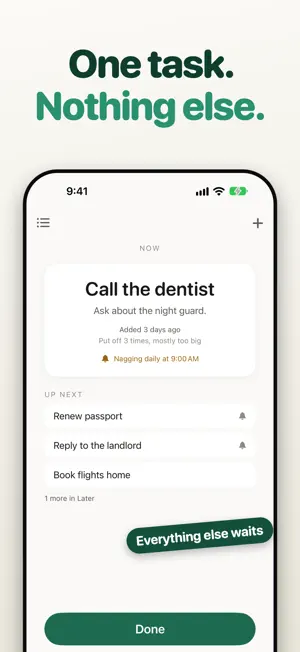
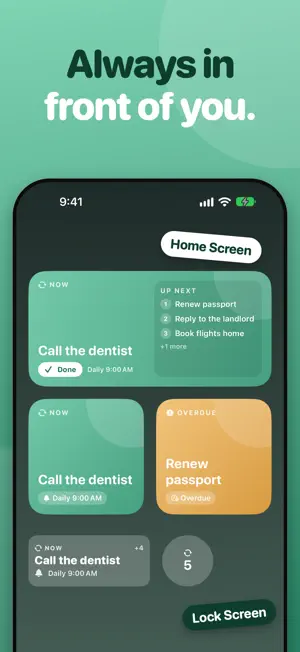
You don't need a longer list. You need to do the one thing you keep avoiding. Follow Up puts a single task in front of you and keeps it there. Everything else waits in Later. When you finish, the next one comes forward. ONE TASK AT A TIME The main screen shows one task and nothing else. No lists to groom, no priorities to juggle. IT NAGS UNTIL YOU DO IT Every task gets a follow-up the moment you add it. Pick gentle notifications or a loud alarm that breaks through silent mode. Repeat daily until it's done, or until a real deadline. SKIPPING COSTS AN HONEST ANSWER Tap "Not this one" and Follow Up asks why. Too big? Wrong time? Blocked? Over time you see the pattern behind what you put off. ALWAYS IN FRONT OF YOU Home Screen and Lock Screen widgets keep the current task visible, and turn amber when a deadline has passed. PRIVATE BY DESIGN Your tasks and notes stay on your device. There is no account and nothing to sign in to. FOLLOW UP PRO Every feature is free for your first 7 days, no sign-up and nothing to cancel. After that, Free includes five open tasks, daily reminders, loud alarms, and widgets. Pro adds unlimited tasks, weekday and weekly reminders, and your put-off history. Choose a yearly plan, or pay once for lifetime. Subscriptions renew automatically unless canceled at least 24 hours before the end of the period. Manage or cancel in your App Store account settings. Terms of Use: https://www.apple.com/legal/internet-services/itunes/dev/stdeula/ Privacy Policy: https://janetran105.github.io/followup-privacy/
What’s new
Version 1.1 · Updated October 18, 2026
• A new look: three tabs at the bottom. Reminder, Your Data, and Settings. • Done sits right under your task, so it's clear what it finishes. • Your Data: your history and all your lists in one place. • A round + button to add a task. • Quick Add: choose when the first reminder comes. In an hour, this evening, tomorrow morning, or any time you pick. • New tasks remind you at the time you added them. • Escalating is stronger: more reminders, and alarms, as the deadline gets close. • New: a quick guide to adding the widget to your Home Screen. • "Not this one" is now "Skip this time".
App privacy
The developer, Nguyen Ngan Hanh Tran, reported these privacy practices to Apple.
Data Not Linked to You
The following data, which may be collected but is not linked to your identity, may be used for the following purposes:
- User Content: Other User Content
- Diagnostics: Crash Data
Used for: Analytics
Alternatives to Follow Up Until It's Done
Looking for apps like Follow Up Until It's Done? Here are 6 similar apps on the App Store. The highest rated is Mino: AI Voice Notes Agent (4.6/5), and all 6 are free to download.
-
 KidsAppParents
-
 Noteleap Meeting Summary AI
4.4
-
 PDF to EPUB Converter .
3.4
-
 Goover: Your AI Research Agent
4.5
-
 Mino: AI Voice Notes Agent
4.6
-
 LottoMonkey: Scan Lottery
4.6
| App | Rating | Price | Last updated | Compare |
|---|---|---|---|---|
| Follow Up Until It's Done | – | Free | October 18, 2026 | |
| KidsAppParents | – | Free | Jan 3, 2024 | Compare |
| Noteleap Meeting Summary AI | 4.4 / 5 (199) | Free | Jun 6, 2026 | Compare |
| PDF to EPUB Converter . | 3.4 / 5 (5) | Free | Jul 13, 2024 | Compare |
| Goover: Your AI Research Agent | 4.5 / 5 (13) | Free | Nov 2, 2026 | Compare |
| Mino: AI Voice Notes Agent | 4.6 / 5 (767) | Free | Sep 3, 2026 | Compare |
| LottoMonkey: Scan Lottery | 4.6 / 5 (9,315) | Free | Sep 18, 2026 | Compare |