

PDF Tool - Edit, Convert, Sign
Quang Tran Productivity iPhoneiPadiPod touch
PDF Tool - Edit, Convert, Sign is a free Productivity app for iPhone and iPad by Quang Tran. Requires iOS 15.5. Updated October 23, 2026.
- Price
- Free
- on the App Store
- Size
- 96 MB
- Age 4+
- Updated
- Oct 23
- 2026 · v1.0.0
Screenshots



About PDF Tool - Edit, Convert, Sign
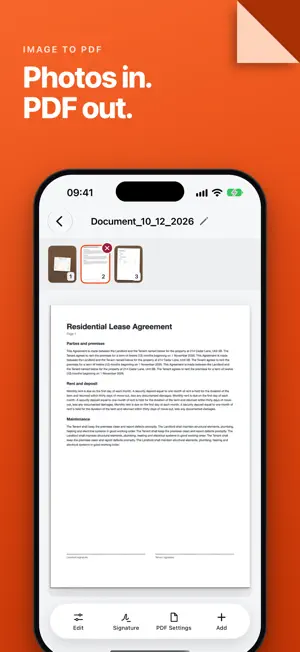
Are you looking for an all-in-one solution to handle your documents on the go? PDF_TOOL is the ultimate PDF converter and editor, powered by smart AI technology to boost your productivity anytime, anywhere. Whether you need to convert complex Office files, sign contracts remotely, or summarize hundred-page documents, PDF_TOOL solves all your needs in just a few taps. KEY FEATURES: 1. All-in-One PDF Converter • Office to PDF & Vice Versa: Seamlessly convert Word (.docx), Excel (.xlsx), and PowerPoint (.pptx) to PDF while keeping the original layout, and convert them back instantly. • Image to PDF: Scan or select photos from your gallery (JPG, PNG) to merge them into a single, high-quality PDF file—perfect for saving receipts and documents. 2. Smart AI Document Assistant • Instant AI Summarizer: The built-in AI automatically reads and extracts key takeaways from long PDF files, saving you hours of reading time. • Text Recognition (OCR): Accurately detect text from scanned documents or images and convert them into fully editable text. 3. Professional PDF Editor & Annotator • Direct Editing: Modify text, add, or remove images directly inside your PDF files without needing the original source file. • Annotate & Mark Up: Use highlighters, drawing pens, text boxes, and stamps to emphasize important information during review. 4. E-Signature & Watermark • Quick Signatures: Create and save your handwritten signature to sign contracts, agreements, and forms on the fly. • Document Protection: Add watermarks or stamps to protect your intellectual property and copyright. 5. File Management & Security • High-Level Security: Lock confidential documents by setting up secure passwords for your PDF files. • Organize & Modify: Easily rename, merge, split, or reorder pages in your PDF documents. WHY CHOOSE PDF_TOOL? • Intuitive UI/UX: Clean and minimalist design, built for students, freelancers, and corporate professionals alike. • Blazing Fast Processing: Convert and edit files in seconds with optimized cloud and local rendering. • Offline Support: Access core conversion and viewing tools even without an active internet connection. Download PDF_TOOL today and turn your smartphone into a powerful pocket-sized office! For more infos, Please visit: https://tikpdf.com/terms-of-service https://tikpdf.com/privacy-policy
App privacy
The developer, Quang Tran, reported these privacy practices to Apple.
Data Used to Track You
The following data may be used to track you across apps and websites owned by other companies:
- Usage Data: Product Interaction, Advertising Data, Other Usage Data
- Diagnostics: Crash Data, Performance Data, Other Diagnostic Data
Data Not Linked to You
The following data, which may be collected but is not linked to your identity, may be used for the following purposes:
- Usage Data: Product Interaction, Advertising Data, Other Usage Data
- Diagnostics: Crash Data, Performance Data, Other Diagnostic Data
Used for: Third-Party Advertising, Developer’s Advertising or Marketing, Analytics, App Functionality, Other Purposes
Alternatives to PDF Tool - Edit, Convert, Sign
Looking for apps like PDF Tool - Edit, Convert, Sign? Here are 6 similar apps on the App Store. The highest rated is AI Note Taker: Voice & Video (5.0/5), and all 6 are free to download.
-
 PDF Tool
-
 AI Note Taker: Voice & Video
5.0
-
 KHIDMATY
3.7
-
 Cloud PDF - OCR Scan Edit File
4.1
-
 Habit — Daily Tracker
3.7
-
 Echo – AI Meeting Note Taker
4.5
| App | Rating | Price | Last updated | Compare |
|---|---|---|---|---|
| PDF Tool - Edit, Convert, Sign | – | Free | October 23, 2026 | |
| PDF Tool | – | Free | Jul 27, 2026 | Compare |
| AI Note Taker: Voice & Video | 5.0 / 5 (4) | Free | May 10, 2026 | Compare |
| KHIDMATY | 3.7 / 5 (54) | Free | Sep 21, 2026 | Compare |
| Cloud PDF - OCR Scan Edit File | 4.1 / 5 (46) | Free | Jan 4, 2026 | Compare |
| Habit — Daily Tracker | 3.7 / 5 (2,408) | Free | Sep 16, 2026 | Compare |
| Echo – AI Meeting Note Taker | 4.5 / 5 (3,782) | Free | Oct 1, 2026 | Compare |