

Pragmatic Audio PEQ
KONECKTA LIMITED Music iPhoneiPadiPod touch
Pragmatic Audio PEQ is a paid Music app for iPhone and iPad by KONECKTA LIMITED. Rated 5.0/5 from 3 ratings. Requires iOS 27.0. Updated October 16, 2026.
- Rating
- 5.0
- 3 ratings
- Price
- 4.99 USD
- on the App Store
- Size
- 25 MB
- Age 4+
- Updated
- Oct 16
- 2026 · v1.0.1
Screenshots



About Pragmatic Audio PEQ
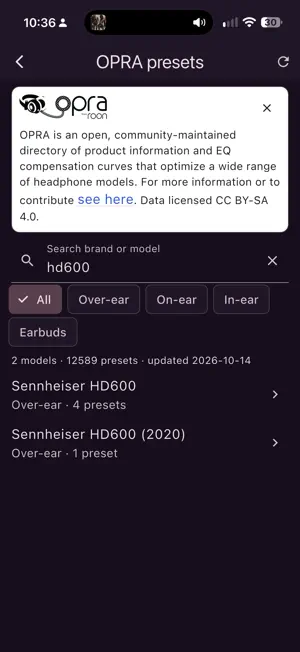
Pragmatic EQ is a parametric equaliser for iPhone and iPad. On iOS 27 or later, select its virtual audio output in Control Center to stream audio from compatible music players through your EQ. CORRECT YOUR HEADPHONES • Browse measurement databases and OPRA community presets to find EQ profiles for your headphones or in-ear monitors. • Import Filters.txt profiles, including separate left and right filter files. • Edit individual parametric bands, shape bass and treble, or use a fixed-band editor. • Save personalised profiles and adjust headroom or set the preamp manually. HEAR THE DIFFERENCE • Compare No PEQ and PEQ while music plays, with optional volume matching and blind A/B comparisons. • Experiment with crossfeed, tube, vinyl and other effects. SEE WHAT YOU HEAR • Live visualisations include spectrum bars, EQ graphs, a spectrogram, level meters, VU meters and a colour spiral. • Visualisations run while their view is active. CHOOSE YOUR LAYOUT • Keep the scrollable one-page layout or switch to tabs in Settings. • A Welcome guide explains how to connect music, load a profile and create your own. • Choose light, dark or system appearance and your interface language. • Optional audio recovery reminders help you reopen the app when needed. PRIVATE BY DESIGN No account, ads or tracking. Audio is processed locally and is not recorded, stored or transmitted. The microphone is never used. REQUIREMENTS AND PLAYBACK LIMITATIONS iOS/iPadOS 27 or later is required for the virtual audio output. Open the app, start music in a compatible player, then select Pragmatic EQ in Control Center. Some players and video modes do not support this route. If iOS returns to your previous output, reopen the app and select Pragmatic EQ again. Pragmatic EQ builds on open source work, including EffectDeck and EffeTune (MIT licence) and the OPRA preset database (CC BY-SA). See About in the app for credits and licences.
What’s new
Version 1.0.1 · Updated October 16, 2026
• New Welcome guide explaining how to connect your music, load a profile and create your own EQ. • Optional tabbed navigation, with the original one-page layout retained by default. • Import separate left and right personalised EQ filter files. • Choose your interface language in Settings, including Dutch, or follow your system language. • Improved Smart Headroom, manual preamp control and bass/treble previews. • Improved filter importing, optional audio recovery reminders and clearer audio and visualisation settings.
App privacy
The developer, KONECKTA LIMITED, reported these privacy practices to Apple.
Data Not Collected
The developer does not collect any data from this app.
Alternatives to Pragmatic Audio PEQ
Looking for apps like Pragmatic Audio PEQ? Here are 6 similar apps on the App Store. The highest rated is GSi Piano Studio (5.0/5), and 4 of the 6 are free to download.


| App | Rating | Price | Last updated | Compare |
|---|---|---|---|---|
| Pragmatic Audio PEQ | 5.0 / 5 (3 ratings) | 4.99 USD | October 16, 2026 | |
| AudioIQ | – | 4.99 USD | Aug 21, 2026 | Compare |
| Insert Stream | – | Free | May 6, 2026 | Compare |
| Discata | – | Free | Oct 20, 2026 | Compare |
| GSi Piano Studio | 5.0 / 5 (1) | 19.99 USD | Oct 15, 2026 | Compare |
| Attune — Headphone EQ | – | Free | Sep 4, 2026 | Compare |
| AudRig | 5.0 / 5 (2) | Free | Aug 18, 2026 | Compare |