

Glowmatic: AI Photo Booth
William Dens Photo & Video iPhoneiPadiPod touch
Glowmatic: AI Photo Booth is a free Photo & Video app for iPhone and iPad by William Dens. Requires iOS 16.4. Updated November 15, 2026.
- Price
- Free
- on the App Store
- Size
- 53 MB
- Age 4+
- Updated
- Nov 15
- 2026 · v1.1.0
Screenshots


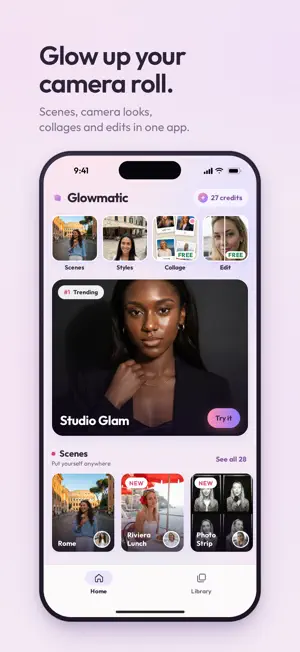
About Glowmatic: AI Photo Booth
Glow up your camera roll. Put yourself in Paris with one AI selfie, give 20 photos the look of one disposable camera, turn them into a photo booth strip or a photo dump collage, and retouch any photo in a free editor. All in one app. No account, no email, no login. SCENES: YOUR SELFIE, ANYWHERE Pick a scene, add one clear selfie, and get a new photo of you there. Your face stays; the pose, outfit and background change around it. 28 scenes, including: • Paris: a café terrace, a Montmartre lane, the Louvre courtyard • Shibuya at dusk, a Brooklyn stoop, Notting Hill, the Golden Gate in the fog, a night picnic by Seoul's Han River • Santorini, Rome, Kyoto in autumn, Dubai, the Taj Mahal at sunrise, Cappadocia, the Northern Lights • A photo booth strip with a new pose in every frame, a studio glam portrait, a Riviera lunch, a bar after hours STYLES: 20 PHOTOS, ONE CAMERA Pick a camera look, select up to 20 photos at once, and get them back in under 20 seconds. Every photo in a batch gets the same version of the look and the same grain, so your photo dump reads as one roll, not 20 random filters. 18 looks, in two sets: • Retro, Y2K and film-era cameras: Disposable, Webcam 2008, Vintage Photobooth, Camcorder, Fisheye, Day Flash, Night Flash, Flash Party, Double Exposure • Glow-up: Golden Hour, Clear Skies, Autumn Gold, First Snow, Evening Lights, Neon Night, Film Still, High-Fashion Editorial, and Clean Background, which clears strangers and crowds from behind you COLLAGES: NEW, FREE, NO WATERMARK 47 collage templates, made on your phone and saved as a photo or a video: • Photo booth strips, instant prints, a 35mm film strip, a contact sheet, a magazine cover • Photo Dump, Posted / Deleted, My Year in 12, Yes / But, Day in Timestamps • Phone screens: Incoming Call, Now Playing, Text Thread • Leopard, zebra and snake prints, a travel postcard, holiday cards Swap, rotate and flip photos, rewrite the text, and come back later: drafts save themselves. Nothing is uploaded, no credits used. THE PHOTO EDITOR: FREE, ON YOUR PHONE Open any photo and edit it right there. Nothing is uploaded, nothing to wait for, no credits used. • Filters: 90 looks at any strength. Save your own mix as a preset. • Adjust: 20 sliders, from exposure and warmth to grain, bloom, halation and vignette. • Beautify: reshape eyes, lips, nose and face, smooth skin, try on makeup and new hair colors. When you like it, save it, make it a collage, or send it on to a style or a scene. FAIR CREDITS • Free to download and free to try. Collages and the editor are free. • One credit per styled photo, one credit per scene. You see the cost before you start. • If a photo or a scene fails, its credit is refunded automatically. • Top up with a credit pack or a weekly or monthly plan. No subscription needed. PRIVATE BY DESIGN • No account. Glowmatic knows your install only by a random device ID, not your Apple Account. • Collages and the editor never upload your photos. Styles and scenes send a photo to our image-processing provider, Google, only to create your result. We don't build a profile from them. • Delete everything yourself, any time: Settings, Your data, Delete my data. KEEP WHAT YOU MAKE Every style and scene lands in your library. Save anything you make to Photos or share it to any app. Glowmatic uses generative AI for Styles and Scenes, and results depend on the photo you start with. A clear, well-lit selfie gives Scenes the most to work with. Only use photos of yourself, or of people who have agreed to it. Subscriptions renew automatically unless cancelled at least 24 hours before the end of the current period. Payment is charged to your Apple Account. Manage or cancel any time in your Apple Account settings. Terms of Use: https://glowmatic.app/terms Privacy Policy: https://glowmatic.app/privacy Help: https://glowmatic.app/support
What’s new
Version 1.1.0 · Updated November 15, 2026
New: collages. 47 free layouts, from photo booth strips and instant prints to Posted / Deleted and holiday cards, saved as a photo or a video, with no watermark. Drafts save themselves. A new Home: scenes, styles, collages and the editor on one screen, with what's trending on top. Styles now come in two sets, Retro and Glow-up. The viewer moves through a whole batch, and your library is sorted by day. Fixed: swiping back no longer freezes the screen while photos are processing.
App privacy
The developer, William Dens, reported these privacy practices to Apple.
Data Not Linked to You
The following data, which may be collected but is not linked to your identity, may be used for the following purposes:
- Purchases: Purchase History
- Contact Info: Email Address
- User Content: Photos or Videos, Customer Support
- Identifiers: Device ID
Used for: App Functionality
Alternatives to Glowmatic: AI Photo Booth
Looking for apps like Glowmatic: AI Photo Booth? Here are 6 similar apps on the App Store. The highest rated is Restore Old Photos: Live Video (5.0/5), and all 6 are free to download.
-
 Restore Old Photos: Live Video
5.0
-
 Boothie: AI Photo Editor
4.3
-
 Clicked: Camera Editor
4.0
-
 PhotoSync – transfer photos
4.7
-
 Animator: AI Dance Video
4.2
-
 BeautyUp-AI Face & Body Editor
4.7
| App | Rating | Price | Last updated | Compare |
|---|---|---|---|---|
| Glowmatic: AI Photo Booth | – | Free | November 15, 2026 | |
| Restore Old Photos: Live Video | 5.0 / 5 (1) | Free | Nov 13, 2026 | Compare |
| Boothie: AI Photo Editor | 4.3 / 5 (40) | Free | Oct 12, 2026 | Compare |
| Clicked: Camera Editor | 4.0 / 5 (42) | Free | Nov 14, 2026 | Compare |
| PhotoSync – transfer photos | 4.7 / 5 (8,277) | Free | Sep 4, 2026 | Compare |
| Animator: AI Dance Video | 4.2 / 5 (757) | Free | Nov 17, 2026 | Compare |
| BeautyUp-AI Face & Body Editor | 4.7 / 5 (25,839) | Free | Nov 16, 2026 | Compare |