

VCompress: Video Compressor
ilya kudravets Photo & Video iPhoneiPadiPod touch
VCompress: Video Compressor is a free Photo & Video app for iPhone and iPad by ilya kudravets. Requires iOS 17.0. Updated November 10, 2026.
- Price
- Free
- on the App Store
- Size
- 19 MB
- Age 4+
- Updated
- Nov 10
- 2026 · v1.2
Screenshots


About VCompress: Video Compressor
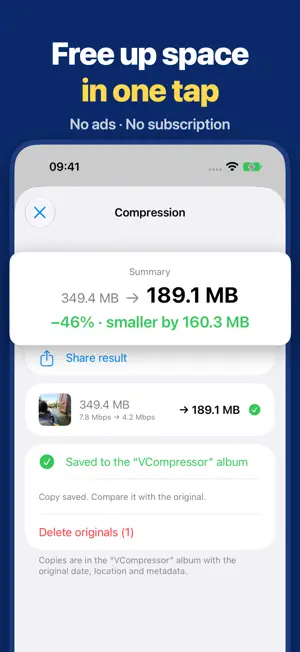
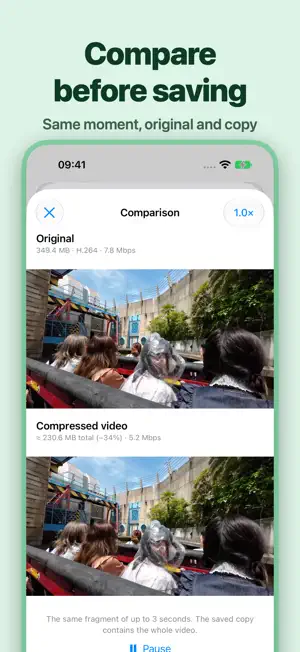
Compress videos and photos on your iPhone or iPad for storage or sharing: 10 videos and 50 photos free every day, no ads, no subscription. Compare video quality before saving. Originals stay in Photos until you choose to delete them. FREE TO USE. NO SUBSCRIPTION. Compress up to 10 videos and 50 photos each day for free. Need to process more? VCompressor Pro removes the daily limits with a one-time purchase. Family Sharing is included. Restore purchases in Settings. COMPARE BEFORE SAVING Watch the same short clip from the original and compressed video, play them together and zoom in to check details. COMPRESS IN BATCHES Browse by date, album and filters. Copies go to the VCompressor album. Resume unfinished queues without creating completed copies again. CHOOSE SIZE AND QUALITY Use a preset or set a target in MB, percent or Mbps. For video, choose HEVC or H.264, audio quality and a frame-rate limit. PHOTOS AND LIVE PHOTOS Supported photos can be saved as HEIC or JPEG with quality and dimension settings. Source PNG files can be optimized losslessly while keeping their dimensions and transparency. A Live Photo becomes a separate still photo without motion or sound. The live original is unchanged. YOU DECIDE WHAT TO DELETE Originals stay in Photos until you confirm deletion. Saving a copy alone does not free storage: both files remain in your library. Deleted originals move to Recently Deleted. With iCloud Photos enabled, deletion syncs to your other devices. Check the saved copy first. Processing takes place on your device. No account is needed, and files are not uploaded to a developer-operated server for compression. Originals stored only in iCloud need an internet connection. On iPhone and iPad, video compression pauses in the background and resumes when you return. Supported metadata, including capture date and location, is preserved. Savings depend on the source file and settings; already compact photos may save little space. Re-encoding can reduce quality. Supported HDR video can be kept in HEVC; HDR photos require a compatible gain map and HEIC output. RAW, slow-motion and spatial video, and unsupported HDR or transparency conversions are skipped.
What’s new
Version 1.2 · Updated November 10, 2026
New home screen: see how much space your copies have saved and your recent copies, and use Smart cleanup to select every video worth compressing at once. Copies that overshoot a size target are now re-encoded to fit, and size estimates for large photo selections are faster.
App privacy
The developer, ilya kudravets, reported these privacy practices to Apple.
Data Linked to You
The following data, which may be collected and linked to your identity, may be used for the following purposes:
- Diagnostics: Performance Data, Other Diagnostic Data
Used for: App Functionality
Alternatives to VCompress: Video Compressor
Looking for apps like VCompress: Video Compressor? Here are 6 similar apps on the App Store. The highest rated is Shrinkray: Video Compressor (5.0/5), and all 6 are free to download.
-
 Video Photo Compressor +
-
 RawStudio: Raw Photo Editor
-
 PocketClip: Compress, No Ads
-
 Shrinkray: Video Compressor
5.0
-
 Ninja Video Compress & Convert
-
 Squish: Video Compressor
5.0
| App | Rating | Price | Last updated | Compare |
|---|---|---|---|---|
| VCompress: Video Compressor | – | Free | November 10, 2026 | |
| Video Photo Compressor + | – | Free | Oct 12, 2026 | Compare |
| RawStudio: Raw Photo Editor | – | Free | Nov 8, 2026 | Compare |
| PocketClip: Compress, No Ads | – | Free | Oct 27, 2026 | Compare |
| Shrinkray: Video Compressor | 5.0 / 5 (7) | Free | Nov 11, 2026 | Compare |
| Ninja Video Compress & Convert | – | Free | Nov 10, 2026 | Compare |
| Squish: Video Compressor | 5.0 / 5 (2) | Free | Nov 6, 2026 | Compare |