

Pixelator
PETER JOHN WRIGHT Graphics & Design iPhoneiPadiPod touchApple Watch
Pixelator is a free Graphics & Design app for iPhone and iPad by PETER JOHN WRIGHT. Rated 5.0/5 from 1 ratings. Requires iOS 26.0. Updated October 9, 2026.
- Rating
- 5.0
- 1 ratings
- Price
- Free
- on the App Store
- Size
- 5 MB
- Age 4+
- Updated
- Oct 9
- 2026 · v2.1.0
Screenshots


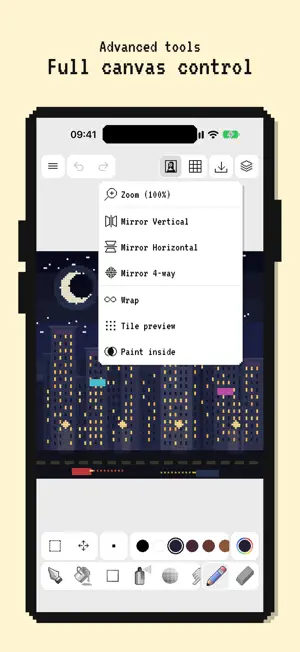

About Pixelator
Pixelator is a fun pixel art studio for iPhone, built for sharp grids, clean tools, and art you can share. DRAW! • Brush, eraser, pen, fill, and scatter • Shapes: line, rectangle, circle, triangle, star, and arrow • Select and move pixels with precision • Adjustable brush size and shape LAYERED WORKFLOW! • Stack, hide, lock, and reorder layers • Opacity control and merge down • Undo through your edit history CANVAS TOOLS! • Symmetry: vertical, horizontal, or 4-way • Grid, wrap mode, and paint-inside options • Canvas sizes from tiny sprites to larger grids (8×8 to 128×128 and custom) PALETTES! • Curated palettes: Pico-8, Game Boy, NES, Sweetie 16, DB16, DB32, and more • Create and manage your own palettes • Full-spectrum color picker with recent colors EXPORT & SHARE • PNG at any scale for crisp upscales • SVG for clean vector-ready pixel art • Import images and pixelate them onto your canvas APPLE INTELLIGENCE* • Invent drawing names from what’s on the canvas • Generate fresh color palettes — all on device Also draw on Apple Watch with a lightweight companion editor. Whether you’re making game sprites, icons, stickers, or weekend doodles, open Pixelator, paint a few pixels, and make something that looks like it came from a cartridge. *Apple Intelligence features require a compatible device and availability.
What’s new
Version 2.1.0 · Updated October 9, 2026
• Canvas composition guides (center, rule of thirds, 8×8 / 16×16 cells) • Outline stroke for the current selection or opaque layer content • Dither brush with coverage control and hatch angle • Split layer by colour in the layers panel • Shape proportion lock for constrained shape drawing • Separate guide-line colour (with opacity) in Settings • Grid colour and opacity combined into one Settings colour control • Magic wand no longer selects mismatched neighbouring colours
App privacy
The developer, PETER JOHN WRIGHT, reported these privacy practices to Apple.
Data Not Collected
The developer does not collect any data from this app.
Alternatives to Pixelator
Looking for apps like Pixelator? Here are 6 similar apps on the App Store. The highest rated is pxlart: AI Pixel Art Generator (4.8/5), and all 6 are free to download.
-
 pxlart: AI Pixel Art Generator
4.8
pxlart: AI Pixel Art Generator
4.8
-
 Picell - Pixel Art Editor
4.0
Picell - Pixel Art Editor
4.0
-
 Pixel Painter : Pixel Art
4.0
Pixel Painter : Pixel Art
4.0
-
 Pixquare - Pixel Art Studio
4.8
Pixquare - Pixel Art Studio
4.8
-
 AR Projector Tracing & Drawing
4.4
AR Projector Tracing & Drawing
4.4
-
 AR Drawing: Sketch & Paint
4.5
AR Drawing: Sketch & Paint
4.5
| App | Rating | Price | Last updated | Compare |
|---|---|---|---|---|
| Pixelator | 5.0 / 5 (1 rating) | Free | October 9, 2026 | |
| pxlart: AI Pixel Art Generator | 4.8 / 5 (17) | Free | Aug 20, 2026 | Compare |
| Picell - Pixel Art Editor | 4.0 / 5 (3) | Free | Oct 30, 2026 | Compare |
| Pixel Painter : Pixel Art | 4.0 / 5 (3) | Free | Jun 4, 2026 | Compare |
| Pixquare - Pixel Art Studio | 4.8 / 5 (3,293) | Free | Oct 26, 2026 | Compare |
| AR Projector Tracing & Drawing | 4.4 / 5 (6,741) | Free | Feb 9, 2026 | Compare |
| AR Drawing: Sketch & Paint | 4.5 / 5 (95,178) | Free | Oct 24, 2026 | Compare |
Compare Pixelator with the top alternatives: ratings, updates, ASO score and keyword gaps →