

DriveCode: Voice AI Coding
Yuya Suzuki Developer Tools iPhoneiPadiPod touchApple Watch
DriveCode: Voice AI Coding is a free Developer Tools app for iPhone and iPad by Yuya Suzuki. Requires iOS 18.0. Updated October 8, 2026.
- Price
- Free
- on the App Store
- Size
- 6 MB
- Age 4+
- Updated
- Oct 8
- 2026 · v1.1
Screenshots


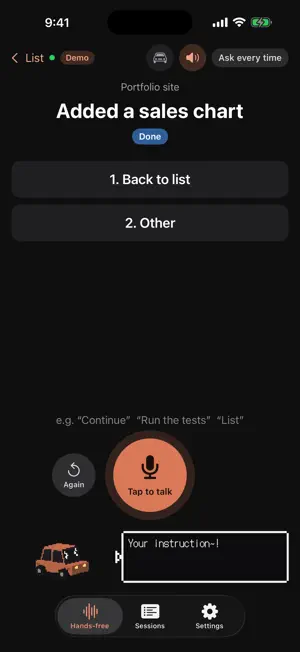

About DriveCode: Voice AI Coding
DriveCode lets you control Claude Code running on your computer at home or at work, by voice, from your iPhone. While driving, walking, or doing chores, hear where things stand and ask for the next step without looking at a screen. WHAT YOU CAN DO • Hear a summary of your most recent sessions (“1, Budget app, working…”) • Join a session by saying its number or name • Answer permission requests by voice: “allow” or “deny” • Get a short summary when a task finishes • Give free-form instructions (with a 2-second undo window) • Say “stop” to stop a task; switch permission modes by voice • CarPlay and Apple Watch support • A pixel-art buddy that talks, drives around, and loves being petted GETTING STARTED 1. Install Claude Code on your computer (Mac or Windows) 2. Install the DriveCode companion on your computer (one command — see the support page) 3. Scan the QR code shown on your computer No computer handy? Try the demo with sample sessions from Settings → Try the demo. PRIVACY • Speech is transcribed on your iPhone; audio is never uploaded • iPhone ↔ computer traffic is end-to-end encrypted; the relay can't read it • No account, no ads, no tracking NOTES • Always drive safely and follow local laws; operate the screen only when parked • Claude Code requires a paid Anthropic plan • DriveCode is not an official Anthropic app. Claude and Claude Code are trademarks of Anthropic. Voices: Kokoro (English) / VOICEVOX:Zundamon (Japanese)
What’s new
Version 1.1 · Updated October 8, 2026
• CarPlay support (iOS 26.4 or later): talk to DriveCode from your car's screen • Scan your computer's QR code with the in-app camera to connect • Tap to talk (hold-to-talk is still available in Settings) • New phrases like “What's the status?” and “Continue 1” • Fixed: spoken replies were sometimes silent when connected to a car
App privacy
The developer, Yuya Suzuki, reported these privacy practices to Apple.
Data Not Collected
The developer does not collect any data from this app.
Alternatives to DriveCode: Voice AI Coding
Looking for apps like DriveCode: Voice AI Coding? Here are 6 similar apps on the App Store. The highest rated is Handsfree Voice Coding (5.0/5), and all 6 are free to download.
-
 Saluki: API & HTTP Client
-
 gollyo
-
 Handsfree Voice Coding
5.0
Handsfree Voice Coding
5.0
-
 Cmux Remote
4.0
Cmux Remote
4.0
-
 Cursornow - Cursor Dashboard
1.0
Cursornow - Cursor Dashboard
1.0
-
 T3 Code - Remote Claude & more
4.9
T3 Code - Remote Claude & more
4.9
| App | Rating | Price | Last updated | Compare |
|---|---|---|---|---|
| DriveCode: Voice AI Coding | – | Free | October 8, 2026 | |
| Saluki: API & HTTP Client | – | Free | Oct 12, 2026 | Compare |
| gollyo | – | Free | Mar 23, 2026 | Compare |
| Handsfree Voice Coding | 5.0 / 5 (1) | Free | Jul 6, 2026 | Compare |
| Cmux Remote | 4.0 / 5 (3) | Free | Oct 27, 2026 | Compare |
| Cursornow - Cursor Dashboard | 1.0 / 5 (2) | Free | Jun 9, 2025 | Compare |
| T3 Code - Remote Claude & more | 4.9 / 5 (178) | Free | Oct 28, 2026 | Compare |