

BluConnect: Smart Home Control
Erhan ERDOGAN Utilities iPhoneiPadiPod touchApple Watch
BluConnect: Smart Home Control is a free Utilities app for iPhone and iPad by Erhan ERDOGAN. Requires iOS 18.0. Updated November 25, 2026.
- Price
- Free
- on the App Store
- Size
- 166 MB
- Age 4+
- Updated
- Nov 25
- 2026 · v0.5.0
Screenshots
Save to Pinterest


About BluConnect: Smart Home Control
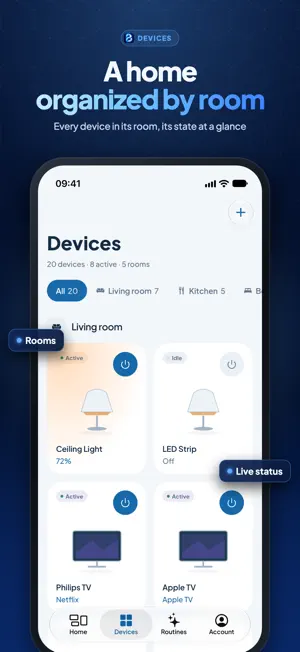
Stop juggling an app for every brand. Samsung, Philips Hue, Xiaomi, LG, Arçelik and more: all your smart devices in one app. Appliances, heating, air conditioning, lights, plugs, TVs, cameras, locks, robot vacuums and electric vehicles: control them from one screen and automate them together. LOCAL FIRST Devices on your home network are added without an account and keep working when the internet is down. Brands that need an account are linked once; supported devices then run over your local network. Your password only goes to the manufacturer when you sign in. Each brand shows how it connects. SUPPORTED BRANDS • Appliances: Beko, Grundig, Arçelik (HomeWhiz), Samsung SmartThings, LG ThinQ, Electrolux, AEG, Miele • Heating: Vaillant, Saunier Duval, Bosch, Ariston, Viessmann, tado°, COSA, Mill, Homematic IP • Heat pumps: NIBE, CTC, Contura (myUplink) • Air conditioning: Mitsubishi Electric, Daikin, Gree, Midea, LG, Samsung, Sensibo • Air: Dyson purifiers, heaters and humidifiers • Lighting: Philips Hue, IKEA, Nanoleaf, WiZ, Yeelight, Govee, Lutron; Tuya / Smart Life (via Google Home or Matter) • Plugs, relays and sensors: Tapo, Kasa, Shelly, Sonoff, Meross, SwitchBot, Xiaomi, Aqara, IKEA, FRITZ! • Security: IP cameras (Hikvision, Dahua, Reolink, Imou…), Ezviz, Eufy, Nuki, TTLock, Kale Kilit, Bosch Smart Home, Netatmo, alarm panels • Robot vacuums: Roborock, Dreame, Ecovacs, iRobot Roomba, Xiaomi • TV and audio: Samsung, LG, Vestel, Google TV, Apple TV, Chromecast, Philips Ambilight, Sonos • Blinds, shutters and gates: Somfy, Lutron, Nice • Solar: Enphase; SMA, Fronius, SolarEdge, Huawei, Sungrow and GoodWe inverters • Electric vehicles and charging: Tesla (Bluetooth, no account), Easee, Ohme • Platforms: Matter, Zigbee (with Home Hub), Apple Home, Google Home, Home Assistant • Garden and tariffs: Rachio irrigation, Octopus Energy • Pets: PETKIT feeders, litter boxes and water fountains • Infrared: ACs and older TVs via Broadlink WHAT YOU CAN DO • Every manufacturer setting and programme in one place • Scenes: "Good night" turns off the lights, locks the door and sets the AC to night mode • Automations: time, sunrise and sunset, device state, arriving and leaving home • Alerts when the dishwasher or washer starts and finishes • Fault and maintenance alerts: filters, descaling, water leaks, alarms • EVs: battery, range, charging and climate; solar or off-peak charging • Energy: per-device consumption and a month-end bill estimate with your own tariff • Live and multi-camera view, pan and tilt, motion alerts • Full-screen TV remote with keyboard • Robot vacuum maps and room cleaning • Family phones: battery, find phone, family calls and voice messages • Widgets: quick actions, room, energy, security and more; on the Lock Screen and in CarPlay • Control Centre, Siri and Shortcuts • Apple Watch: favourites, scenes, remote and complications (Plus) • Household members, guest access, multiple homes • Turn a tablet into a wall panel (Plus) • Home Hub (optional): automations keep running with your phone off; the Matter bridge brings your devices to Apple Home and Google Home FREE AND PLUS The Free plan covers everyday control of 2 devices, programme tracking on 1 appliance and 1 home. BluConnect Plus unlocks unlimited devices and homes, automations and location triggers, notifications, energy bills, infrared remotes, guest access, family voice messages, camera pan and tilt, the wall panel, Apple Watch and Home Hub. Plus is offered as a monthly or yearly subscription (with a 3-day free trial) or as a one-time purchase. Payment is charged to your Apple ID account. Subscriptions renew automatically for the same period unless cancelled at least 24 hours before the end of the current period; you can manage or cancel them anytime in your App Store account settings. Terms of Use (EULA): https://www.bluconnect.app/en/terms Privacy Policy: https://www.bluconnect.app/en/privacy User guide and support: https://www.bluconnect.app/en/help
What’s new
Version 0.5.0 · Updated November 25, 2026
New: • New brands (Beta): Aqara (official connection; hubs, sensors and switches, events arrive instantly), Sensibo AC controller, Mill heaters, Nanoleaf, IKEA DIRIGERA, Nice gate and garage motors, Meross plugs and garage door openers, iRobot Roomba and Braava, Eufy cameras and doorbells (status and events; live view stays in the Eufy app), Roidmi robot vacuums (through your Mi Home account). Kale smart locks now work through TTLock; Desi locks through Google Home. • Google Home connection is now on: sign in with your Google account and pick your home; lights, plugs, thermostats, locks and sensors in Google Home come into BluConnect. Smart Life / Tuya and Desi devices come in this way too. • Tuya-based brands such as Fonri, S-link, Viko, MOES and Zemismart: a guide to adding them through Google Home or Matter. • Watch your cameras together: Home › Cameras › Watch all. Multi-view on phone and tablet with swipe, enlarge and auto-rotate. • Redesigned wall panel (Plus): cameras play live at once; weather, security (alarm and locks), sensors, recent events, family and voice messages from the panel, energy flow, heating, gates and garage, robot vacuums, maintenance alerts and today's automations; rooms and scenes in swipeable strips; screensaver and night mode; a tablet-first layout that stays roomy in portrait and landscape. • Flash-light alerts in routines: lights blink to let you know (doorbell, laundry done…). • Periodic checks (Plus): a routine re-checks its conditions every N minutes while they hold. • New widgets: Quick actions (2–4 scenes and devices of your choice as big buttons; in CarPlay too), Running now (the running program with a countdown and progress; on the Lock Screen too), Climate (current temperature, target −/+, on/off) and Sensor (temperature, humidity and air quality; on the Lock Screen too). • More new widgets: Room (your chosen room's devices and air), Energy (today's use and cost, current power, solar; on the Lock Screen too) and Security (alarm, locks and open doors / windows; widgets can only lock). • Widgets are never empty: favorite devices appear when there are no scenes, and switchable devices when there are no favorites; bigger tap targets. • Refreshed Home: shortcuts for homes, energy, cameras and (on tablets) the wall panel in the top bar; colorful, swipeable summary cards (including online and running devices); on first launch the network scan shows live on a radar and found devices are one tap away. • Get notified when a new version is in the store; check any time in Account › Updates. • "Can't find your brand?" in Add device to request a brand. • Send a family call to everyone or just one person; a phone's screen now shows battery, sleep and "Find phone" in one place; silencing supported phones (Plus). Fixes: • Roborock: the "Roborock didn't respond" error on pause / start (retried after a timeout). • Samsung TV: older models that don't report volume get Volume +/− instead of a slider. • Play / pause no longer fail when nothing is casting to the TV (the TV's own connection is used); on TVs that block volume over DLNA (LG), volume goes through the TV's own connection. • On the Free plan, widgets and Siri show only the devices within your plan limit. • Manufacturer-specific settings show readable names instead of raw codes. • Wall panel: windows opened back to back no longer close, and sections fill the width on a portrait tablet.
App privacy
The developer, Erhan ERDOGAN, reported these privacy practices to Apple.
Data Linked to You
The following data, which may be collected and linked to your identity, may be used for the following purposes:
- Identifiers: Device ID, User ID
- Usage Data: Product Interaction
- Diagnostics: Other Diagnostic Data
- Other Data: Other Data Types
- Location: Coarse Location
- Contact Info: Email Address, Name
- User Content: Customer Support, Other User Content
Used for: Analytics, App Functionality
Data Not Linked to You
The following data, which may be collected but is not linked to your identity, may be used for the following purposes:
- Location: Coarse Location
Used for: Analytics
Alternatives to BluConnect: Smart Home Control
Looking for apps like BluConnect: Smart Home Control? Here are 6 similar apps on the App Store.
-
 Kumanda: TV Remote
-
 AYOT
-
 Solarify
-
 Video to MP3: Audio Extract
-
 Duvar Kağıdı: Canlı Temalar
-
 Çeyiz Takip - Liste Hazırla
| App | Rating | Price | Last updated | Compare |
|---|---|---|---|---|
| BluConnect: Smart Home Control | – | Free | November 25, 2026 | |
| Kumanda: TV Remote | – | Free | Nov 8, 2026 | Compare |
| AYOT | – | Free | Aug 11, 2025 | Compare |
| Solarify | – | Free | Jan 23, 2026 | Compare |
| Video to MP3: Audio Extract | – | Free | May 12, 2026 | Compare |
| Duvar Kağıdı: Canlı Temalar | – | Free | Jan 9, 2024 | Compare |
| Çeyiz Takip - Liste Hazırla | – | Free | Oct 19, 2026 | Compare |