

Ocro: Scan, Hide, Share
Anil Shah Productivity iPhoneiPadiPod touch
Ocro: Scan, Hide, Share is a free Productivity app for iPhone and iPad by Anil Shah. Requires iOS 17.0. Updated October 16, 2026.
- Price
- Free
- on the App Store
- Size
- 127 MB
- Age 4+
- Updated
- Oct 16
- 2026 · v1.1.1
Screenshots


About Ocro: Scan, Hide, Share
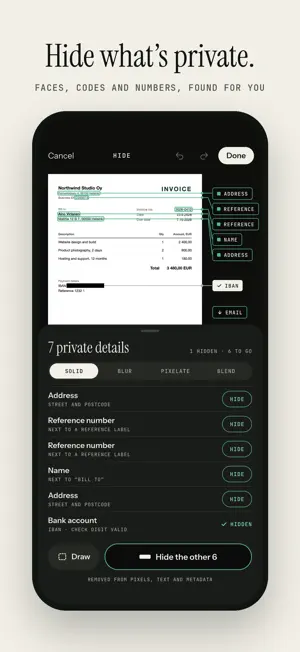
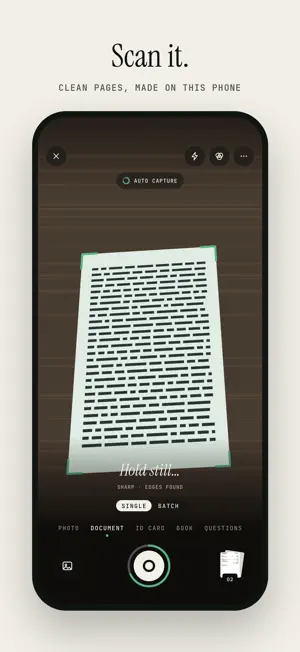
Ocro is a private document scanner that finds your personal details and hides them before you share. Scan a page, let Ocro black out the names, numbers and faces you'd rather keep to yourself, and send a clean PDF in seconds. Everything happens on your phone, so your documents stay yours. SCAN CLEAN, FLAT PAGES • Point your camera at any page: Ocro finds the edges, captures it automatically and straightens it into a flat, sharp scan • The Auto look evens out shadows, colour casts and moiré, so the paper turns white and text reads clearly • Scan many pages in a row, or a book's two facing pages at once • ID card mode puts the front and back on one page at their real size, ready to print or send • Glare on a glossy page? Take a second photo and Ocro restores the text underneath • Import photos and PDFs you already have HIDE WHAT'S PRIVATE, AUTOMATICALLY Ocro reads every page and finds the details people most often forget to cover: • Names, addresses, phone numbers and email addresses • Bank account numbers, IBANs and card numbers • Personal ID numbers, dates of birth and passport lines • Faces, signatures, stamps, QR codes, barcodes and number plates Hide everything with one tap, or choose item by item. Draw over anything else you want gone. Pick how it looks: solid, blur, pixelate or blend, shaped to fit each face or signature. Hidden really means hidden. The text under a redaction is removed from the file itself, not just covered by a box, so it can't be copied, searched or recovered. Screenshots too. Share a screenshot to Ocro, or tap Hide a screenshot, and Ocro finds the private details for you, so you can send a chat, a banking app or a booking confirmation without the parts you'd rather keep to yourself. Several screenshots can be joined into one long page. Add words to Always hide, such as your own name or account number, and Ocro hides them in every document from then on. SHARE THE REST • Export as PDF, JPG or plain text • Set a size limit, like 2 MB for an email or a form upload, and Ocro makes the smallest file that stays readable • Protect a PDF with a password • Share straight to any app or save to your phone • Export several documents at once PDF TOOLS IN ONE PLACE Merge PDFs, split a PDF, compress a PDF, add or remove a password, extract pages, turn images into a PDF or a PDF into images, extract text, and make a scanned PDF searchable. Sign documents with your saved signature and annotate them with pen, highlighter, arrows, shapes and text. TRANSLATE A PAGE, OFFLINE Translate a scanned page or a photo into your language, set over the page at the size of its own text. Languages download once through the App Store works without a connection. Hidden details are never translated. CLEAR HANDWRITING Questions mode lifts handwritten answers off worksheets and forms, keeping the printed questions and every box, so a page can be filled in again. Remove handwriting does the same for any page. READ AND FIND TEXT (OCR) Ocro's text recognition reads the world's major languages and scripts, including English, Spanish, French, German, Arabic, Hindi, Chinese, Japanese and Korean. Copy the text from any page, search across all your documents, and export PDFs with selectable, searchable text. PRIVATE BY DESIGN • Scanning, reading and hiding all run on your device • Use it without an account and without signing in • Your documents are never used for ads and never leave your phone unless you share them • Lock Ocro with your face, fingerprint or passcode • Works fully offline MADE TO FEEL AT HOME Undo and redo every edit, home screen widgets, quick actions and shortcuts that start a scan in one tap, dark mode, and an interface in your language. Every feature is free. Ocro is supported by ads; watch a short video to turn them off for a while. Download Ocro and share documents without sharing your private details.
What’s new
Version 1.1.1 · Updated October 16, 2026
** Offline Translate ** Performance Enhancement ** Bug Fixes
App privacy
The developer, Anil Shah, reported these privacy practices to Apple.
Data Used to Track You
The following data may be used to track you across apps and websites owned by other companies:
- Location: Coarse Location
- Identifiers: Device ID
- Usage Data: Product Interaction, Advertising Data
Data Not Linked to You
The following data, which may be collected but is not linked to your identity, may be used for the following purposes:
- Location: Coarse Location
- Identifiers: Device ID
- Usage Data: Product Interaction, Advertising Data
- Diagnostics: Crash Data, Performance Data, Other Diagnostic Data
Used for: Third-Party Advertising, Analytics
Alternatives to Ocro: Scan, Hide, Share
Looking for apps like Ocro: Scan, Hide, Share? Here are 6 similar apps on the App Store. The highest rated is Kagi Summarize (4.8/5), and all 6 are free to download.
-
 Muslim Habits Tracker
-
 Kagi Summarize
4.8
-
 Universal Remote - Control TVs
4.3
-
 Kagi Translate
4.2
-
 MEW-PAY
3.5
-
 Zoho Mail Admin
4.7
| App | Rating | Price | Last updated | Compare |
|---|---|---|---|---|
| Ocro: Scan, Hide, Share | – | Free | October 16, 2026 | |
| Muslim Habits Tracker | – | Free | Jun 28, 2026 | Compare |
| Kagi Summarize | 4.8 / 5 (25) | Free | Aug 27, 2026 | Compare |
| Universal Remote - Control TVs | 4.3 / 5 (90) | Free | Jun 27, 2025 | Compare |
| Kagi Translate | 4.2 / 5 (56) | Free | Sep 25, 2026 | Compare |
| MEW-PAY | 3.5 / 5 (357) | Free | Jun 10, 2026 | Compare |
| Zoho Mail Admin | 4.7 / 5 (1,059) | Free | Mar 19, 2026 | Compare |