

Vaultic™ Authenticator
SON TUNG Utilities iPhoneiPadiPod touch
Vaultic™ Authenticator is a free Utilities app for iPhone and iPad by SON TUNG. Requires iOS 18.6. Updated October 19, 2026.
- Price
- Free
- on the App Store
- Size
- 33 MB
- Age 4+
- Updated
- Oct 19
- 2026 · v1.0
Screenshots
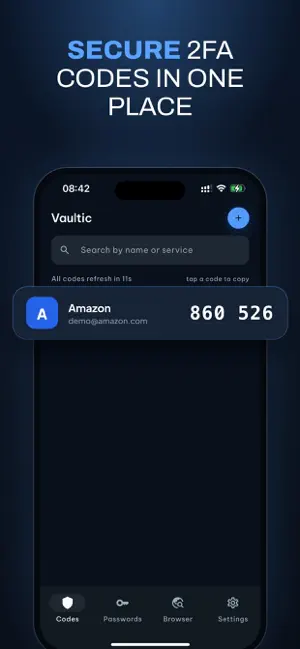
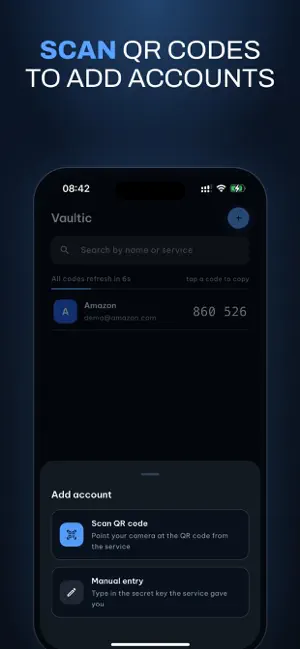


About Vaultic™ Authenticator
Vaultic generates two-factor authentication codes and stores your passwords — entirely on your device. No account. No sign-up. No server. Vaultic has no backend at all, which means there is nothing for us to read, leak, or hand over. Your 2FA secrets and passwords never leave your phone unless you choose to back them up, and that backup is encrypted on this device with a password only you know. TWO-FACTOR CODES • Standard TOTP (RFC 6238) — works with Google, GitHub, AWS, Microsoft and thousands more • Add accounts by scanning a QR code or entering a key by hand • SHA-1, SHA-256 and SHA-512; 6 or 8 digits; 30 or 60-second cycles • Search, rename and reorder your accounts • Works completely offline — airplane mode, no signal, no problem PASSWORD VAULT • Save logins with username, password, website and notes • Built-in password generator • Tap to copy, with the clipboard cleared for you afterwards • Stored in the iOS Keychain and encrypted by the system PRIVATE BROWSER (Vaultic Plus) • Browse in a session that leaves nothing behind • Fill a saved login straight into the page • Cookies, cache and site data erased once you close your tabs ENCRYPTED BACKUP • Back up your codes and passwords to your own iCloud Drive • Encrypted on your device with AES-256-GCM before anything is uploaded • Your backup password never leaves your phone. We cannot reset it, and we cannot read your backup. APP LOCK • Lock Vaultic behind Face ID, Touch ID or a PIN • Locks itself automatically once you leave the app BUILT FOR PRIVACY • Camera is the only permission Vaultic asks for, and only to scan QR codes • No advertising SDKs • Full VoiceOver support, Dynamic Type and Dark Mode • Available in English and Vietnamese VAULTIC PLUS Vaultic Plus unlocks the private browser and removes the limit on how many accounts and passwords you can add. Payment is charged to your Apple Account at confirmation of purchase. A subscription renews automatically unless it is cancelled at least 24 hours before the end of the current period, and your account is charged for renewal within 24 hours of the end of that period. You can manage or cancel a subscription in your Apple Account settings. Any unused portion of a free trial is forfeited when you buy a subscription. Terms of Use: https://sontung.app/term-of-use/ Privacy Policy: https://sontung.app/privacy/ One promise worth stating plainly: your 2FA codes, your saved passwords, and both backup and restore keep working on the free version and after a subscription ends. Vaultic will never hold your own data hostage.
App privacy
The developer, SON TUNG, reported these privacy practices to Apple.
Data Not Linked to You
The following data, which may be collected but is not linked to your identity, may be used for the following purposes:
- Location: Coarse Location
- Identifiers: Device ID
- Diagnostics: Crash Data
Used for: Analytics
Alternatives to Vaultic™ Authenticator
Looking for apps like Vaultic™ Authenticator? Here are 6 similar apps on the App Store. The highest rated is RapidTunnel VPN (4.7/5), and all 6 are free to download.


| App | Rating | Price | Last updated | Compare |
|---|---|---|---|---|
| Vaultic™ Authenticator | – | Free | October 19, 2026 | |
| Overleap VPN | – | Free | Oct 13, 2026 | Compare |
| Noltis | – | Free | Oct 5, 2026 | Compare |
| SnapWrap - Your Private Vault | 4.0 / 5 (2) | Free | Aug 26, 2026 | Compare |
| RapidTunnel VPN | 4.7 / 5 (15) | Free | Oct 14, 2026 | Compare |
| FoxVault | – | Free | Jul 22, 2026 | Compare |
| Suldor | – | Free | Sep 28, 2026 | Compare |