

Tuck AI: Save for Later
Marcos Pastor Abajo Entertainment iPhoneiPadiPod touch
Tuck AI: Save for Later is a free Entertainment app for iPhone and iPad by Marcos Pastor Abajo. Requires iOS 17.0. Updated November 3, 2026.
- Price
- Free
- on the App Store
- Size
- 15 MB
- Age 12+
- Updated
- Nov 3
- 2026 · v1.10
Screenshots



About Tuck AI: Save for Later
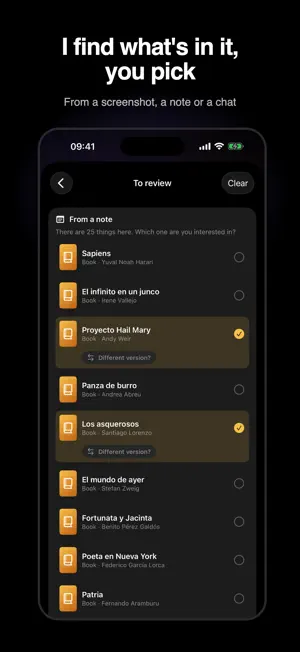
Someone recommends a show in a tweet, a book on a podcast, a recipe on TikTok or a restaurant on Instagram? It ends up as a screenshot you never look at again. Tuck keeps it all in one place, for when you have some time. SAVE FROM ANY APP Share → Tuck. A link, a screenshot, a photo, a pin, a post or a WhatsApp chat: Tuck understands what's in it and shows you the details, with cover, synopsis and where to watch. If a pin or a TikTok hides a book or a restaurant, you choose what to save: what's inside, the post, or both. And it remembers where you saw it. ONE SCREENSHOT IS ENOUGH If a screenshot has 18 movies and 5 books, Tuck asks which ones you're interested in. It never saves anything on its own. It asks before using AI, and what it reads isn't stored. EVERYTHING BY TYPE Shows, movies, books, podcasts, music, videos, recipes, restaurants, games, articles and threads, each in its place. Create your own categories ("Wine", "Travel") and tag anything ("Rome"). WHERE TO WATCH Pick your streaming services and Tuck tells you what you can watch now and where. If something on your list lands on one of them, or a show you watched gets a new season, you'll get a heads-up. BRING WHAT YOU ALREADY HAVE Your lists in Notes, a WhatsApp chat, old screenshots, or what you have on Goodreads, Letterboxd, FilmAffinity and IMDb. Keep using the app while it imports. SHARED LISTS Invite your partner, family or book club with a link. Everyone can say "I'm in" and add their stars; if you can't decide, Tuck picks for you. AND ALSO • Favorites: tap the heart and sort each category with what you're most excited about on top. • The "For today" widget: something from your list, right on your Home Screen. • "Can't decide?" picks for you from what you've saved. • Mark things as done and rate them; "Because you liked…" reminds you of similar things you saved. • Your own note on anything ("Paco recommended it"). • Siri ("Save a book to Tuck"), articles and recipes to read offline, full Bluesky threads. • Sign in with Apple or with your email and your list is safe and on all your iPhones. • In English and Spanish. No ads. Export your list or delete your account anytime. TUCK PRO For free you can keep up to 100 things to get to (finished ones don't count, and nothing is ever deleted). With Tuck Pro you save without limits. Monthly or yearly subscription (yearly comes with a one-week free trial). Payment is charged to your Apple Account at confirmation of purchase and renews automatically unless canceled at least 24 hours before the end of the current period. Manage or cancel it in Settings → your name → Subscriptions. Terms of Use: https://www.apple.com/legal/internet-services/itunes/dev/stdeula/ Privacy: https://tuckapp.es/privacidad Movie and TV data from TMDB. Streaming availability from JustWatch.
What’s new
Version 1.10 · Updated November 3, 2026
What's new in Tuck: • Choose where each thing goes: as you save, tap its type to change it, or put it in one of your categories or a new one. A hotel from Booking no longer ends up in Restaurants just because it has a restaurant. • Things you save to a shared list no longer have to be in yours too: turn off "Also in your lists" and they go only to the shared one. • TikTok photo posts load every time, not just some of the time. • If an Instagram carousel or an X post is slow to respond, I try again instead of ending up without the photos. And Bluesky posts now come with their photos. • A cleaner home screen: the top bar blends into the background. • And some fixes.
App privacy
The developer, Marcos Pastor Abajo, reported these privacy practices to Apple.
Data Linked to You
The following data, which may be collected and linked to your identity, may be used for the following purposes:
- Purchases: Purchase History
- Usage Data: Product Interaction
- Contact Info: Email Address, Name
- User Content: Other User Content
- Identifiers: User ID
- Diagnostics: Performance Data
Used for: Analytics, App Functionality
Data Not Linked to You
The following data, which may be collected but is not linked to your identity, may be used for the following purposes:
- User Content: Photos or Videos
Used for: App Functionality
Alternatives to Tuck AI: Save for Later
Looking for apps like Tuck AI: Save for Later? Here are 6 similar apps on the App Store. The highest rated is DramaBay - Short Drama Series (4.6/5), and all 6 are free to download.


| App | Rating | Price | Last updated | Compare |
|---|---|---|---|---|
| Tuck AI: Save for Later | – | Free | November 3, 2026 | |
| Metafest | – | Free | May 23, 2025 | Compare |
| KOP Stadium | – | Free | Dec 22, 2025 | Compare |
| VIVE AHORA Desalia 2026 | – | Free | Jun 1, 2026 | Compare |
| MADRING | – | Free | Sep 11, 2026 | Compare |
| Roig Arena | – | Free | Nov 5, 2026 | Compare |
| DramaBay - Short Drama Series | 4.6 / 5 (949) | Free | Jan 16, 2026 | Compare |