

Nekoyomi: Speed Read & Listen
Taiki Morinaga Book iPhoneiPadiPod touch
Nekoyomi: Speed Read & Listen is a free Book app for iPhone and iPad by Taiki Morinaga. Requires iOS 18.0. Updated October 19, 2026.
- Price
- Free
- on the App Store
- Size
- 89 MB
- Age 17+
- Updated
- Oct 19
- 2026 · v1.0.4
Screenshots



About Nekoyomi: Speed Read & Listen
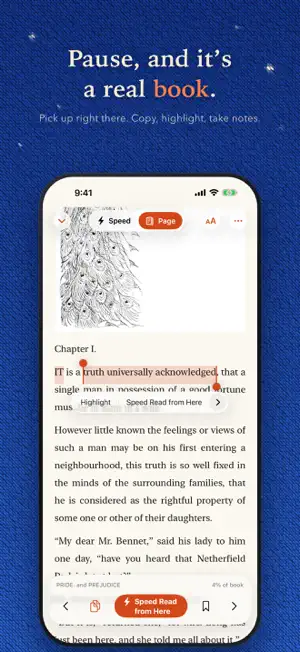
Keep your eyes still. Let the words come to you. Nekoyomi shows text a phrase at a time, right in the middle of the screen, so your eyes don’t have to travel across the page. It’s a little faster than turning pages, and a lot calmer than skimming. PAUSE, AND IT’S A BOOK Tap to stop and you land on a normal page, exactly where you were. Read a line back, long-press to highlight or copy, then speed-read again from any sentence you like. YOUR RHYTHM Steady like a metronome, a breath at every comma, a touch slower on long words, or a natural read-aloud pace. Show one word at a time or a few together. Long-press while reading to change speed and rhythm on the fly. LISTEN, OR READ IN ANOTHER LANGUAGE Listen to books and web articles with your choice of voice and speed. Set a sleep timer for bedtime. Translate the full text into a supported language, then read, listen to or save the translation. Some voices and translation languages need a download first. OPENS ALMOST ANYTHING EPUB, PDF, MOBI and AZW3 (DRM-free), KEPUB, FB2, Word, ODT, Markdown, HTML, RTF, plain text and more. Over 15 formats in all. Illustrations show up too, and stay on screen a beat longer. Drop files into the app’s folder in Files and they appear on your shelf. THE WEB, TOO Open an article in the built-in browser and tap the speed-reading button. Menus and ads fall away, leaving the story. Save it to your library with its inline photos, illustrations and captions, and choose a collection to keep it in. FREE CLASSICS, ONE TAP AWAY Browse Project Gutenberg, Standard Ebooks, Wikisource and Aozora Bunko right inside the app. Or choose Random and a category to add a book, news article or encyclopedia entry. New additions stand out until you first open them. A SHELF OF YOUR OWN Create collections for novels, work or study. Put the Continue Reading widget on your Home Screen to pick up where you left off. Optional reminders let you choose a time and only notify you on days you haven’t read. MADE FOR MANY LANGUAGES Use the app in 18 languages, including right-to-left Arabic and Hebrew. Japanese is split into natural phrases and can be read vertically. Chinese and Thai are split into words. Newly imported books and articles can retain their original Japanese ruby annotations for display and read-aloud. EASY ON THE EYES Paper, sepia, night and black themes, a handful of typefaces, and a choice of embroidered-cat app icons, because why not. NEKOYOMI PRO • No ads • iCloud sync for your books, place, bookmarks and highlights • Save articles from Safari to read later • News and RSS feeds that fill your shelf on their own • Color highlights and notes, with export to Markdown, Notion or Readwise • Reading stats: time spent, characters read, speed over time, streaks • Burroughs Mode: rearrange fragments from books on your shelf or the web into new prose, poems or lyrics, with source references Choose a monthly plan or a one-time purchase. Eligible subscribers can try the monthly plan free for one week. The monthly plan renews automatically unless it’s cancelled at least 24 hours before the end of the free trial or the current period. Payment is charged to your Apple Account. You can cancel anytime in Settings > Apple Account > Subscriptions. Terms of Use: https://www.apple.com/legal/internet-services/itunes/dev/stdeula/ Privacy Policy: https://tsubamemagic.com/rsvp/privacy.html
What’s new
Version 1.0.4 · Updated October 19, 2026
RSVP Reader is now Nekoyomi. Your books and existing purchases stay with you. • Added Burroughs Mode to Nekoyomi Pro. Mix fragments from your books or the web into new prose, poems or lyrics. • Newly imported books and articles can retain their original Japanese ruby annotations, both on the page and when read aloud. • Refined text selection and the reading-position marker in page view.
App privacy
The developer, Taiki Morinaga, reported these privacy practices to Apple.
Data Linked to You
The following data, which may be collected and linked to your identity, may be used for the following purposes:
- Location: Coarse Location
- Identifiers: Device ID
- Usage Data: Product Interaction, Advertising Data
Used for: Third-Party Advertising, Developer’s Advertising or Marketing, Analytics
Data Not Linked to You
The following data, which may be collected but is not linked to your identity, may be used for the following purposes:
- Diagnostics: Performance Data, Other Diagnostic Data, Crash Data
Used for: Third-Party Advertising, Developer’s Advertising or Marketing, Analytics
Alternatives to Nekoyomi: Speed Read & Listen
Looking for apps like Nekoyomi: Speed Read & Listen? Here are 6 similar apps on the App Store. The highest rated is Fox Reader: AI Audiobook Maker (5.0/5), and all 6 are free to download.
-
 OneComic: Manga & Comics
-
 青空EPUB
-
 Readarium: Read It Later
-
 Fox Reader: AI Audiobook Maker
5.0
Fox Reader: AI Audiobook Maker
5.0
-
 Realbook: EPUB PDF Book Reader
-
 Fan Reader
4.2
Fan Reader
4.2
| App | Rating | Price | Last updated | Compare |
|---|---|---|---|---|
| Nekoyomi: Speed Read & Listen | – | Free | October 19, 2026 | |
| OneComic: Manga & Comics | – | Free | Oct 12, 2026 | Compare |
| 青空EPUB | – | Free | Sep 8, 2026 | Compare |
| Readarium: Read It Later | – | Free | Sep 14, 2026 | Compare |
| Fox Reader: AI Audiobook Maker | 5.0 / 5 (3) | Free | Jun 24, 2026 | Compare |
| Realbook: EPUB PDF Book Reader | – | Free | Sep 26, 2026 | Compare |
| Fan Reader | 4.2 / 5 (5) | Free | Jun 11, 2026 | Compare |