

Video Volume Booster: Bovumi
Aleksandr Timonchev Photo & Video iPhoneiPadiPod touch
Video Volume Booster: Bovumi is a free Photo & Video app for iPhone and iPad by Aleksandr Timonchev. Requires iOS 17.0. Updated October 18, 2026.
- Price
- Free
- on the App Store
- Size
- 15 MB
- Age 4+
- Updated
- Oct 18
- 2026 · v1.0
Screenshots


About Video Volume Booster: Bovumi
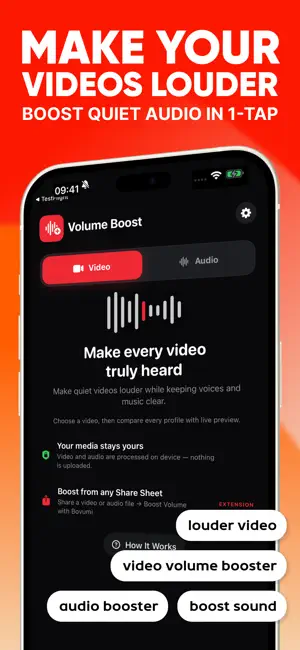
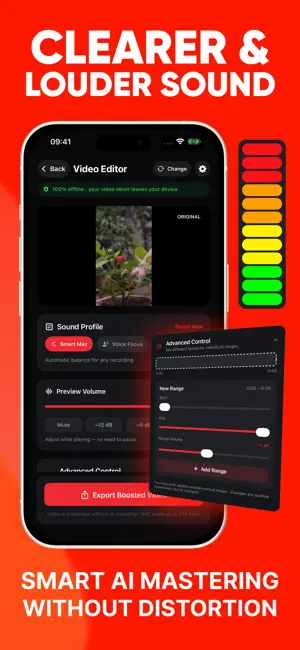
Make quiet videos and audio files easier to hear with Bovumi. Bring up a softly recorded voice, add energy to music, or give a quiet clip more presence. Import your media, adjust the sound and hear the difference in a live preview before you export. ONE TOOL FOR VIDEO AND AUDIO Choose a video from Photos or import media from Files. Work with the soundtrack of a video or with an audio file on its own. Export processed audio as M4A, or save and share your boosted video. FIND THE RIGHT SOUND • Smart Max: a balanced starting point for different recordings. • Voice Focus: bring speech forward. • Music Punch: give music more energy. • Bass Lift: add weight to the low end. • Quiet Rescue: lift very quiet recordings. ADJUST THE PARTS THAT NEED IT Set the overall gain or use Advanced Control to adjust selected ranges on the timeline. Bring up a quiet section or turn down a louder moment without applying the same change to the whole recording. HEAR IT BEFORE YOU SAVE IT Compare the original sound with your chosen settings. Adjust the level while listening and find the balance that suits your recording. MORE CONTROL OVER LOUDNESS LUFS analysis, three-band processing and True Peak limiting help you manage loudness and peaks. The result depends on the source recording and your settings; stronger boosts may make compression more noticeable. KEEP YOUR MEDIA ON YOUR DEVICE Audio processing happens locally on your iPhone. Your media is not uploaded for processing. When exporting a video, Bovumi preserves the video track without re-encoding its frames. TRY THE PREVIEW, THEN EXPORT WITH PRO Live preview is available for free. Bovumi Pro unlocks exports and Advanced Control. Purchase options and prices are shown in the app before you buy. Bovumi processes imported video and audio files. It does not change the system volume of other apps. Subscription unlocks full access: unlimited saves, exports, and all premium features. Terms of use: https://www.apple.com/legal/internet-services/itunes/dev/stdeula/
App privacy
The developer, Aleksandr Timonchev, reported these privacy practices to Apple.
Data Not Collected
The developer does not collect any data from this app.
Alternatives to Video Volume Booster: Bovumi
Looking for apps like Video Volume Booster: Bovumi? Here are 6 similar apps on the App Store. The highest rated is Frame Grabber: Best Shots (5.0/5), and all 6 are free to download.
-
 LumiVal - AI Photo Enhancer
-
 Easy Captions Flow
-
 Moments: Smart Video Editor
-
 DuoCam Recorder & Capturer
-
 Frame Grabber: Best Shots
5.0
-
 Captions: Auto Video Subtitles
5.0
| App | Rating | Price | Last updated | Compare |
|---|---|---|---|---|
| Video Volume Booster: Bovumi | – | Free | October 18, 2026 | |
| LumiVal - AI Photo Enhancer | – | Free | May 23, 2026 | Compare |
| Easy Captions Flow | – | Free | Oct 28, 2026 | Compare |
| Moments: Smart Video Editor | – | Free | Oct 19, 2026 | Compare |
| DuoCam Recorder & Capturer | – | Free | Apr 22, 2026 | Compare |
| Frame Grabber: Best Shots | 5.0 / 5 (1) | Free | Sep 26, 2026 | Compare |
| Captions: Auto Video Subtitles | 5.0 / 5 (3) | Free | Sep 7, 2026 | Compare |