

PC Forge
REVUD TJAN Utilities iPhoneiPadiPod touch
PC Forge is a free Utilities app for iPhone and iPad by REVUD TJAN. Requires iOS 15.0. Updated October 9, 2026.
- Price
- Free
- on the App Store
- Size
- 49 MB
- Age 4+
- Updated
- Oct 9
- 2026 · v1.0.0
Screenshots



About PC Forge
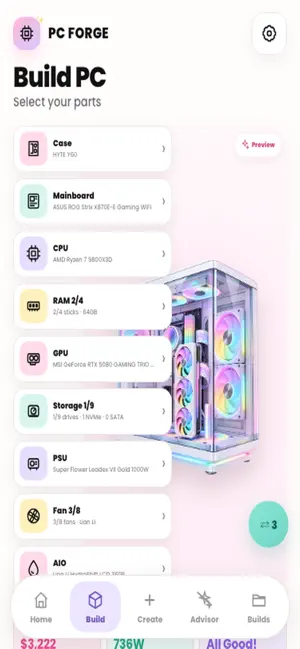
PC Forge helps you build your dream PC through a mobile-first experience featuring a modern pastel interface. From the Home screen, you can start a new build and view statistics on saved builds, favorites, compatibility status, and configuration value. The Build PC page serves as the assembly hub: select individual components across categories (Case, Motherboard, CPU, RAM, GPU, Storage, PSU, Fan, and AIO) while viewing the total price, estimated power draw, recommended PSU wattage, real-time compatibility reports, and a list of warnings/errors with quick-fix buttons; you can also access the Visual Preview, Analyze Build, Save Build, or view the full Build Overview. The Parts section allows you to search, filter, sort, and favorite components; switch quickly between categories; toggle "Compatible Only" to view parts matching your current build; browse Featured Parts and the full catalog; and tap components to view detailed specs, pricing, and compatibility status, or to add/remove them from the build or add them to the Comparison tool. The Detail page displays full specifications, context-specific actions (select, add RAM kit, add drive, add fan, remove), and suggestions for similar components. The Smart Advisor takes inputs—such as budget, usage purpose (Gaming, Coding, 3D Work, Office, Video Editing), target resolution, CPU/GPU priorities, and case size—to generate a balanced configuration suggestion; you can view the build, apply it to your current session, save it as a new build, or continue editing. The Analyzer evaluates the configuration using a Performance Score, a summary of selected components, simulated benchmarks, category-specific insights, and shortcuts to resolve compatibility issues. The Visual Builder allows you to preview the PC layout based on the case and motherboard, toggle component layers, zoom and reset the view, quickly select categories, and open a full-screen preview canvas. "My Builds" manages saved configurations, offering filtering (All/Favorites/Gaming/Workstation), search, sorting, and actions such as preview, edit, compare, duplicate, rename, favorite, and delete; each build card displays a case preview, CPU/GPU/RAM details, price, and a compatibility badge. "Compare Parts" places two components of the same type side-by-side, comparing metrics like price, performance, TDP, VRAM, capacity, speed, and value score. "Build Overview" aggregates the entire configuration into a dashboard view, featuring the build title, gaming balance, total price, a list of component cards, and options to save or edit. "Settings" allows for the customization of animation intensity, currency (USD/VND), and audio feedback, as well as the clearing of app data, build data, favorites, and comparison history
App privacy
The developer, REVUD TJAN, reported these privacy practices to Apple.
Data Not Collected
The developer does not collect any data from this app.
Alternatives to PC Forge
Looking for apps like PC Forge? Here are 6 similar apps on the App Store.


| App | Rating | Price | Last updated | Compare |
|---|---|---|---|---|
| PC Forge | – | Free | October 9, 2026 | |
| PitLog: Car Care | – | Free | Aug 2, 2026 | Compare |
| Cyber Core Manage | – | Free | Jul 9, 2026 | Compare |
| Quiet Chamber | – | Free | Sep 22, 2026 | Compare |
| Ride-Vitals | – | Free | Aug 26, 2026 | Compare |
| The Last Sunlight | – | Free | Mar 17, 2025 | Compare |
| My Car: Care & Fuel | – | Free | Oct 9, 2026 | Compare |
Compare PC Forge with the top alternatives: ratings, updates, ASO score and keyword gaps →