

Limi - AI Usage Widget
SION NOH Utilities iPhoneiPadiPod touchApple Watch
Limi - AI Usage Widget is a free Utilities app for iPhone and iPad by SION NOH. Requires iOS 16.0. Updated October 18, 2026.
- Price
- Free
- on the App Store
- Size
- 3 MB
- Age 4+
- Updated
- Oct 18
- 2026 · v1.2.1
Screenshots


About Limi - AI Usage Widget
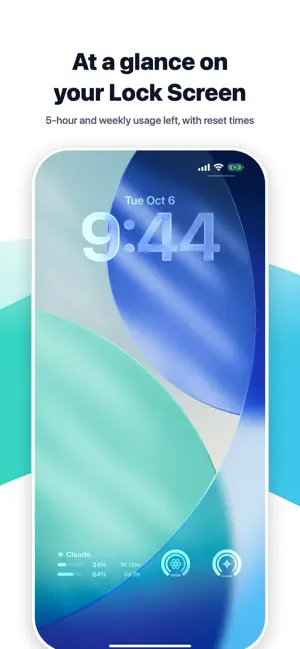
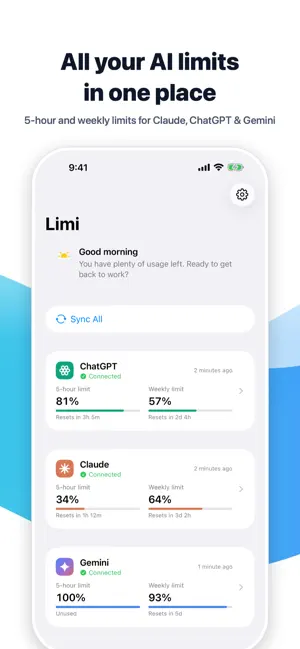
Ever been cut off by a usage limit right in the middle of your work? Limi shows how much usage is left on your Claude, ChatGPT and Gemini subscriptions, and when it refills, all in one place. Check it at a glance with Home Screen and Lock Screen widgets, without opening the app. AT A GLANCE • 5-hour limit: how much is left and when it resets • Weekly limit: how much is left this week and when it resets • Which AI has the most room right now SUPPORTED SERVICES • Claude: plan usage limits • ChatGPT: Codex (coding agent) usage limits • Gemini: Gemini app usage limits The limits shown depend on what each service provides for your account. Plans without these limits may not show a value. HOME SCREEN WIDGETS • AI Usage Comparison: 5-hour usage left for your AIs, side by side • Recommended AI: the AI with the most usage left right now • AI Usage Gauge: one AI of your choice, big and clear (iOS 17 or later) • AI Usage Dashboard: circular gauges for every AI at once • Reset Countdown: limits in the order they reset • AI Usage Details: 5-hour and weekly usage left with reset times LOCK SCREEN WIDGETS • A circular gauge for each service • A two-line widget for each service: 5-hour and weekly usage left and time until reset • Sync Usage button: refresh without opening the app (iOS 17 or later) Tap a widget to jump straight to that AI. APPLE WATCH • See usage left in the Watch app, on watch faces and in the Smart Stack. AUTOMATIC REFRESH Your iPhone refreshes usage in the background from time to time, even when the app is closed. iOS decides how often, based on battery and other conditions. NOTIFICATIONS • Get notified when a limit you used heavily (35% or less left on the 5-hour or weekly limit) refills. • Get a heads-up 5 days and 1 day before your Claude login expires. • Get notified right away if a login expires. • Optionally hold night-time (midnight to 7 AM) notifications until 7 AM. YOUR PRIVACY • No developer server. Usage goes straight from each service to your iPhone. • We never ask for your password. You sign in on each service's own login page. • Login info is stored only in your iPhone's Keychain, encrypted. • No ads, no analytics, no tracking. Notifications are created on your iPhone. • Login info is used only to read usage. Limi never sends messages or uses up your usage. GOOD TO KNOW • Limi is an independent app and is not affiliated with Anthropic, OpenAI or Google. Claude, ChatGPT and Gemini are trademarks of their respective owners. • These aren't official integrations, so a change on a service's side may briefly stop them from working. We'll fix issues as quickly as we can. • Claude requires signing in again about once a month. • Requires iOS 16 or later. Some widgets require iOS 17 or later. Contact: [email protected]
What’s new
Version 1.2.1 · Updated October 18, 2026
• Widgets now refresh your usage on their own, without opening the app • Improved widget display • More reliable background sync • Minor bug fixes
App privacy
The developer, SION NOH, reported these privacy practices to Apple.
Data Not Collected
The developer does not collect any data from this app.
Alternatives to Limi - AI Usage Widget
Looking for apps like Limi - AI Usage Widget? Here are 6 similar apps on the App Store.
-
 Usage Gauge
-
 JaugeAI
-
 AI limits : usage tracker
-
 TokenWise - AI Quota Tracker
-
 Web Live Activities
-
 ARGO WMS
| App | Rating | Price | Last updated | Compare |
|---|---|---|---|---|
| Limi - AI Usage Widget | – | Free | October 18, 2026 | |
| Usage Gauge | – | Free | Sep 20, 2026 | Compare |
| JaugeAI | – | Free | Oct 12, 2026 | Compare |
| AI limits : usage tracker | – | Free | Oct 18, 2026 | Compare |
| TokenWise - AI Quota Tracker | – | Free | Oct 24, 2026 | Compare |
| Web Live Activities | – | Free | Oct 26, 2026 | Compare |
| ARGO WMS | – | Free | Mar 11, 2026 | Compare |