

Alcove: Tasks & Notes
Muhammed Basil E Productivity iPhoneiPadiPod touchMac
Alcove: Tasks & Notes is a free Productivity app for iPhone and iPad by Muhammed Basil E. Requires iOS 17.4. Updated October 15, 2026.
- Price
- Free
- on the App Store
- Size
- 60 MB
- Age 4+
- Updated
- Oct 15
- 2026 · v1.2
Screenshots


About Alcove: Tasks & Notes
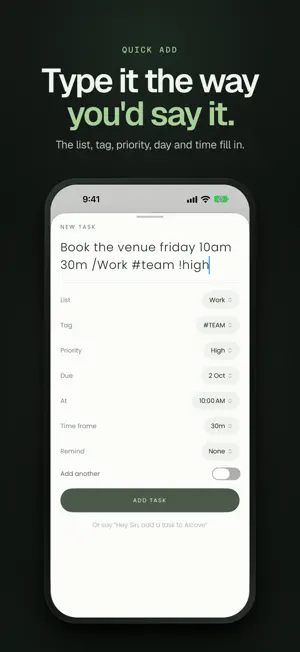
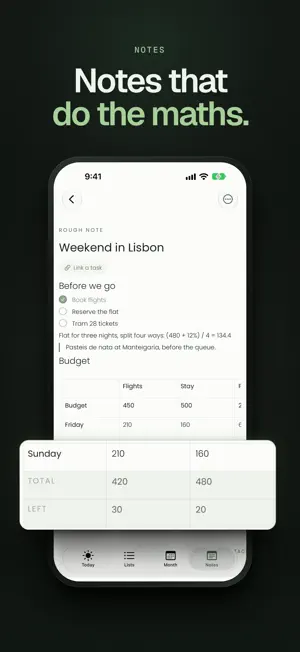
Alcove is a calm to-do list, daily planner and notes app in one place. Capture tasks in plain words, plan your week on a calendar, keep notes that do the maths, record meetings into notes with a summary, and move work along on kanban boards. Tick tasks off from a widget, and find the same lists on your Mac, kept in step by your own iCloud. TYPE IT THE WAY YOU'D SAY IT Write "Call mum Friday 6pm" or "Stand-up every weekday 9:30 15m /Work" and Alcove picks out the day, time, length, repeat, priority, list and tags as you type. On the Mac, press Option-Space from any app to add a task. SPEAK YOUR TASKS Say everything on your mind at once. Alcove turns it into separate tasks, each with its date, time and list. MEETINGS, WRITTEN UP Press Record when a meeting starts. On the Mac, Alcove hears your microphone and the call, so it works with Zoom, Teams, Google Meet or any call app, with no bot joining. On iPhone and iPad it records the room. When you stop, you get a note with the recording and the transcript with who said what, and a summary with the decisions and action items, ready to become tasks, where Apple Intelligence supports the language. Speech is transcribed on your device, in more than a dozen languages including Malayalam, Hindi and Tamil, written in their own script. Meeting notes need macOS 26 or iOS 26. PLAN YOUR DAY AND WEEK • Today, Upcoming and a calendar with an hour grid and an all-day row • Drag a task to a new time or day • Repeating tasks for any rhythm: every few days, weeks, months or years, chosen weekdays, or counted from when you finished REMINDERS AS LOUD AS THE TASK Pick quiet, a notification, or an alarm. On iPhone with iOS 26, an alarm rings through silent mode and Focus, with Stop and Snooze. Mark a task done right from its reminder, and look back on every reminder, and anything you missed, on the Notifications page. NOTES THAT DO THE MATHS Headings, checklists, code, quotes and tables, written with Markdown shortcuts. End a line with = and it's worked out, and tables add up their own totals. Paste a checklist or table from another app and it arrives as one. Turn any checklist line into a task. KANBAN BOARDS Lay tasks out in To do, Doing and Done, or columns of your own. Tasks stay in their lists and in Today, and a card dropped in Done is finished everywhere. WIDGETS, SIRI AND SHORTCUTS • Widgets for the Home Screen, Lock Screen and Mac desktop, with tasks you can tick without opening the app • Controls for Control Center and the Lock Screen • Siri adds tasks, reads out your day and takes notes • Shortcuts actions for your own automations MADE FOR THE MAC A menu bar list with a live count, a main window with a sidebar of every list, board and note, floating windows for lists, notes and boards that stay on top, and keyboard shortcuts throughout. AI assistants can work with your tasks too, but only once you turn them on, only with the permissions you approve, and every call is logged. PRIVATE BY DESIGN No account to create, no ads and no tracking. Your tasks and notes sync through your own iCloud. Progress shows what you finished against what you added, worked out on your device, with no streaks and no scores. AND THE DETAILS • 100 steps of undo, and six months of history for every task • Files and pictures attached to tasks and notes, on every device through your iCloud • Search across tasks, notes, tags and attachments • Lists with colours and icons, folders and tags • Nine accents and eight papers, in light and dark ONE PURCHASE, NO SUBSCRIPTION Download free and try everything for 14 days, starting whenever you're ready. Then a single purchase unlocks Alcove for good on your Mac, iPhone and iPad, and Family Sharing includes your family. If you don't unlock, your tasks and notes stay readable and exportable, and nothing is deleted. Privacy Policy: https://alcovetasks.com/privacy Terms of Use: https://www.apple.com/legal/internet-services/itunes/dev/stdeula/
What’s new
Version 1.2 · Updated October 15, 2026
• Meeting notes: record a meeting and get a note with the recording, the transcript with who said what, and a summary with the action items. Transcribed on your iPhone or iPad (iOS and iPadOS 26) • Indian languages are written in their own script: Malayalam, Hindi, Tamil and more, mixed meetings included • People are told apart and named in a tap; voice memory can suggest names next time • Notifications: tap the bell on Today for the reminders that went off and what became of each, what you missed, and what is coming up • Folders hold notes: file notes in folders and open a folder as a page of its own • Quicker lists and notes, smoother pinning, and many smaller fixes
App privacy
The developer, Muhammed Basil E, reported these privacy practices to Apple.
Data Not Collected
The developer does not collect any data from this app.
Alternatives to Alcove: Tasks & Notes
Looking for apps like Alcove: Tasks & Notes? Here are 6 similar apps on the App Store. The highest rated is haatch. - Goal & Habit Tracker (5.0/5), and all 6 are free to download.
-
 Orgnice
-
 Note-Due: Tasks & Notes
4.0
Note-Due: Tasks & Notes
4.0
-
 Habit Tracker - Dayrise
4.5
Habit Tracker - Dayrise
4.5
-
 haatch. - Goal & Habit Tracker
5.0
haatch. - Goal & Habit Tracker
5.0
-
 Did it: Habit Tracker
4.8
Did it: Habit Tracker
4.8
-
 Habit Tracker & Daily habits
4.7
Habit Tracker & Daily habits
4.7
| App | Rating | Price | Last updated | Compare |
|---|---|---|---|---|
| Alcove: Tasks & Notes | – | Free | October 15, 2026 | |
| Orgnice | – | Free | Oct 7, 2026 | Compare |
| Note-Due: Tasks & Notes | 4.0 / 5 (1) | Free | Oct 11, 2026 | Compare |
| Habit Tracker - Dayrise | 4.5 / 5 (15) | Free | Oct 18, 2026 | Compare |
| haatch. - Goal & Habit Tracker | 5.0 / 5 (1) | Free | Dec 9, 2025 | Compare |
| Did it: Habit Tracker | 4.8 / 5 (26) | Free | Jan 16, 2026 | Compare |
| Habit Tracker & Daily habits | 4.7 / 5 (48) | Free | May 17, 2026 | Compare |